

Introduction
We know Windows 8 is still missing the Start button and not
sure if Microsoft has any plans to put it back. I don't think so. You can
download Windows
8 from your MSDN or TechNet account now. Windows 8 will be available to the public
on Oct 26.
Since we are missing the Start button, it makes it difficult
to find an application in non-Metro mode. One option is you go to the metro
mode, search the application and launch it. But I found that time-consuming
option. When I am writing articles, I switch between several applications. So,
I write an article in Microsoft Word 2013 and code in Visual Studio 2012. Then I
need IrfanView for my image resizing and cropping and I need Notepad to clean
up the word text for Web. I do not a direct copy from Word to Web because that
adds lots of junk HTML to the article.
I also run a few more programs. For example, I use
Expression Blend to create my article's custom images and so on.
So, the faster way I found is to use the command prompt in
non-Metro mode. Check out how
to open a command prompt in Windows 8.
Let's say, I want to run Notepad, I would WIN+X and select
Run (ALT+R) from the command prompt.
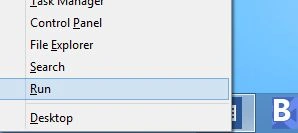
In the Run dialog search text box, I type notepad and hit ENTER.
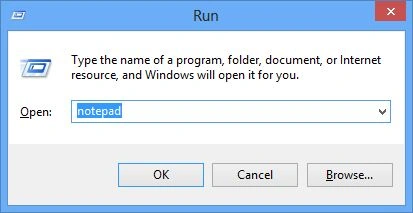
This launches Notepad for me.
Summary
In this article, we learned about the Fastest way to open an application in Windows 8.
Sam HobbsPosted Sep 3, 2012, 12:38 PM
In Windows 7 I can execute Notepad by typing it into Windows Explorer and I keep a Windows Explorer window open. I seldom execute applications that way but it might help in Windows 8; I do not know but I asume it would be easy to try.