

Problem
In SharePoint 2013, when I tried to access the site collection using a REST service http://servername/sites/Developer/_api/site I was getting an error as shown in Figure 1.
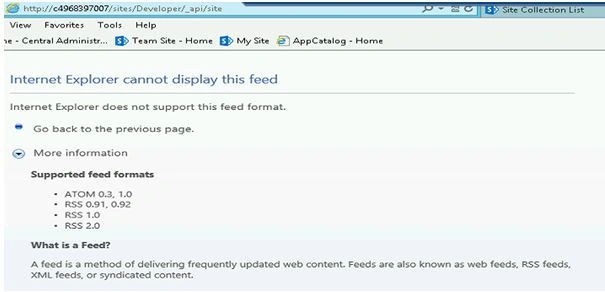
Figure 1: Feed format not supported
How to resolve:
- In Internet Explorer click on settings, then click on "Internet Options" as shown in Figure 2.
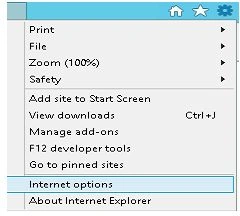
Figure 2: Internet Options
- Click on the "Content" Tab, and then click on Settings button under "Feeds and Web Slices" section as shown in Figure 3.
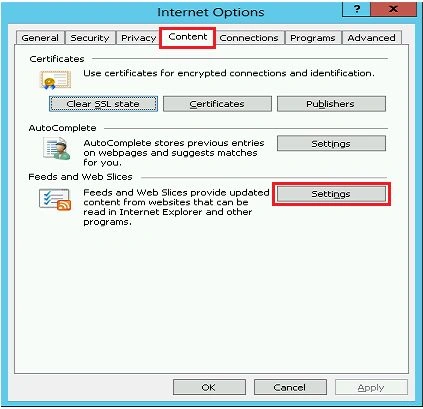
Figure 3: "Settings" in Feed and Web Slices
- Unselect the "Turn on feed reading views" option as shown in Figure 4.
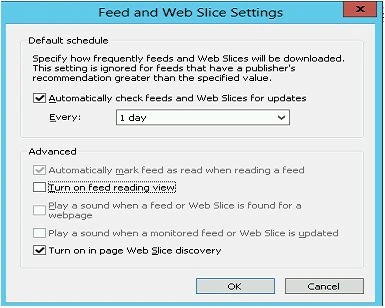
Figure 4: Feed and Web Slice Settings
- Click on "Ok".
- Refresh the page.
- You will be able to access the site collection using the REST service in SharePoint 2013 as shown in Figure 5.
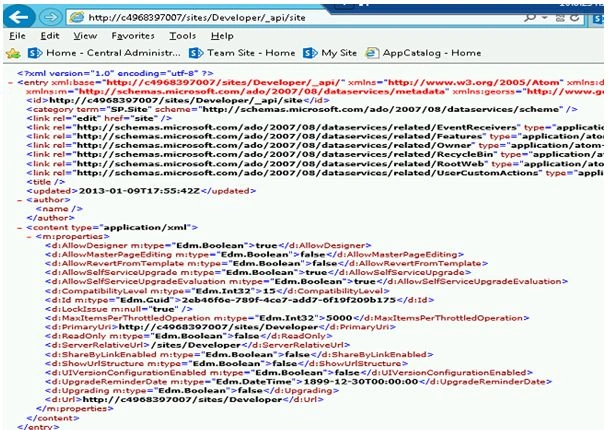
Figure 5: Feed format
Summary
Thus in this article you have seen how to resolve "Feed format not supported" when trying to access the site using a REST service in SharePoint 2013.
Gowtham RajamanickamPosted Apr 11, 2016, 2:57 AM
good one...