- Open visual studio
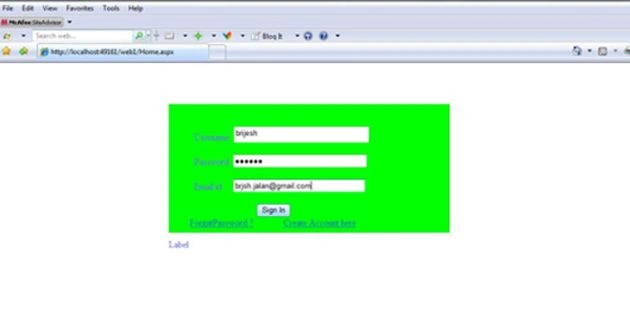
- Drag a panel to web form for login box.
- Now drag some Textboxes ,Labels and
Buttons on web form
<asp:Panel ID="Panel1" runat="server"BackColor="Lime"BackImageUrl="~/App_Data/img1.JPG"BorderColor=
"#00CC00"Height="224px"Style="margin-left: 287px"Width="488px"> <br /> <br /> <asp:LabelID="Label2"
runat="server"Text="Username"></asp:Label> <asp:TextBox ID="TextBox1" runat="server"Height="22px"OnTextChanged="TextBox1_TextChanged1"Width="229px"
AutoCompleteType="Disabled"></asp:TextBox><br/><br/>
<asp:LabelID=
"Label3"runat="server"Text="Password"></asp:Label> <asp:TextBoxID=
"TextBox2"runat="server"Width="226px"
TextMode="Password"></asp:TextBox> <br/>  
; <br />
Email id <asp:TextBoxID="TextBox3"runat="server"
Width="223px"AutoCompleteType ="Disabled"></asp:TextBox><br /> <br />
<asp:ButtonID="Button1"runat="server"OnClick="Button1_Click"Text="Sign In" /><br/> - Now create database Using sqlserver.
- Create connection for database

Fetch a Data from database into a Login form
Join the conversation! Your thoughts help the community grow.
Sign in to leave a comment
It is the same account you read, post and publish with — and you will come straight back to this page.
anupamPosted Jan 25, 2012, 1:06 AM
how can do this code in oracle
mohan kumarPosted Nov 21, 2011, 3:01 AM
Nice article
Guest UserPosted Jul 20, 2010, 8:50 AM
What?!? Do you know what Sql Injection is? Bad... Very bad...