
Introduction
This article shows how to fetch contacts from an Android phone and show them in a ListView.
-
Cursor
Cursor is a class that contains data (rows) returned by the query. In this, we used a cursor variable to hold the cursor that is returned by the query. - moveToNext() method
The moveToNext() method iterates the rows of a cursor. - getContentResolver()
The getContentResolver() method gets the object of the contentresolver. - query()
query() is a method provided by the Cursor class that is called with the object of the content resolver to get the Cursor.
In this first, you need to get the cursor object to get the cursor that contains all the information in the form of rows. And to fetch the data from the row you need to set the cursor pointer to the row by the moveToNext() method. Create a variable of the String type to hold the phone and name of the user. After holding it in variables we will create the object of the ContactBean class where we made the four methods Nameget(), Nameset(), PhoneNoget() and PhoneNoset().
The Nameset() method sets the name of when we called it from the object of the ContactBean class.
The PhoneNoset() method sets the phone number when we called it from the object of the contactbean class.
Create an XML file and write this:
Step 2
- <?xml version="1.0" encoding="utf-8"?>
- <RelativeLayout xmlns:android="http://schemas.android.com/apk/res/android"
- android:layout_width="fill_parent"
- android:layout_height="fill_parent"
- android:orientation="vertical" >
- <ListView
- android:id="@+id/listviewshow"
- android:layout_width="fill_parent"
- android:layout_height="fill_parent"
- android:background="#C0C0C0" />
- </RelativeLayout>
Create another XML file and write this:
- <?xml version="1.0" encoding="utf-8"?>
- <RelativeLayout xmlns:android="http://schemas.android.com/apk/res/android"
- android:id="@+id/relativelay"
- android:layout_width="fill_parent"
- android:layout_height="wrap_content"
- android:background="@drawable/bg_row"
- android:orientation="vertical" >
- <TextView
- android:id="@+id/tvname"
- android:layout_width="fill_parent"
- android:layout_height="wrap_content"
- android:layout_marginLeft="3dp"
- android:layout_marginTop="3dp"
- android:text="Title"
- android:textSize="17dp"
- android:textStyle="bold"
- android:textColor="#2F1F1F">
- </TextView>
- <TextView
- android:id="@+id/tvphone"
- android:layout_width="fill_parent"
- android:layout_height="wrap_content"
- android:layout_below="@+id/tvname"
- android:layout_marginLeft="3dp"
- android:layout_marginTop="10dp"
- android:text="Phone no"
- android:textSize="14dp"
- android:textColor="#2F1F1F">
- </TextView>
- </RelativeLayout>
Create an XML file and write this:
[The XML is missing]
- package com.samir;
- import android.app.Activity;
- import android.app.AlertDialog;
- import android.content.DialogInterface;
- import android.database.Cursor;
- import android.os.Bundle;
- import android.provider.ContactsContract;
- import android.view.View;
- import android.widget.AdapterView;
- import android.widget.AdapterView.OnItemClickListener;
- import android.widget.Button;
- import android.widget.ListView;
- import android.widget.Toast;
- import java.util.ArrayList;
- import java.util.Collections;
- import java.util.Comparator;
- import java.util.List;
- public class ContactListActivity extends Activity implements
- OnItemClickListener {
- Button button;
- private ListView mylistView;
- private List < ContactBean > mylist = new ArrayList < ContactBean > ();
- @Override
- protected void onCreate(Bundle savedInstanceState) {
- super.onCreate(savedInstanceState);
- setContentView(R.layout.main);
- mylistView = (ListView) findViewById(R.id.listviewshow);
- mylistView.setOnItemClickListener(this);
- Cursor phonescursor = getContentResolver().query(ContactsContract.CommonDataKinds.Phone.CONTENT_URI, null, null, null, null);
- while (phonescursor.moveToNext()) {
- String name = phonescursor.getString(phonescursor.getColumnIndex(ContactsContract.CommonDataKinds.Phone.DISPLAY_NAME));
- String phoneNumber = phonescursor.getString(phonescursor.getColumnIndex(ContactsContract.CommonDataKinds.Phone.NUMBER));
- ContactBean objContact = new ContactBean();
- objContact.Nameset(name);
- objContact.PhoneNoset(phoneNumber);
- mylist.add(objContact);
- }
- phonescursor.close();
- ContanctAdapter objAdapter = new ContanctAdapter(ContactListActivity.this, R.layout.alluser_row, mylist);
- mylistView.setAdapter(objAdapter);
- if (null != mylist && mylist.size() != 0) {
- Collections.sort(mylist, new Comparator < ContactBean > () {
- @Override
- public int compare(ContactBean lhs, ContactBean rhs) {
- return lhs.Nameget().compareTo(rhs.Nameget());
- }
- });
- AlertDialog alert = new AlertDialog.Builder(ContactListActivity.this).create();
- alert.setTitle("");
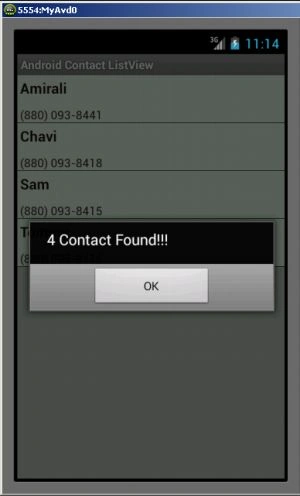
- alert.setMessage(mylist.size() + " Contact Found!!!");
- alert.setButton("OK", new DialogInterface.OnClickListener() {
- @Override
- public void onClick(DialogInterface dialog, int which) {
- dialog.dismiss();
- }
- });
- alert.show();
- } else {
- showToast("No Contact Found!!!");
- }
- }
- private void showToast(String msg) {
- Toast.makeText(this, msg, Toast.LENGTH_SHORT).show();
- }
- @Override
- public void onItemClick(AdapterView < ? > listview, View v, int position, long id) {
- ContactBean bean = (ContactBean) listview.getItemAtPosition(position);
- }
- }
- package com.samir;
- public class ContactBean {
- private String name;
- private String phoneNo;
- public String Nameget() {
- return name;
- }
- public void Nameset(String name) {
- this.name = name;
- }
- public String PhoneNoget() {
- return phoneNo;
- }
- public void PhoneNoset(String phoneNo) {
- this.phoneNo = phoneNo;
- }
- }
Step 5
Create another Java class file and write this:
- package com.samir;
- import android.app.Activity;
- import android.content.Context;
- import android.text.Html;
- import android.view.LayoutInflater;
- import android.view.View;
- import android.view.ViewGroup;
- import android.widget.ArrayAdapter;
- import android.widget.TextView;
- import java.util.List;
- public class ContanctAdapter extends ArrayAdapter < ContactBean >
- {
- private Activity activity;private List < ContactBean > contacts;private int row;private ContactBean objBean;public ContanctAdapter(Activity act, int row, List < ContactBean > items)
- {
- super(act, row, items);
- this.activity = act;
- this.row = row;
- this.contacts = items;
- }
- @Override
- public View getView(final int position, View convertView, ViewGroup parent)
- {
- View view = convertView;
- ViewHolder holder;
- if (view == null)
- {
- LayoutInflater inflater = (LayoutInflater) activity.getSystemService(Context.LAYOUT_INFLATER_SERVICE);
- view = inflater.inflate(row, null);
- holder = new ViewHolder();
- view.setTag(holder);
- }
- else
- {
- holder = (ViewHolder) view.getTag();
- }
- if ((contacts == null) || ((position + 1) > contacts.size()))
- return view;
- objBean = contacts.get(position);
- holder.name = (TextView) view.findViewById(R.id.tvname);
- holder.PhoneNo = (TextView) view.findViewById(R.id.tvphone);
- if (holder.name != null && null != objBean.Nameget() && objBean.Nameget().trim().length() > 0)
- {
- holder.name.setText(Html.fromHtml(objBean.Nameget()));
- }
- if (holder.PhoneNo != null && null != objBean.PhoneNoget() && objBean.PhoneNoget().trim().length() > 0)
- {
- holder.PhoneNo.setText(Html.fromHtml(objBean.PhoneNoget()));
- }
- return view;
- }
- public class ViewHolder
- {
- public TextView name, PhoneNo;
- }
- }
Step 6
Output:
 Step 7
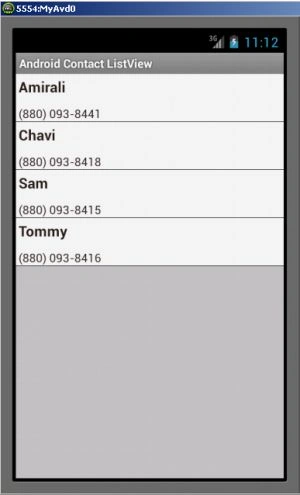
After clicking on the "Ok" button:
Step 7
After clicking on the "Ok" button:
blu tionPosted Nov 10, 2015, 5:52 AM
Hi I hope you can help. The code above does not compile, it crashes and I noticed the .xml file in step 3 is missing as well. May you please update
Mahesh ChandPosted Jul 9, 2013, 9:29 PM
Do you need to provide user id and password to fetch the contacts?