
Introduction
In my previous article I described how to insert image into database and in this article I will describe how to retrieve an image from a database and display it in a picture box.
Use the following procedure to fetch the image.
Step 1
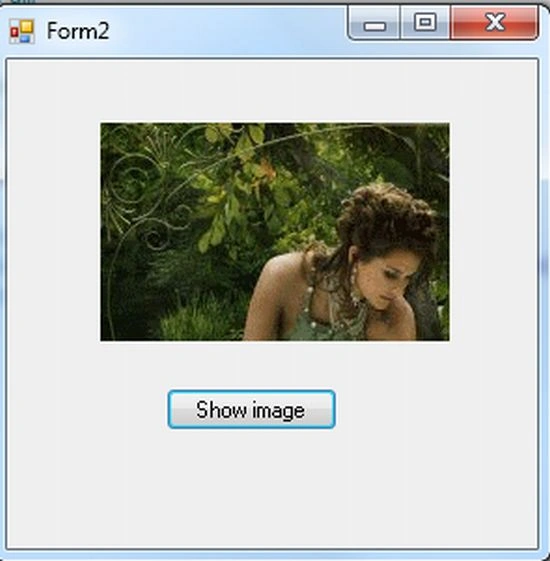
Open a Windows Forms application and insert a picture box and a button into the form.
Step 2
Write C# code to retrieve the image from the SQL Server database .
using System;
using System.Collections.Generic;
using System.ComponentModel;
using System.Data;
using System.Drawing;
using System.Linq;
using System.Text;
using System.Windows.Forms;
using System.Data.SqlClient;
using System.IO;
namespace insert_image_in_database
{
public partial class Form2 : Form
{
public Form2()
{
InitializeComponent();
}
SqlConnection con;
SqlCommand cmd;
private void button1_Click(object sender, EventArgs e)
{
con = new SqlConnection("Data Source=MCNDESKTOP03;Initial Catalog=pulkit;User ID=sa;Password=wintellect@123");
con.Open();
cmd = new SqlCommand("select picname from pic where id=2", con);
SqlDataAdapter da = new SqlDataAdapter(cmd);
DataSet ds = new DataSet();
da.Fill(ds);
if (ds.Tables[0].Rows.Count > 0)
{
MemoryStream ms = new MemoryStream((byte[])ds.Tables[0].Rows[0]["picname"]);
pictureBox1.Image = new Bitmap(ms);
}
}
}
}
Step 3
Now run your application and click on the button to see the image displayed in the picture box.
nwenar abbasPosted Dec 12, 2021, 12:13 AM
I get error which says parameter is not valid
Gareth SwemmerPosted Oct 10, 2018, 4:22 AM
I have seen many samples given. I am still getting the same error. : Parameter is not valid.'
Pugazh VenkatPosted Mar 28, 2018, 11:39 AM
I need to show multiple images like online site products view how to do that