

Introduction
In this article we are going to understand the concept of fetch row records
from database table on a button click.
Let's see how the
FetchingRows4mDbTable application can be created. To do so use the following
steps.
Step 1 : Open Visual Studio
Open File menu ->select new ->Choose Website
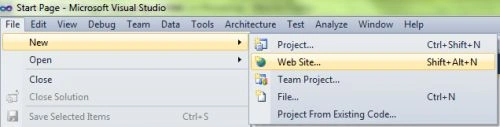
This is where we will create the ASP. NET application.
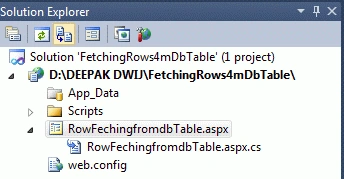
- Go to Solution Explorer
- Right-click on the Application name
- Select Add-->add new item
- Now in the window that opens, select an HTML page or new Web form
- Rename it to RowFechingfromdbTable.aspx
Step 2 :
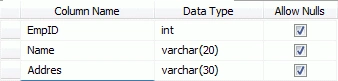
Create Database table names as MCN
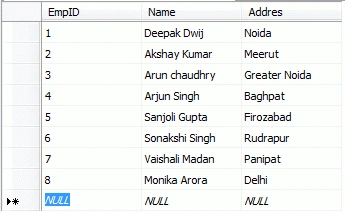
Insert data in MCN Table
Step 3 :
Take 3 Textboxes, 3 Labels and 3 Buttons in your
RowFechingfromdbTable.aspx page
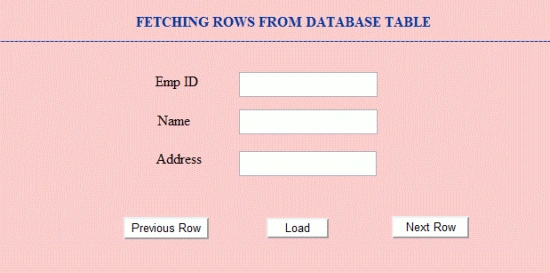
Designing Code for RowFechingfromdbTable.aspx page.
<%@
Page Language="C#"
AutoEventWireup="true"
CodeFile="RowFechingfromdbTable.aspx.cs"
Inherits="_Default"
%>
<!DOCTYPE
html PUBLIC
"-//W3C//DTD XHTML 1.0 Transitional//EN"
"http://www.w3.org/TR/xhtml1/DTD/xhtml1-transitional.dtd">
<html
xmlns="http://www.w3.org/1999/xhtml">
<head
runat="server">
<title></title>
<style
type="text/css">
.style1
{
color:
#003399;
}
</style>
</head>
<body>
<center>
<form
id="form1"
runat="server">
<div
style="height:
315px; width:
892px; background-color:
#FFCCCC;">
<asp:TextBox
ID="TextBox1"
runat="server"
Style="top:
94px; left:
551px; position:
absolute;
height:
22px; width:
152px"></asp:TextBox>
<br
/>
<span
class="style1"><strong>FETCHING
ROWS FROM DATABASE
TABLE
<br
/>
-----------------------------------------------------------------------------------------</strong></span><br
/>
<asp:TextBox
ID="TextBox2"
runat="server"
Style="top:
136px; left:
551px; position:
absolute;
height: 22px;
width: 152px"></asp:TextBox>
<br
/>
<asp:Label
ID="Label1"
runat="server"
Style="top:
95px; left:
456px; position:
absolute;
height:
20px; width:
50px" Text="Emp
ID"></asp:Label>
<asp:Label
ID="Label2"
runat="server"
Style="top:
139px; left:
445px; position:
absolute;
height:
18px; width:
65px" Text="Name
"></asp:Label>
<asp:Label
ID="Label3"
runat="server"
Style="top:
182px; left:
443px; position:
absolute;
height:
20px; width:
80px" Text="Address"></asp:Label>
<br
/>
<asp:TextBox
ID="TextBox3"
runat="server"
Style="top:
183px; left:
551px; position:
absolute;
height:
22px; width:
151px"></asp:TextBox>
<br
/>
<br
/>
<br
/>
<asp:Button
ID="Button2"
runat="server"
BackColor="White"
OnClick="Button2_Click"
Style="top:
257px; left:
421px; position:
absolute; height:
25px; width:
96px;
right:
594px" Text="Previous
Row" />
<br
/>
<asp:Button
ID="Button3"
runat="server"
BackColor="White"
OnClick="Button3_Click"
Style="top:
256px; left:
723px; position:
absolute; height:
25px; width:
87px"
Text="Next
Row" />
<asp:Button
ID="Button1"
runat="server"
BackColor="White"
OnClick="Button1_Click"
Style="top:
258px; left:
582px; position:
absolute; height:
23px; width:
70px"
Text="Load"
/>
</div>
</form>
</center>
</body>
</html>
Step 4 :
Source Code for
RowFechingfromdbTable.cs
using
System;
using
System.Collections.Generic;
using
System.Linq;
using
System.Web;
using
System.Web.UI;
using
System.Web.UI.WebControls;
using
System.Data;
using
System.Data.SqlClient;
public
partial class
_Default : System.Web.UI.Page
{
public static
int i;
SqlConnection con;
SqlDataAdapter da;
DataTable dt =
new DataTable();
DataRow dr;
protected void
Page_Load(object sender,
EventArgs e)
{
con = new
SqlConnection(@"Data Source=.;Initial
Catalog=DEEPAKDWIJ;Persist Security Info=True;User ID=sa;Password=wintellect");
da = new
SqlDataAdapter("select * from MCN",
con);
da.Fill(dt);
}
protected void
Button1_Click(object sender,
EventArgs e)
{
i = 0;
dr = dt.Rows[i];
TextBox1.Text = Convert.ToString(dr[0]);
TextBox2.Text = Convert.ToString(dr[1]);
TextBox3.Text = Convert.ToString(dr[2]);
}
protected void
Button2_Click(object sender,
EventArgs e)
{
if (i == 0)
Response.Write("First record !");
else
i--;
dr = dt.Rows[i];
TextBox1.Text = Convert.ToString(dr[0]);
TextBox2.Text = Convert.ToString(dr[1]);
TextBox3.Text = Convert.ToString(dr[2]);
}
protected void
Button3_Click(object sender,
EventArgs e)
{
if (i == (dt.Rows.Count - 1))
Response.Write("Last record !");
else
i++;
dr = dt.Rows[i];
TextBox1.Text = Convert.ToString(dr[0]);
TextBox2.Text = Convert.ToString(dr[1]);
TextBox3.Text = Convert.ToString(dr[2]);
}
}
Step 5 : Output Press F5
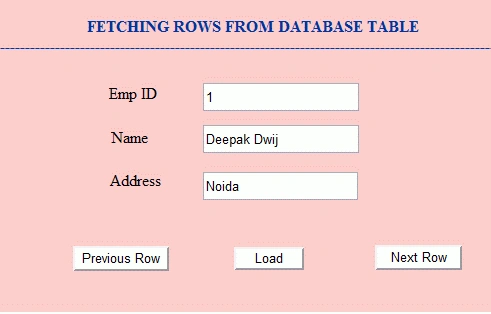
When you press Load Button
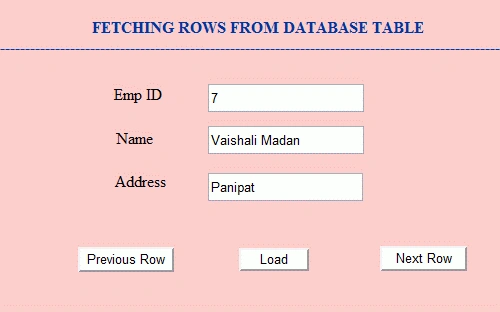
When you press Next Row Button.
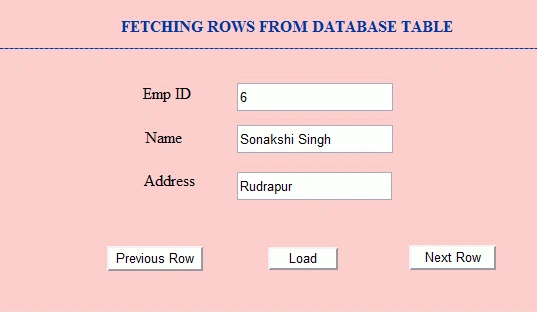
When you press Previous Row Button
Here are the some useful resources
Create table at run time in Database by
using ASP.NET
How to Show Progress of Fetching Database Records Using a ProgressBar
Control in WinForm
Highlight GridView by Clicking on it in ASP.NET
DetailsView in Asp.net
Rajesh ThampiPosted Feb 9, 2020, 3:12 AM
Thank you! I had another requirement, however your sample made it pretty easy for me to achieve it. regards
Prashant BhardwajPosted Mar 29, 2018, 6:49 AM
Bekaar code bilkul
Isaac HatilimaPosted Mar 19, 2018, 9:27 AM
Idex out of bounds.
shoaib ahmedPosted Apr 5, 2016, 1:15 PM
it throws exception .. index out of bound