

Introduction
BackgroundWorker can execute processor-intensive (time-consuming) tasks in a separate thread so the User Interface (UI) does not freeze. Since the tasks are running in the background and might take a long time, it is necessary to show some custom messages and update the UI when the work is done.
Adding BackgroundWorker Control
To add a BackgroundWorker control to the form, simply drag and drop the control from the Toolbox on to the form or double-click the control in the Toolbox to add it to the form. The control is then placed onto the System-tray. The following image shows the BackgroundWorker control in the System tray highlighted with a circle.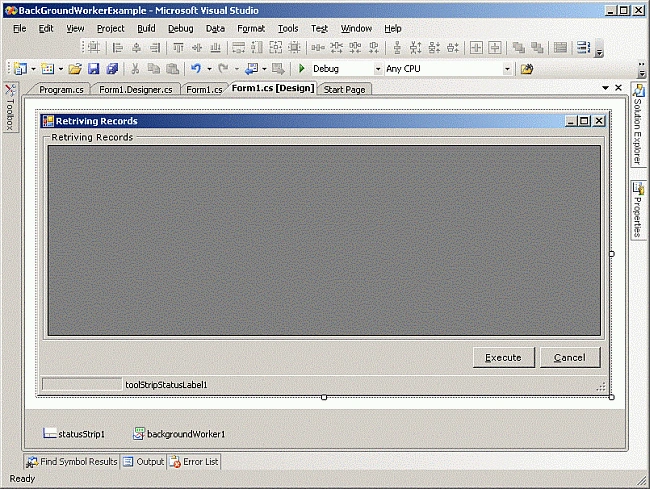
BackgroundWorker Properties
The properties of a BackgroundWorker that you need to know are:
- WorkerReportsProgress: Indicates progress when a task is running.
- WorkerSupportsCancellation: Indicates whether the background task can be cancelled.
- IsBusy: Indicates that the background worker is performing an Asynchronous Operation/background task or not.
- CancellationPending: Indicates that the application has requested the cancellation of the background task.
BackgroundWorker Methods
The methods associated with a BackgroundWorker are:
- RunWorkerAsync: To start the background task
- CancelAsync: To stop the background task/thread
- ReportProgress: To report progress
BackgroundWorker Events
There are three events associated with a BackgroundWorker.
DoWork
The DoWork event does the costly work of executing the background thread. The DoWork event is called when the RunWorkerAsync method is called.
private void backgroundWorker1_DoWork(object sender, DoWorkEventArgs e)
{
//Logic for time-consuming Background Task to be Done
}
The DoWorkEventArgs e has the properties e.Argument and e.Result:
- e.Argument - Parameter reference to the BackgroundWorker received by RunWorkerAsync
- e.Result - To indicate whether the BackgroundWorker did the processing
ProgressChanged
The ProgressChanged event reports the progress done by the thread. The ProgressChanged event is raised from the DoWork Event using the ReportProgress() Method.
private void backgroundWorker1_ProgressChanged(object sender, ProgressChangedEventArgs e)
{
// To report BackgroundWorker Progress
}
Then the ProgressChangedEventArgs e contains the properties e.ProgressPercentage and e.UserState:
- e.ProgressPercentage: Gets the progress percentage of the background task that is sent as a paramter in the ReportProgress() Method of the DoWork Event
- e.UserState: Gets the user state that is sent as part of the ReportProgress() Method from the DoWork Event
RunWorkerCompleted
The event is executed when the BackgroundWorker has completed the Task. The event is also triggered when the BackgroundWorker has failed to do the task assigned or the task is intentionally canceled.
private void backgroundWorker1_RunWorkerCompleted(object sender, RunWorkerCompletedEventArgs e)
{
//Executed Up on Completion of BackgroundTask/ Failure/ Cancellation of Operation
}
The RunWorkerCompletedEventArgs e has:
- e.Cancelled: Indicates that the BackgroundWorker Operation has been cancelled.
- e.Error: Error occurred in the background process execution.
- e.Result: Indicates the result of the background process execution.
BackgroundWorker Example
Program
using System;
using System.Collections.Generic;
using System.ComponentModel;
using System.Data;
using System.Drawing;
using System.Linq;
using System.Text;
using System.Windows.Forms;
using System.Data.SqlClient;
using System.Threading;
namespace BackGroundWorkerExample
{
public partial class frmRetrive : Form
{
SqlCommand Sqlcmd;
string ConnString = "Data Source=ServerName; User id =YourDBUserName; Password =DBPwd;";
int TotalRecords;
public frmRetrive()
{
InitializeComponent();
// To report progress from the background worker we set this property
backgroundWorker1.WorkerReportsProgress = true;
}
private void frmRetrive_Load(object sender, EventArgs e)
{
btCancel.Enabled = false;
statusStrip1.Visible = false;
toolStripStatusLabel1.Visible = false;
dataGridView1.ColumnCount = 2;
dataGridView1.Columns[0].Name = "Fiche No.";
dataGridView1.Columns[0].Width = 150;
dataGridView1.Columns[1].Width = 150;
dataGridView1.RowHeadersWidth = 21;
dataGridView1.ColumnHeadersHeightSizeMode = DataGridViewColumnHeadersHeightSizeMode.EnableResizing;
dataGridView1.ColumnHeadersHeight = 23;
dataGridView1.Columns[1].Name = "Employee Name";
}
private void btExecute_Click(object sender, EventArgs e)
{
statusStrip1.Visible = true;
toolStripStatusLabel1.Visible = true;
toolStripProgressBar1.Maximum = GetTotalRecords();
if (!backgroundWorker1.IsBusy)
{
RetriveTableData TObj = new RetriveTableData();
dataGridView1.Rows.Clear();
backgroundWorker1.RunWorkerAsync(TObj);
btExecute.Enabled = false;
btCancel.Enabled = true;
}
}
private void backgroundWorker1_DoWork(object sender, DoWorkEventArgs e)
{
RetriveTableData Obj = (RetriveTableData)e.Argument;
string SqlcmdString = "SELECT C_FICH,C_SITE FROM XT_FICH";
SqlDataReader reader;
int i = 1;
try
{
using (SqlConnection conn = new SqlConnection(ConnString))
{
Sqlcmd = new SqlCommand(SqlcmdString, conn);
conn.Open();
reader = Sqlcmd.ExecuteReader();
if (reader.HasRows)
{
while (reader.Read())
{
//int.Parse(reader["NO_IND"].ToString());
Obj.EmpId = reader["C_FICH"].ToString();
Obj.EmpName = reader["C_SITE"].ToString();
Thread.Sleep(100);
// To Report progress.
backgroundWorker1.ReportProgress(i, Obj);
if (backgroundWorker1.CancellationPending)
{
// Set the e.Cancel flag so that the WorkerCompleted event
// knows that the process was cancelled.
e.Cancel = true;
backgroundWorker1.ReportProgress(0);
return;
}
i++;
}
conn.Close();
}
}
}
catch (Exception ex)
{
MessageBox.Show(ex.Message);
}
}
private void backgroundWorker1_ProgressChanged(object sender, ProgressChangedEventArgs e)
{
if (!backgroundWorker1.CancellationPending)
{
RetriveTableData Obj = (RetriveTableData)e.UserState;
dataGridView1.Rows.Add(Obj.EmpId.ToString(), Obj.EmpName.ToString());
toolStripProgressBar1.Value = e.ProgressPercentage;
toolStripStatusLabel1.Text = "Processing row.. " + e.ProgressPercentage.ToString() + " of " + TotalRecords;
}
}
private void backgroundWorker1_RunWorkerCompleted(object sender, RunWorkerCompletedEventArgs e)
{
if (e.Cancelled)
{
toolStripStatusLabel1.Text = "Cancelled by User Intentionally...";
toolStripProgressBar1.Value = 0;
}
// Check to see if an error occurred in the background process.
else if (e.Error != null)
{
toolStripStatusLabel1.Text = e.Error.Message;
}
else
{
// BackGround Task Completed with out Error
toolStripStatusLabel1.Text = " All Records Loaded...";
}
}
private int GetTotalRecords()
{
SqlConnection con;
SqlCommand cmd;
try
{
using (con = new SqlConnection(ConnString))
{
cmd = new SqlCommand("SELECT COUNT(*) FROM XT_FICH", con);
con.Open();
TotalRecords = int.Parse(cmd.ExecuteScalar().ToString());
con.Close();
}
}
catch (Exception ex)
{
MessageBox.Show(ex.Message);
}
return TotalRecords;
}
private void btCancel_Click(object sender, EventArgs e)
{
if (backgroundWorker1.IsBusy)
{
backgroundWorker1.CancelAsync();
btCancel.Enabled = false;
btExecute.Enabled = true;
}
}
public class RetriveTableData
{
public string EmpId;
public string EmpName;
}
private void frmRetrive_FormClosing(object sender, FormClosingEventArgs e)
{
if (e.CloseReason == CloseReason.UserClosing)
{
if (backgroundWorker1.IsBusy)
{
backgroundWorker1.CancelAsync();
btCancel.Enabled = false;
btExecute.Enabled = true;
}
}
}
}
}
Indresh MalviyaPosted May 2, 2020, 7:31 AM
Its is inserting duplicate rows in datagridview, how to solve this?
Mohammed AshrafPosted Jun 24, 2016, 4:45 AM
Really this is a good article...author can give a complete picture...thanks for sharing..
Sam HobbsPosted Feb 21, 2013, 4:39 PM
I think it helps to make it clear that the DoWork event is called in the other thread. All other events execute in the same thread as the thread that called the RunWorkerAsync method (the form's thread). The Microsoft documentation is not as clear about that so if we mention it here then that makes our documentation better.