

In this article I will be talking about the following two things:
- Returning only useful fields from the API.
- Consuming an API that accepts a comma-separated list of fields.
Returning only useful fields from the API
When you are writing a RESTful web API you often want to allow clients to feed a list of fields to the API that the clients need. The reason is to return only the useful data to the client. Say for example, you have an entity called Product that has many properties. The client may need only a few properties of the Product object. If you return the entire object every time the client asks for a product, it unnecessarily wastes bandwidth and increases the response time. So to avoid that you can accept a list of fields the client wants and return only those. How can you do that?
Here is your Product class:
- public class Product : BaseEntity
- {
- public int? Id { get; set; }
- public string Name { get; set; }
- public double? Price { get; set; }
- public bool? isAvailable { get; set; }
- public int? UnitsInStock { get; set; }
- public string Category { get; set; }
- public int? ShelfLife { get; set; } //in days
- //many more such properties
- }
- public abstract class BaseEntity
- {
- public List<string> serializableProperties { get; set; }
- public void SetSerializableProperties(string fields)
- {
- if (!string.IsNullOrEmpty(fields))
- {
- var returnFields = fields.Split(new char[] { ',' }, StringSplitOptions.RemoveEmptyEntries);
- serializableProperties = returnFields.ToList();
- return;
- }
- var members = this.GetType().GetMembers();
- serializableProperties = new List<string>();
- serializableProperties.AddRange(members.Select(x => x.Name).ToList());
- }
- }
The SetSerializableProperties method accepts a comma-separated list of properties and fills this list.
Now, when returning the result from the API, we will be using JSON .NET serialize to return the required data. In order to serialize only the required properties, we'll write a custom ContractResolver.
- public class ShouldSerializeContractResolver : DefaultContractResolver
- {
- protected override JsonProperty CreateProperty(System.Reflection.MemberInfo member, Newtonsoft.Json.MemberSerialization memberSerialization)
- {
- var property = base.CreateProperty(member, memberSerialization);
- if (property.DeclaringType == typeof(BaseEntity) || property.DeclaringType.BaseType == typeof(BaseEntity))
- {
- if (property.PropertyName == "serializableProperties")
- {
- property.ShouldSerialize = instance => { return false; };
- }
- else
- {
- property.ShouldSerialize = instance =>
- {
- var p = (Product)instance;
- return p.serializableProperties.Contains(property.PropertyName);
- };
- }
- }
- return property;
- }
- }
Now this is how our GET API will look:
- // GET api/products/5
- public JsonResult<Product> Get(int id, string fields="")
- {
- var product = _productsRepository.Find(x => x.Id == id);
- product.SetSerializableProperties(fields);
- return Json(product, new Newtonsoft.Json.JsonSerializerSettings()
- {
- ContractResolver = new ShouldSerializeContractResolver()
- });
- }
For example: myproductswebapi.azurewebsites.net/api/products?fields=Name,Id
Consuming an API that accepts a comma-separated list of fields
Now, when consuming an API that accepts such comma-separated list, appending a bunch of fields to the URL string looks really shabby for two reasons:
- If you want like 30 fields to be returned out of 50, you can easily make a mistake while writing all those property names and end up wasting a lot of time in figuring out why something is not being returned.
- If you forget one or two fields and/or decide to alter that list, making changes to that long string is not something you'd enjoy. :)
Here we can use the Expression Tree to specify the fields you want. Instead of creating a long string, we can use a lambda expression. So what we want to do is:
- _productService.GetProducts(x => new { x.Id, x.Name, x.Price });
The definition GetProducts method in the service looks as in this:
- public async Task GetProducts(Expression<Func<Product, object>> parameters)
- public static string GetProps<T>(Expression<Func<T, object>> parameters)
- {
- StringBuilder requestedParametersString = new StringBuilder();
- if (parameters != null && parameters.Body != null)
- {
- var body = parameters.Body as System.Linq.Expressions.NewExpression;
- if (body.Members != null && body.Members.Any())
- {
- foreach (var member in body.Members)
- {
- requestedParametersString.Append(member.Name + ",");
- }
- }
- }
- return requestedParametersString.ToString();
- }
There are many types of expressions that are part of an expression tree "body" like BinaryExpression:
x => x + 5
Here x + 5 is a BinaryExpression.
In the lambda expression that we are using, we are instantiating a new object
x => new { x.Id, x.Name, x.Price }
So the type of that Expression is NewExpression.
The "Body" attribute of the expression tree is actually of type Expression that is the base class of all these expression types (recall inheritance concept). Using the "as" keyword, we are telling the compiler that this Expression object holds the reference to a derived class NewExpression object (since we are sure that we will be sending an object of type NewExpression).
NewExpression has a Members property that gets the members that can retrieve the values of the fields that were initialized with constructor arguments. By iterating through this collection we will get all the member names and form a comma-separated string of all these names. This string is then returned from the utility function.
Errr, is it making sense to you? It works, trust me! :D
Here is how my ProductService class looks:
- public class ProductService
- {
- private string BaseUrl { get; set; }
- private HttpClient client { get; set; }
- public ProductService()
- {
- client = new HttpClient();
- BaseUrl = "http://myproductswebapi.azurewebsites.net/api/products";
- }
- public async Task<List<Product>> GetProducts(Expression<Func<Product, object>> parameters)
- {
- string requestedParametersString = Utilities.GetProps(parameters);
- HttpResponseMessage response = await client.GetAsync(this.BaseUrl + "?fields=" + requestedParametersString);
- if (response.IsSuccessStatusCode)
- {
- var products = await response.Content.ReadAsAsync<List<Product>>();
- return products;
- }
- return new List<Product>();
- }
- public async Task<Product> GetProduct(int id,Expression<Func<Product, object>> parameters)
- {
- string requestedParametersString = Utilities.GetProps(parameters);
- HttpResponseMessage response = await client.GetAsync(this.BaseUrl + "/" + id + "?fields=" + requestedParametersString);
- if (response.IsSuccessStatusCode)
- {
- var product = await response.Content.ReadAsAsync<Product>();
- return product;
- }
- return new Product();
- }
- }
- public class ProductController : Controller
- {
- private ProductService _productService;
- // GET: Product
- public async Task<ActionResult> Index()
- {
- this._productService = new ProductService();
- var products = await this._productService.GetProducts(x => new { x.Id, x.Name, x.Price });
- return View("Products",products);
- }
- // GET: Product/Details/5
- public async Task<ActionResult> Details(int id)
- {
- this._productService = new ProductService();
- var product = await this._productService.GetProduct(id,x => new { x.Id, x.Name, x.Price,x.ShelfLife, x.UnitsInStock });
- return View(product);
- }
- }

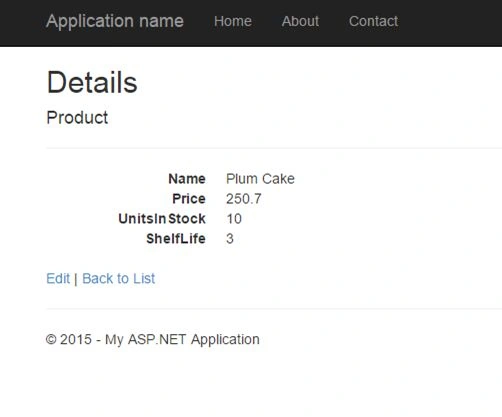
As you can see, we have a main view that shows a list of all the products with limited information and if you click on the details button, it shows detailed information of the product. So when the list view is loaded we are only fetching the fields that we need and not wasting the bandwidth and time to get other fields. This will increase the web application's performance significantly.
You can check out the entire solution here.
I hope this was helpful.
Until next time, cheers.
Nilesh MoradiyaPosted Dec 29, 2016, 6:29 AM
What could be the best way to manage chain selection(i.e if there is SubProduct list in product and also want's to provide fields section over it in same request)
ShwetaPosted May 31, 2015, 1:32 PM
Thanks guys.. :)
Sibeesh VenuPosted May 30, 2015, 1:11 PM
Good one.
Sunny SharmaPosted May 30, 2015, 1:06 PM
Nice Share!
Praveen KumarPosted May 30, 2015, 12:23 PM
Nice
Santhakumar MunuswamyPosted May 30, 2015, 12:20 PM
keep it up
Santhakumar MunuswamyPosted May 30, 2015, 12:20 PM
Thanks for nice one
Shailesh UkePosted May 30, 2015, 9:16 AM
Nice ...
NitinPosted May 30, 2015, 8:20 AM
Nice
Dinesh BeniwalPosted May 30, 2015, 7:59 AM
Thanks for sharing Shweta ;)
Abhishek JaiswalPosted May 30, 2015, 1:38 AM
Nice Read, keep sharing!! :)
Gopi ChandPosted May 29, 2015, 3:24 PM
Great article with excellent explanation.Its Good one Shweta :)
Santhakumar MunuswamyPosted May 29, 2015, 1:20 PM
Thanks for nice one