

Abstract
This article illustrates how to perform tasks involving reading and writing files from various partitions using the C# .Net programming API. In particular, it covers exploring the directory structure, determining what files and folders are present, and also does other file-related operations such as moving, copying, and deleting objects from the disk. The core purpose of this article is to explore types defined in the System.IO namespace and to provide an understanding of various ways to read from and write to character-based, binary-based, and string-based data stores.
The Anatomy of the File System
The System.IO namespace provides four classes that allow you to manipulate individual files, as well as interact with a machine directory structure. The Directory and File directly extend the System. Object and supports the creation, copying, moving, and deletion of files using various static methods. They only contain static methods and are never instantiated. The FileInfo and DirecotryInfo types are derived from the abstract class FileSystemInfo type and they are typically, employed for obtaining the full details of a file or directory because their members tend to return strongly typed objects. They implement roughly the same public methods as a Directory and a File but they are stateful and the members of these classes are not static.
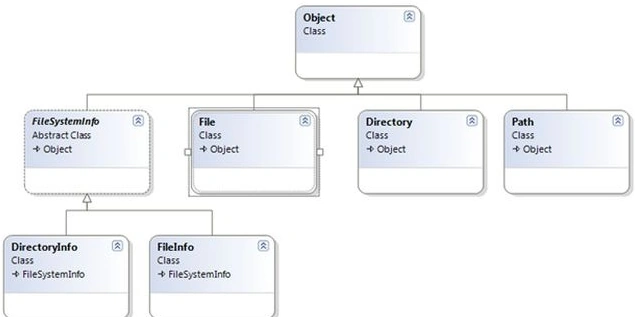
In the .NET framework, the System.IO namespace is the region of the base class libraries devoted to file-based input and output services. Like any namespace, the System.IO namespace defines a set of classes, interfaces, enumerations, structures, and delegates. The following table outlines the core members of this namespace
| Class Types | Description |
| Directory/ DirectoryInfo | These classes support the manipulation of the system directory structure. |
| DriveInfo |
This class provides detailed information regarding the drives that a given machine has. |
| FileStream | This gets you random file access with data represented as a stream of bytes. |
| File/FileInfo | These sets of classes manipulate a computer's files. |
| Path | It performs operations on the System. String types that contain file or directory path information in a platform-neutral manner. |
| BinaryReader/ BinaryWriter | These classes allow you to store and retrieve primitive data types as binary values. |
| StreamReader/StreamWriter | Used to store textual information in a file. |
| StringReader/StringWriter | These classes also work with textual information. However, the underlying storage is a string buffer rather than a physical file. |
| BufferedStream | This class provides temp storage for a stream of bytes that you can commit to storage at a later time. |
The System.IO provides a class DriveInfo to manipulate the system drive-related tasks. The DriveInfo class provides numerous details such as the total number of drives, calculation of total hard disk space, available space, drive name, ready status, types, and so on. Consider the following program that shows the total disk drives
DriveInfo[] di = DriveInfo.GetDrives();
Console.WriteLine("Total Partitions");

foreach (DriveInfo items in di)
{
    Console.WriteLine(items.Name);
}
The following code snippets perform the rest of the DriveInfo class method operations in detail. It displays specific drive full information.
using System;
using System.IO;
namespace DiskPartition
{
    class Program
    {
        static void Main(string[] args)
        {
            DriveInfo[] di = DriveInfo.GetDrives();

            Console.WriteLine("Total Partitions");
            Console.WriteLine("---------------------");
            foreach (DriveInfo items in di)
            {
                Console.WriteLine(items.Name);
            }
            Console.Write("\nEnter the Partition::");
            string ch = Console.ReadLine();
            DriveInfo dInfo = new DriveInfo(ch);
            Console.WriteLine("\n");
            Console.WriteLine("Drive Name::{0}", dInfo.Name);
            Console.WriteLine("Total Space::{0}", dInfo.TotalSize);
            Console.WriteLine("Free Space::{0}", dInfo.TotalFreeSpace);
            Console.WriteLine("Drive Format::{0}", dInfo.DriveFormat);
            Console.WriteLine("Volume Label::{0}", dInfo.VolumeLabel);
            Console.WriteLine("Drive Type::{0}", dInfo.DriveType);
            Console.WriteLine("Root dir::{0}", dInfo.RootDirectory);
            Console.WriteLine("Ready::{0}", dInfo.IsReady);
            Console.ReadKey();
        }
    }
}
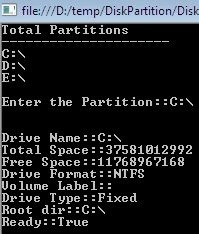
After compiling this program, it displays nearly every detail of disk drives and a specific drive as in the following
Working with Directories
The .NET framework provides two rudimentary classes, DirectoryInfo and Directory, to do directory-related operations such as creation and deletion.
Directory Info Class
The DirectoryInfo class contains a set of members for the creation, deletion, moving, and enumeration of directories and subdirectories. Here, in the following code sample, display the information related to the temp directory.
DirectoryInfo di = new DirectoryInfo(@"D:\temp");

Console.WriteLine("*******Directory Informations*******\n\n");
Console.WriteLine("Full Name={0}", di.FullName);
Console.WriteLine("Root={0}", di.Root);
Console.WriteLine("Attributes={0}", di.Attributes);
Console.WriteLine("Creation Time={0}", di.CreationTime);
Console.WriteLine("Name={0}", di.Name);
Console.WriteLine("Parent={0}", di.Parent);
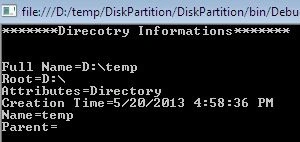
The previous code produces the information related to the temp directory located in the D drive as in the following.
Typically, we make the assumption that the path passed in the constructor of the DirectoryInfo class physically exists. However, if you attempt to interact with a nonexistent directory then the CLR will throw an exception. So, we need to create a directory first to handle the exceptions that occur as in the following.
DirectoryInfo di = new DirectoryInfo(@"D:\temp\xyz");
di.Create();
We can also programmatically extend a directory structure using the CreateSubdirectory() method. The following code sample first creates a subdirectory in D drive then in D:\ajay\ as in the following.
DirectoryInfo di = new DirectoryInfo(@"D:\");
di.CreateSubdirectory("ajay");
di.CreateSubdirectory(@"ajay\ajay11");
Directory Class
The Directory class provides nearly the same functionality as DirecotryInfo. The Directory class typically returns string data rather than strongly typed DirectoryInfo objects. The following sample deletes the directory and subdirectory in the D drive.
static void Main(string[] args)
{
    DirectoryInfo di = new DirectoryInfo(@"d:\abc");
    Console.WriteLine("Name:{0}", di.FullName);

    Console.Write("Are you sure to Delete:");
    string str = Console.ReadLine();
    if (str == "y")
    {
        Directory.Delete(@"d:\abc", true);
    }
    Console.Write("Deleted.....");
}
Nithya RajaPosted Sep 23, 2019, 7:04 AM
Could please explain asp.net mvc web application file handling techniques?
Joss BossPosted Mar 20, 2018, 7:06 PM
Thanks. this is the code I would like to know.
Ayush GuptaPosted Jul 18, 2017, 4:43 AM
Exactly code i was looking for ........