

Introduction
I love to do utility programs in .Net. And this is one of them. As I was playing with JSplit (a free file splitter program), I wondered if I could do it in .Net. The framework supports file operations like reading files in bytes and creating them. It is indeed easy to do file operations in .Net.
Basics on File operations
The namespace System.IO provides classes for file operations. StreamReader is a class which provides methods to read a file in different modes. It allows the user to read file by number of characters, by line, by block and to the end of the file. There is another class FileStream which allows the user to read file by number of bytes. This is what we are going to use.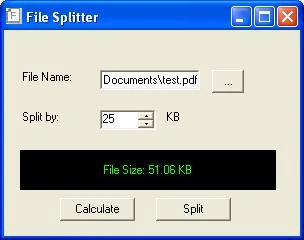
Getting Started
Lets begin by creating a windows application with a textbox, a numericupdown control, a label and three buttons. Add a openfileDialog control and add some code to extract the filename from the dialog and to put it in the textbox when the browse button is clicked.
if (openFileDialog1.ShowDialog() == DialogResult.OK)
{
txtFileName.Text = openFileDialog1.FileName;
}
Now change the Maximum value of the numericupdown control to 1. Change the backcolor of the label to black and forecolor to green (to give a matrix screen effect).
Set the text property of the buttons to "Calculate" and "
Include the namespaces System.IO and System.Text in the Using section.
Calculate Method
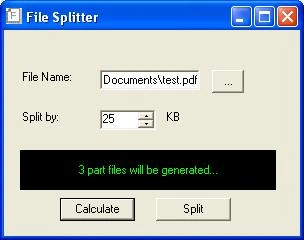
In Calculate method we are going to calculate the number of parts the file will be splitted based on the file size and the split size specified by the user.
Double click on the calculate button to go to the Click event. Now initialize the class FileStream by passing the filename from the textbox and specifying file mode and file access parameters.
FileStream FR = new FileStream(txtFileName.Text, FileMode.Open, FileAccess.Read);
The number of parts is caculated by dividing the file size (in bytes) and user selected split size. This is made to display in the label.
int no_of_parts = Int32.Parse(FR.Length.ToString())/intByteSize;
int intmod=Int32.Parse(FR.Length.ToString())%intByteSize;
//Include the remaining bytes
if(intmod > 0)
no_of_parts=no_of_parts+1;
maha rajaPosted Mar 17, 2015, 7:44 AM
I am using your download code,no changes your code the above error after splitting file open in Adobe reader.
maha rajaPosted Mar 17, 2015, 7:42 AM
Adobe Reader could not open "test_2.pdf1" because it is either not a supported file type or because the file has been damaged (for example, it was sent as an email attachments and wasn't correctly decoded).
Levi LogicsPosted Feb 23, 2014, 8:54 AM
tnx sir this is useful, but i am splitting 2.something vedio and it took so long to complete, and also the window freeze to not responding how to solve this issue.
ubahariya nPosted Jun 8, 2009, 2:59 AM
Nice Wrk, Tks! It's really useful. I want to split by mentioning some words like -------hi!------- fjhdf dsfsf dffsdf sdfsd ****End**** -------hi!------- fjhdf dsfsf dffsdf sdfsd ****End**** -------hi!------- fjhdf dsfsf dffsdf sdfsd ****End**** -------hi!------- fjhdf dsfsf dffsdf sdfsd ****End**** -------hi!------- fjhdf dsfsf dffsdf sdfsd ****End**** I want to split the file after the word ****End****