

Introduction
In this article, I will discuss how you can create your own File Upload feature in a Silverlight application.
Step 1
First, create a Silverlight Web application in Visual Studio 2008. You will see your default Page.xaml.
Step 2
On Create Page.xaml, change your code by adding the following Panel, Button, and TextBlock controls.
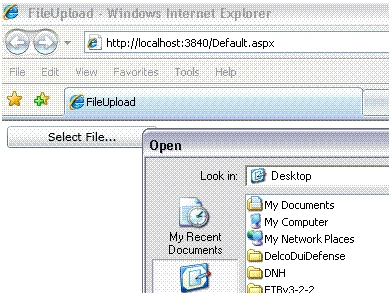
On the button click event handler, I write code to call the OpenFileDialog that allows us to browse files and gives us the selected file name. Here is the code.
- public void Button_Click(object sender, RoutedEventArgs e) {
- OpenFileDialog dlg = new OpenFileDialog();
- dlg.Multiselect = false;
- dlg.Filter = "All files (*.*)|*.*|PNG Images (*.png)|*.png";
- bool ? retval = dlg.ShowDialog();
- if (retval != null && retval == true) {
- UploadFile(dlg.File.Name, dlg.File.OpenRead());
- StatusText.Text = dlg.File.Name;
- }
- else {
- StatusText.Text = "No file selected...";
- }
- }
The UploadFile method looks like the following. In this code, I use a WebClient class and a PushData method.
- private void UploadFile(string fileName, Stream data)
- {
- UriBuilder ub = new UriBuilder("http://localhost:3840/receiver.ashx");
- ub.Query = string.Format("filename={0}", fileName);
- WebClient c = new WebClient();
- c.OpenWriteCompleted += (sender, e) =>
- {
- PushData(data, e.Result);
- e.Result.Close();
- data.Close();
- };
- c.OpenWriteAsync(ub.Uri);
- }
- private void PushData(Stream input, Stream output)
- {
- byte[] buffer = new byte[4096];
- int bytesRead;
- while ((bytesRead = input.Read(buffer, 0, buffer.Length)) != 0)
- {
- output.Write(buffer, 0, bytesRead);
- }
- }
John KowsicPosted Dec 1, 2014, 2:58 AM
Nice.. but i facing timeout exception error by stream. can u help to fix this.
Mehdi FarahmandiPosted Aug 20, 2014, 6:43 AM
rttrt
jesusPosted Apr 11, 2013, 4:33 AM
Hello, when I try to upload a file of 5 Mb, I get a HttpException "Maximum request length exceeded" around context.Request.InputStream
Anant SinghPosted Jun 23, 2012, 7:35 AM
awesomeeeeeee
Mohan SinghPosted Feb 20, 2012, 1:11 AM
Nice example Nipur, But I need file upload with drag and drop functionality, it is nice you can provide a sample example. Thanks, Mohan
Mohan SinghPosted Feb 16, 2012, 5:55 AM
Hi Nipur, I am new in silverlight and need one favour. Drag and drop file and upload to server using silver light in IE. Thanks
Burhan SaiyedPosted Feb 1, 2012, 7:03 AM
Hello Nipun,. i have downloaded the .zip file for file uploader. When i extracted it & then saw the references, System.Web.Silverlight is corrupted,so i deleted it & now my Question is,from where to add the new reference for System.Web.Silverlight? please reply quick
bagus susastraPosted Dec 5, 2011, 10:49 PM
thanks so much Nipun. very nice article. :)
Chan chanPosted Nov 29, 2011, 9:27 AM
I am sorry. I have spent so long time to solve the problem but i still cant find it. Is there any problem for the while loop. I converted it to vb. but i found that it will skip the output.stream when it reach the while loop when i debug using debugger. What's the problem? i think the code is exactly same with the c#. But I am not understand why it would be different! its also the same in the generic handler. Please help :( Private Sub UploadFileData(ByVal strm As Stream, ByVal OutputStream As Stream) Try Dim fileData As Byte() = New Byte(4095) {} Dim fileDataToRead As Integer MessageBox.Show("UploadFileData") While ((fileDataToRead = strm.Read(fileData, 0, fileData.Length)) > 0) OutputStream.Write(fileData, 0, fileDataToRead) End While MessageBox.Show("UploadFileData Finish") Catch ex As Exception MessageBox.Show(ex.Message) End Try MessageBox.Show("Finish") End Sub
ahmed barakatPosted Nov 9, 2011, 1:40 AM
thank you
AndyPosted May 13, 2011, 1:05 PM
<%@ WebHandler Language="C#" Class="fileUpload" %> using System; using System.Collections.Generic; using System.Linq; using System.Web; using System.IO; using System.Web.Hosting; namespace PageFlip.Web { /// <summary> /// Summary description for fileUpload /// </summary> public class fileUpload : IHttpHandler ... I have problem with first line. Can me help somebody? Error 1 Keyword, identifier, or string expected after verbatim specifier: @ c:\BAKALARKA_zaloha\PageFlip.Web\fileUpload.ashx.cs
AndyPosted May 13, 2011, 7:36 AM
<%@ WebHandler Language="C#" Class="fileUpload" %> using System; using System.Collections.Generic; using System.Linq; using System.Web; using System.IO; using System.Web.Hosting; namespace PageFlip.Web { /// <summary> /// Summary description for fileUpload /// </summary> public class fileUpload : IHttpHandler ... I have problem with first line. Can me help somebody? Error 1 Keyword, identifier, or string expected after verbatim specifier: @ c:\BAKALARKA_zaloha\PageFlip.Web\fileUpload.ashx.cs
Foram ShethPosted May 2, 2011, 9:11 PM
Thanks Nipun, Nice Article..I have only one question..Offline I can upload the fil but online its not working..online I am not able to upload the file...I changed the URL also..Please let me know the online URL...Please let me know my email address is [email protected]..
Christopher QuesadaPosted Mar 22, 2011, 2:06 AM
Hello, I have a little question. when I deploy the solution to the "production server" this URL must change UriBuilder ub = new UriBuilder("http://localhost:3840/receiver.ashx"); How can I know the final production url of the handler??? Thanks
balaji krishnaneditedPosted Jan 13, 2011, 4:20 AMEdited Jan 13, 2011, 4:22 AM
Hi Nipun, i need code file upload and download using WCF silverlight 4.0,it need to support large files.for example 1 GB of file is splitted into muliple pieces, each pieces should be 4 MB file and joining them together as a single file with the same file name while uploading and downloading.please give me the solution for this with the help of code.
rajib_banPosted Nov 15, 2010, 3:15 PM
Hi Nipun, Very nice article. One question though... How to notify the client abt file uploaded successfully so that client can start reading the file ?
jayPosted Oct 2, 2010, 5:57 PM
Hi, Nice article. Would you mind to tell me how I can inform the silverlight that the file is uploaded successfully from ashx file. Thanks
hetal patelPosted Apr 15, 2010, 5:46 AM
Hi. Your solution is not working properly. I got the image in image folder but its exclude from project.so its not display in Image button. So i have to Include that image in my project. Can u give me the solution for this problem? Its Urgent please.
Eric FickesPosted Mar 10, 2010, 4:51 AM
Once I got through the handler permission dance, this sample worked 99% like a champ. I have one issue that it appears as if the file isn't closed properly when written to the server. I'm uploading WMV files for a Silverlight app ( already encoded ). Everything works great until playback, and the WMVs only play ~ 50%. Anybody have any suggestions of things I should look into? This is my first foray into uploading with Silverlight.
OliverPosted Feb 24, 2010, 5:16 AM
Hey out there. I turned my relevant projects in my solution to static portnumbers... I just have a problem with the above link. My Handler looks like this: <%@ WebHandler Language="C#" Class="receiver" %> using System; using System.Web; using System.IO; public class receiver : IHttpHandler { public void ProcessRequest(HttpContext context) { string filename = context.Request.QueryString["filename"].ToString(); using (FileStream fs = File.Create(context.Server.MapPath("~/" + filename))) { SaveFile(context.Request.InputStream, fs); } } private void SaveFile(Stream stream, FileStream fs) { byte[] buffer = new byte[4096]; int bytesRead; while ((bytesRead = stream.Read(buffer, 0, buffer.Length)) != 0) { fs.Write(buffer, 0, bytesRead); } } public bool IsReusable { get { return false; } } } Yes and my call looks like that: private string host = "localhost"; private string port = "64670"; private string app = "SensorVisual.Web"; ... private void UploadFile_Click(object sender, RoutedEventArgs e) { // Prompt the user to select an image file. OpenFileDialog ofd = new OpenFileDialog(); ofd.Multiselect = false; ofd.Filter = "XML File (*.xml)|*.xml"; if ((bool)ofd.ShowDialog()) { string name = "upload" + DateTime.Now.ToString("dd_MM_yy_hhmm") + ".xml"; UploadFileData(name, ofd.File.OpenRead()); } } private void UploadFileData(string fileName, Stream data) { UriBuilder ub = new UriBuilder("http://"+this.host+":"+this.port+"/"+this.app+"/receiver.ashx"); ub.Query = string.Format("filename={0}", fileName); WebClient c = new WebClient(); c.OpenWriteCompleted += (sender, e) => { PushData(data, e.Result); e.Result.Close(); data.Close(); }; c.OpenWriteAsync(ub.Uri); } But the problem is that it doesn't work. If I start my SL project it works, that I can open http://localhost:64670/SensorVisual.Web/receiver.ashx?filename=test.xml. That works pretty fine, it also creates the test.xml File. My problem is, that it isn't working with this function. Please could you help me? It's really urgent... Thanks for your help in advance! greets
Jonathan MeyerPosted Jan 14, 2010, 5:22 AM
Hello ! I use your code to test the upload. There is juste one problem... The file is not uploaded. can someone help me, please ? ps: i test on local with VS2008
DipsaPosted Aug 25, 2009, 5:43 AM
Hi Nipun, I want to use this control in vb.net. can you please tell me how to use lamda expression in vb.net? I am stuck at this point.
JonathanPosted Aug 3, 2009, 10:00 AM
Hi Nipan Very useful post - thanks I have an app displaying images from a file in the Silverlight App but as far as I can see your implementation only allows to write images to the asp.net app so: Read SL App file = Photos Write Asp.Net app file = More Photos How to get the Silverlight and Asp.net apps to write to and read from a common file?
PeterPosted Apr 28, 2009, 9:03 PM
Nice article! We have extended on the open source projects out there, and created a new codeplex project with a stable, flexible, and well-documented silverlight file uploader that is based on similar techniques to those used in this article: http://silverlightuploader.codeplex.com/
vajinder pal singhPosted Apr 24, 2009, 6:06 AM
Hello Nipun, It's good article Just want to know is there is any File size limitation that can be uploaded by this code if yes How to extend it Thanks Vajinder
Mahesh ChandPosted Mar 24, 2009, 11:12 AM
CodePlex has something interesting here. Silverlight file uploader that supports multi-file upload, resize images before upload with image thumbnail, individual progress and overall progress indicator, fast upload, ASP.NET server control, and is highly customizable. http://www.codeplex.com/SilverlightFileUpld
Mahesh ChandPosted Mar 24, 2009, 11:10 AM
I think SL3 has a built-in OpenFileDialog and SaveFileDialog controls. That would be cool.