

In this article we are going to learn how to implement jquery progress bar in File Upload control in ASP MVC.
Step 1
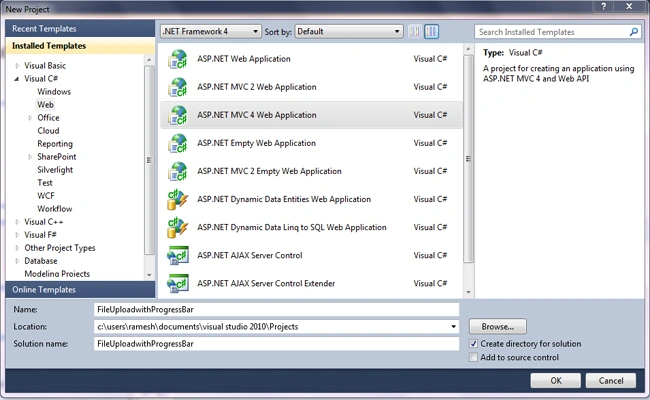
First we have to create an Asp Mvc project in visual studio. To do that, Open Visual Studio -> New Project -> A new dialog window will appear -> In left pane select C# ->select Web -> Select "ASP.NET MVC 4 Application" name your project and click ok.
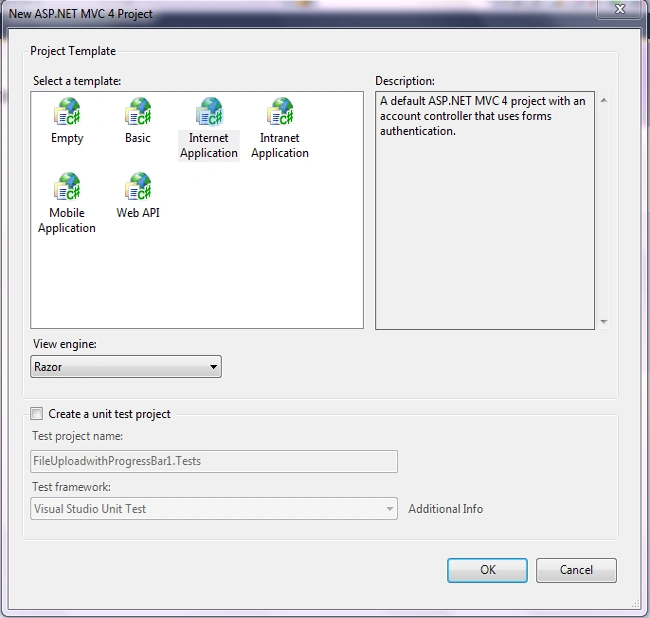
Again a new dialog window will appear. In that select "Internet Application"
Please refer to the below image for your reference.
Step 2
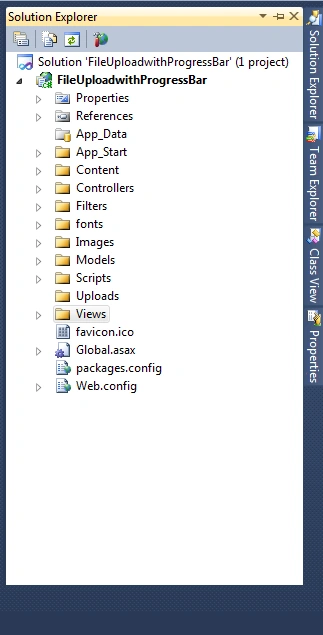
Now you can see your project files in right corner of visual studio. Please refer to the below image for your reference
Step 3
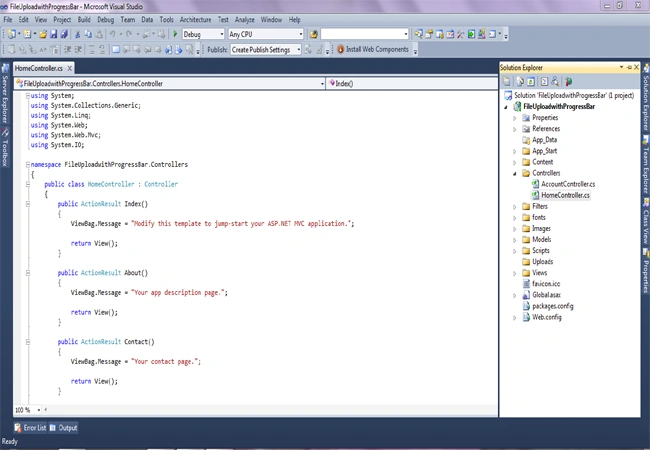
Open controller folder. In that we have "Home" and "Account" controller default. It was created while creating a new project in asp mvc.
If you open "Home" controller , you can see some default code in that. Please refer to the below image for your reference.
Step 4
In view folder we can see the "Home" folder and can see the "Index" view. It was also created when we created a project.
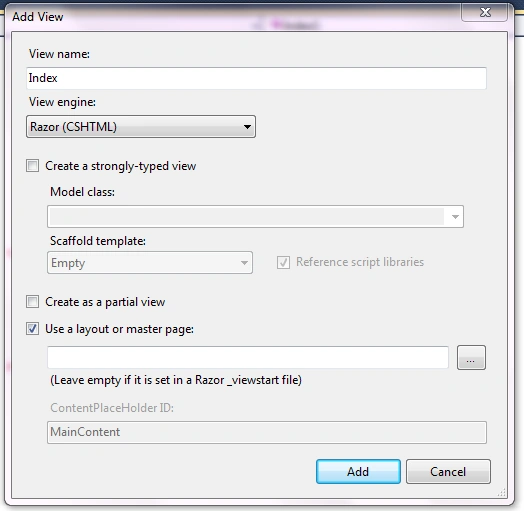
If you want to create a view for your action result , just right click on your action result and click "Add View"
Please refer to the below image for your reference.
Step 5
Now let's change the index view code as per our requirement.
Please just copy and paste the code in your index view.
Note
Here I have added the "ProgressBar" css and script file from CDN(Content Delivery Network)
Here I have added the "ProgressBar" css and script file from CDN(Content Delivery Network)
- @{
- ViewBag.Title = "Home Page";
- }
- <link href="https://code.jquery.com/ui/1.10.4/themes/ui-lightness/jquery-ui.css"
- rel="stylesheet"> @*I got this link from Tutorials point*@
- <link href="../../Content/bootstrap.css" rel="stylesheet" type="text/css" /> @*Download Bootstrap from Nuget Package manager*@
- <link href="../../Content/bootstrap-theme.css" rel="stylesheet" type="text/css" />
- <style>
- .ui-widget-header
- {
- background: #cedc98;
- border: 1px solid #DDDDDD;
- color: #333333;
- font-weight: bold;
- }
- .progress-label
- {
- position: absolute;
- left: 50%;
- top: 13px;
- font-weight: bold;
- text-shadow: 1px 1px 0 #fff;
- }
- .red
- {
- color: red;
- }
- </style>
- <div class="container">
- <h1>
- File Upload Demo</h1>
- <div id="FileBrowse">
- <div class="row">
- <div class="col-sm-4">
- <input type="file" id="Files" />
- </div>
- <div class="col-sm-2">
- <input type="button" id="UploadBtn" class="btn btn-danger" value="Upload" />
- </div>
- </div>
- </div>
- <div class="row">
- <div class="col-sm-4">
- <div id="progressbar-5">
- <div class="progress-label">
- </div>
- </div>
- </div>
- </div>
- <br />
- <div class="row">
- <div class="col-sm-6">
- <table class="table" id="ListofFiles">
- <tr>
- <th>
- Files
- </th>
- <th>
- Action
- </th>
- </tr>
- </table>
- </div>
- </div>
- <br />
- <br />
- <br />
- <br />
- </div>
- @section scripts{
- <script src="https://code.jquery.com/jquery-1.10.2.js"></script>
- <script src="https://code.jquery.com/ui/1.10.4/jquery-ui.js"></script>
- <script>
- $('#UploadBtn').click(function () {
- var fileUpload = $("#Files").get(0);
- var files = fileUpload.files;
- // Create FormData object
- var fileData = new FormData();
- // Looping over all files and add it to FormData object
- for (var i = 0; i < files.length; i++) {
- fileData.append(files[i].name, files[i]);
- }
- $.ajax({
- url: '/Home/UploadFiles',
- type: "POST",
- contentType: false, // Not to set any content header
- processData: false, // Not to process data
- data: fileData,
- async: false,
- success: function (result) {
- if (result != "") {
- $('#FileBrowse').find("*").prop("disabled", true);
- LoadProgressBar(result); //calling LoadProgressBar function to load the progress bar.
- }
- },
- error: function (err) {
- alert(err.statusText);
- }
- });
- });
- function LoadProgressBar(result) {
- var progressbar = $("#progressbar-5");
- var progressLabel = $(".progress-label");
- progressbar.show();
- $("#progressbar-5").progressbar({
- //value: false,
- change: function () {
- progressLabel.text(
- progressbar.progressbar("value") + "%"); // Showing the progress increment value in progress bar
- },
- complete: function () {
- progressLabel.text("Loading Completed!");
- progressbar.progressbar("value", 0); //Reinitialize the progress bar value 0
- progressLabel.text("");
- progressbar.hide(); //Hiding the progress bar
- var markup = "<tr><td>" + result + "</td><td><a href='#' onclick='DeleteFile(\"" + result + "\")'><span class='glyphicon glyphicon-remove red'></span></a></td></tr>"; // Binding the file name
- $("#ListofFiles tbody").append(markup);
- $('#Files').val('');
- $('#FileBrowse').find("*").prop("disabled", false);
- }
- });
- function progress() {
- var val = progressbar.progressbar("value") || 0;
- progressbar.progressbar("value", val + 1);
- if (val < 99) {
- setTimeout(progress, 25);
- }
- }
- setTimeout(progress, 100);
- }
- function DeleteFile(FileName) {
- //Write your delete logic here
- }
- </script>
- }
Let;s understand the code now, I have used one file input control, html input button. Find the code here
- <div id="FileBrowse">
- <div class="row">
- <div class="col-sm-4">
- <input type="file" id="Files" />
- </div>
- <div class="col-sm-2">
- <input type="button" id="UploadBtn" class="btn btn-danger" value="Upload" />
- </div>
- </div>
- </div>
- <div class="row">
- <div class="col-sm-4">
- <div id="progressbar-5">
- <div class="progress-label">
- </div>
- </div>
- </div>
- </div>
- <div class="row">
- <div class="col-sm-6">
- <table class="table" id="ListofFiles">
- <tr>
- <th>
- Files
- </th>
- <th>
- Action
- </th>
- </tr>
- </table>
- </div>
- </div>
In jquery I have written upload button click event and passed the file to controller using ajax method.
Please find the code below,
- $('#UploadBtn').click(function () {
- var fileUpload = $("#Files").get(0);
- var files = fileUpload.files;
- // Create FormData object
- var fileData = new FormData();
- // Looping over all files and add it to FormData object
- for (var i = 0; i < files.length; i++) {
- fileData.append(files[i].name, files[i]);
- }
- $.ajax({
- url: '/Home/UploadFiles',
- type: "POST",
- contentType: false, // Not to set any content header
- processData: false, // Not to process data
- data: fileData,
- async: false,
- success: function (result) {
- if (result != "") {
- $('#FileBrowse').find("*").prop("disabled", true);
- LoadProgressBar(result); //calling LoadProgressBar function to load the progress bar.
- }
- },
- error: function (err) {
- alert(err.statusText);
- }
- });
- });
Let's create the "UploadFiles" action result in "Home" controller to receive the file from request and save the file in our "Uploads" folder.
Please find the code below for your reference.
- public ActionResult UploadFiles()
- {
- string FileName="";
- HttpFileCollectionBase files = Request.Files;
- for (int i = 0; i < files.Count; i++)
- {
- //string path = AppDomain.CurrentDomain.BaseDirectory + "Uploads/";
- //string filename = Path.GetFileName(Request.Files[i].FileName);
- HttpPostedFileBase file = files[i];
- string fname;
- // Checking for Internet Explorer
- if (Request.Browser.Browser.ToUpper() == "IE" || Request.Browser.Browser.ToUpper() == "INTERNETEXPLORER")
- {
- string[] testfiles = file.FileName.Split(new char[] { '\\' });
- fname = testfiles[testfiles.Length - 1];
- }
- else
- {
- fname = file.FileName;
- FileName = file.FileName;
- }
- // Get the complete folder path and store the file inside it.
- fname = Path.Combine(Server.MapPath("~/Uploads/"), fname);
- file.SaveAs(fname);
- }
- return Json(FileName, JsonRequestBehavior.AllowGet);
- }
All the code wrote in "LoadProgressBar", please find the code for your reference.
- function LoadProgressBar(result) {
- var progressbar = $("#progressbar-5");
- var progressLabel = $(".progress-label");
- progressbar.show();
- $("#progressbar-5").progressbar({
- //value: false,
- change: function () {
- progressLabel.text(
- progressbar.progressbar("value") + "%"); // Showing the progress increment value in progress bar
- },
- complete: function () {
- progressLabel.text("Loading Completed!");
- progressbar.progressbar("value", 0); //Reinitialize the progress bar value 0
- progressLabel.text("");
- progressbar.hide(); //Hiding the progress bar
- var markup = "<tr><td>" + result + "</td><td><a href='#' onclick='DeleteFile(\"" + result + "\")'><span class='glyphicon glyphicon-remove red'></span></a></td></tr>"; // Binding the file name
- $("#ListofFiles tbody").append(markup);
- $('#Files').val('');
- $('#FileBrowse').find("*").prop("disabled", false);
- }
- });
- function progress() {
- var val = progressbar.progressbar("value") || 0;
- progressbar.progressbar("value", val + 1);
- if (val < 99) {
- setTimeout(progress, 25);
- }
- }
- setTimeout(progress, 100);
- }
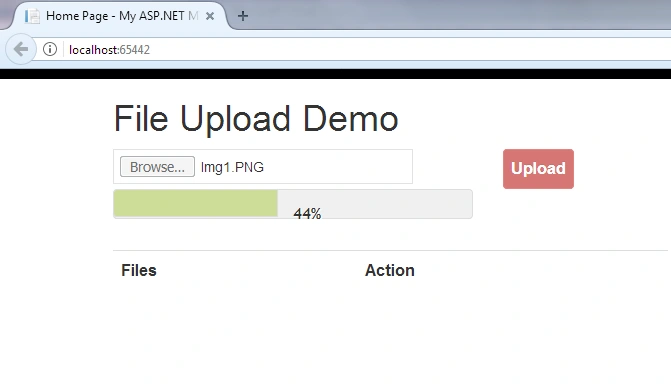
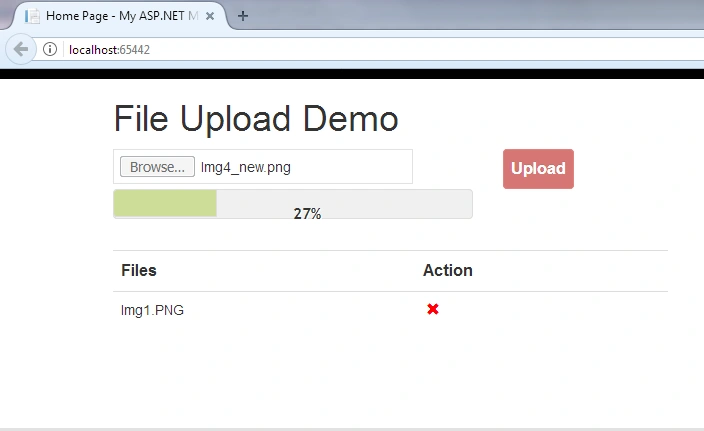
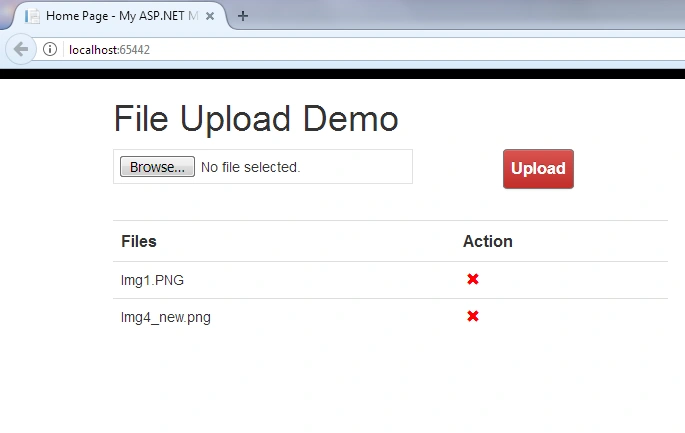
Thanks for reading my article. If you have any comments or queries, please mention in the comment box.
Bilal MughalPosted Dec 8, 2021, 10:50 PM
Did'nt work for me
Osama AbunawasPosted Sep 21, 2020, 1:38 AM
Stupid solution also using timeout to increase the percentage even you are not using the browser caching putting time interval to show fake progress :- () : function progress() { var val = progressbar.progressbar("value") || 0; progressbar.progressbar("value", val + 1); if (val < 99) { setTimeout(progress, 25); } } setTimeout(progress, 100);
Osama AbunawasPosted Sep 21, 2020, 1:19 AM
This will not give you the server side progress, you will get the browser cache percentage.
zabair ishaqPosted Dec 4, 2019, 7:35 AM
Videoupload:374 Uncaught TypeError: $(...).progressbar is not a function
Heta NaikPosted Nov 29, 2018, 12:31 AM
Cannot resolve 'Server' and 'MapPath' Please help for this error
ganesh naiduPosted Oct 2, 2018, 1:29 PM
Waste, it's lunching the progress bar after the file got saved in the directory.
Mehrdad MomeniPosted Sep 3, 2018, 1:16 AM
Hi ramesh how can i use your code for 10MB and up files?
Avadhesh KumarPosted Aug 16, 2018, 11:03 AM
Nice, working with Visual studio 2015, but it gives "Internal Server Error " when publishing to the IIS 8.5. Can you please give suggestion how to implement it in Windows Server environment.
Jp PestPosted Jul 27, 2018, 8:04 PM
Hi, how do I bind the list of files to my form which has different field that I have email out, and should include the fields and the attachment
Farhan AhmedPosted Mar 2, 2018, 1:00 AM
Nice its really helpful for advance thinking
hassan rajaeidustPosted Feb 23, 2018, 2:48 AM
Hi,thanks a lot for your article..but.. how can set max files to upload for this uploader? and limit for upload image or other types...for example mp4..?thanks
prabhu gPosted Oct 9, 2017, 11:55 AM
Its very useful for me to implement progressbar in my projects