

In this article you will learn the following things:
- File Uploading
- Dynamically handle button for SAVE (new record) and UPDATE (changes) saved data to the database.
- Image display from image path from the database.
Note: Image not saved in table and image path store only table.
- Create an ASP.NET Empty Web Site and give name FileUpload.

- Right click on solution bar.
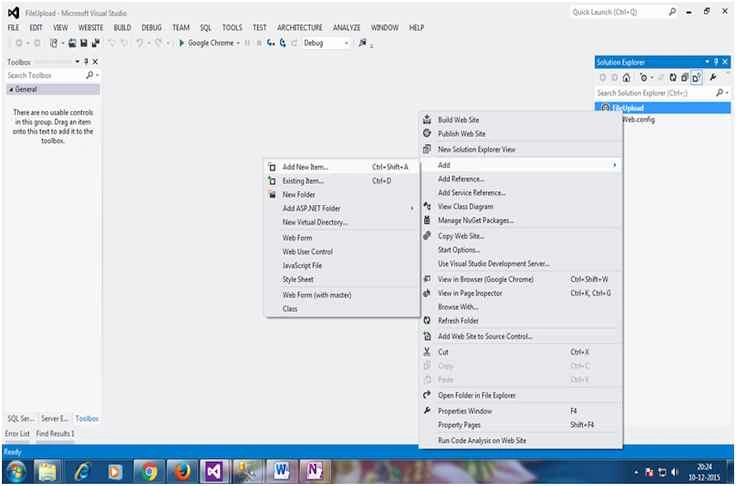
- Add a new Web Form.

- Right click on Solution explorer and click New Folder option. Give name FRIENDIMAGES.
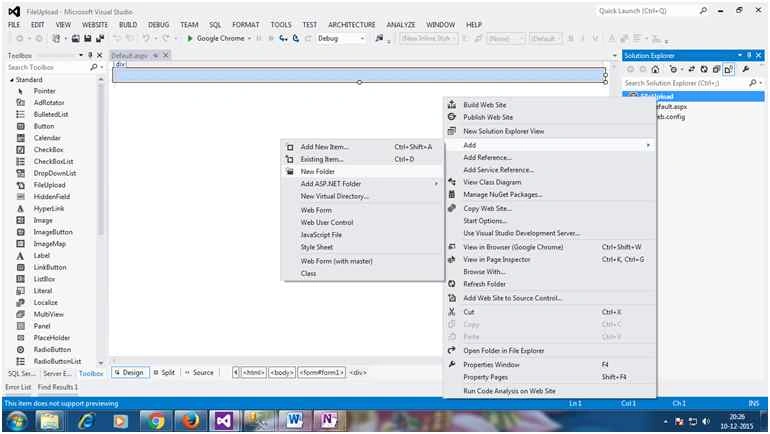
We will store all images inside FRIENDIMAGES.
- Now switch back to DEFAULT.ASPX page, drag and drop HTML TABLE from TOOL BOX.
Note: HTML tool box of controls located at bottom of toolbox.
Add the following controls as per charts.
Control Type Control ID Description Label lblFriend To display MemberID TextBox txtName To enter member name. Image imgFriend Friend Image to display. File Upload fuFriendImage Friend Image File Upload. TextBox txtPlace To enter place. TextBox txtMobile To enter mobile. Button btnSubmit Button to submit data. GridView gvMember Gridview to display data.
Set following settings from properties:
AutoGenerateSelectButton="True" Width="100%"Drag and drop above mentioned controls from TOOLBOX after html table.
- Add the following namespace in DEFAULT.ASPX.CS.Using System.Data: This namespace to access ADO.NET full functionalities.
- using System.Data;
- using System.Data.SqlClient;
- using System.Configuration;
- using System.IO;
Using System.Data.SqlClient: This namespace to access SQL Server database.
Using System.Configuration: To fetch connection string from web.config.
Using System.IO: To work with file and folders.
- Table structure of tblFriends.
- CREATE TABLE [dbo].[tblFriends](
- [FriendID] [int] IDENTITY(1,1)NOT NULL,
- [FriendName] [varchar](50)NULL,
- [FriendImage] [varchar](500)NULL,
- [Place] [varchar](500)NULL,
- [Mobile] [varchar](20)NULL
- )ON [PRIMARY]
- GO
- ASPX code,
DEFAULT.ASPX- <%@ Page Language="C#" AutoEventWireup="true" CodeFile="Default.aspx.cs" Inherits="_Default" %>
- <!DOCTYPE html>
- <html xmlns="http://www.w3.org/1999/xhtml">
- <head runat="server">
- <title></title>
- <style type="text/css">
- .auto-style1 {
- text-align: center;
- }
- .auto-style2 {
- width: 119px;
- height: 23px;
- text-align: left;
- }
- .auto-style3 {
- height: 23px;
- }
- .auto-style4 {
- width: 274px;
- }
- .auto-style5 {
- height: 23px;
- width: 274px;
- }
- .auto-style6 {
- text-align: left;
- }
- .auto-style7 {
- text-align: center;
- height: 23px;
- }
- .auto-style8 {
- text-align: center;
- height: 23px;
- font-size: x-large;
- font-weight: bold;
- text-decoration: underline;
- }
- .auto-style9 {
- text-align: left;
- height: 239px;
- }
- .auto-style10 {
- width: 274px;
- height: 239px;
- }
- .auto-style11 {
- height: 239px;
- }
- </style>
- </head>
- <body>
- <form id="form1" runat="server">
- <div>
- <table style="width:100%;">
- <tr>
- <td class="auto-style8" colspan="3">Friend Detail</td>
- </tr>
- <tr>
- <td class="auto-style1"> </td>
- <td class="auto-style4"> </td>
- <td> </td>
- </tr>
- <tr>
- <td class="auto-style6">
- <asp:Label ID="Label1" runat="server" Text="Friend ID"></asp:Label>
- </td>
- <td class="auto-style4">
- <asp:Label ID="lblMemberID" runat="server" Text="[FriendID]"></asp:Label>
- </td>
- <td> </td>
- </tr>
- <tr>
- <td class="auto-style2">
- <asp:Label ID="Label2" runat="server" Text="Name"></asp:Label>
- </td>
- <td class="auto-style5">
- <asp:TextBox ID="txtName" runat="server" Width="250px"></asp:TextBox>
- </td>
- <td class="auto-style3"></td>
- </tr>
- <tr>
- <td class="auto-style9">
- <asp:Label ID="Label3" runat="server" Text="Image"></asp:Label>
- </td>
- <td class="auto-style10">
- <asp:Image ID="imgFriend" runat="server" Height="194px" Width="189px" />
- <br />
- <asp:FileUpload ID="fuFriendImage" runat="server" />
- <br />
- <br /> </td>
- <td class="auto-style11"></td>
- </tr>
- <tr>
- <td class="auto-style6">
- <asp:Label ID="Label4" runat="server" Text="Place"></asp:Label>
- </td>
- <td class="auto-style4">
- <asp:TextBox ID="txtPlace" runat="server"></asp:TextBox>
- </td>
- <td> </td>
- </tr>
- <tr>
- <td class="auto-style6">
- <asp:Label ID="Label5" runat="server" Text="Mobile"></asp:Label>
- </td>
- <td class="auto-style4">
- <asp:TextBox ID="txtMobile" runat="server"></asp:TextBox>
- </td>
- <td> </td>
- </tr>
- <tr>
- <td class="auto-style1"> </td>
- <td class="auto-style4"> </td>
- <td> </td>
- </tr>
- <tr>
- <td class="auto-style1" colspan="2">
- <asp:Button ID="btnSave" runat="server" OnClick="btnSave_Click" Text="Save" /> </td>
- <td> </td>
- </tr>
- <tr>
- <td class="auto-style7"></td>
- <td class="auto-style5"></td>
- <td class="auto-style3"></td>
- </tr>
- <tr>
- <td class="auto-style1"> </td>
- <td class="auto-style4"> </td>
- <td> </td>
- </tr>
- <tr>
- <td class="auto-style1" colspan="3">
- <asp:GridView ID="gvFriend" runat="server" AutoGenerateColumns="False" AutoGenerateSelectButton="True" Width="100%" BackColor="#DEBA84" BorderColor="#DEBA84" BorderStyle="None" BorderWidth="1px" CellPadding="3" CellSpacing="2" OnSelectedIndexChanged="gvFriend_SelectedIndexChanged">
- <Columns>
- <asp:BoundField DataField="FriendID" HeaderText="Friend ID." ItemStyle-Width="150" />
- <%--<asp:TemplateField HeaderText="FriendID" InsertVisible="False" SortExpression="FriendID">
- <ItemTemplate>
- <asp:Label ID="Label1" runat="server" Text='<%# Bind("FriendID") %>'></asp:Label>
- </ItemTemplate>
- </asp:TemplateField>--%>
- <asp:TemplateField HeaderText="FriendName" SortExpression="FriendName">
- <ItemTemplate>
- <asp:Label ID="lblFriendName" runat="server" Text='<%# Bind("FriendName") %>'></asp:Label>
- </ItemTemplate>
- </asp:TemplateField>
- <asp:TemplateField HeaderText="FriendImage" SortExpression="FriendImage">
- <ItemTemplate>
- <asp:Image ID="imgFrnd" runat="server" ImageUrl='<%# Bind("FriendImage") %>' Width="50"></asp:Image>
- </ItemTemplate>
- </asp:TemplateField>
- <asp:TemplateField HeaderText="Place" SortExpression="Place">
- <ItemTemplate>
- <asp:Label ID="lblPlace" runat="server" Text='<%# Bind("Place") %>'></asp:Label>
- </ItemTemplate>
- </asp:TemplateField>
- <asp:TemplateField HeaderText="Mobile" SortExpression="Mobile">
- <ItemTemplate>
- <asp:Label ID="lblMobile" runat="server" Text='<%# Bind("Mobile") %>'></asp:Label>
- </ItemTemplate>
- </asp:TemplateField>
- </Columns>
- <FooterStyle BackColor="#F7DFB5" ForeColor="#8C4510" />
- <HeaderStyle BackColor="#A55129" Font-Bold="True" ForeColor="White" />
- <PagerStyle ForeColor="#8C4510" HorizontalAlign="Center" />
- <RowStyle BackColor="#FFF7E7" ForeColor="#8C4510" />
- <SelectedRowStyle BackColor="#738A9C" Font-Bold="True" ForeColor="White" />
- <SortedAscendingCellStyle BackColor="#FFF1D4" />
- <SortedAscendingHeaderStyle BackColor="#B95C30" />
- <SortedDescendingCellStyle BackColor="#F1E5CE" />
- <SortedDescendingHeaderStyle BackColor="#93451F" /> </asp:GridView>
- </td>
- </tr>
- <tr>
- <td class="auto-style1"> </td>
- <td class="auto-style4"> </td>
- <td> </td>
- </tr>
- <tr>
- <td class="auto-style1"> </td>
- <td class="auto-style4"> </td>
- <td> </td>
- </tr>
- <tr>
- <td class="auto-style1"> </td>
- <td class="auto-style4"> </td>
- <td> </td>
- </tr>
- </table>
- </div>
- </form>
- </body>
- </html>
- C# Code - Code Behind
DEFAULT.ASPX.CS
- using System;
- using System.Collections.Generic;
- using System.Linq;
- using System.Web;
- using System.Web.UI;
- using System.Web.UI.WebControls;
- using System.Data;
- using System.Data.SqlClient;
- using System.Configuration;
- using System.IO;
- public partial class _Default : System.Web.UI.Page
- {
- string ConStr = ConfigurationManager.ConnectionStrings["MemberCDACConnectionString"].ConnectionString;
- protected void Page_Load(object sender, EventArgs e)
- {
- if (!IsPostBack)
- {
- BindGridView();
- }
- }
- /// <summary>
- /// Friend Submission code.
- /// </summary>
- /// <param name="sender"></param>
- /// <param name="e"></param>
- protected void btnSave_Click(object sender, EventArgs e)
- {
- if (btnSave.Text.ToLower() == "save")
- {
- if (fuFriendImage.HasFile)
- {
- string FileName = Path.GetFileName(fuFriendImage.PostedFile.FileName);
- //Save files to disk
- fuFriendImage.SaveAs(Server.MapPath("FriendImages/" + FileName));
- SqlConnection con = new SqlConnection(ConStr);
- con.Open();
- SqlCommand cmd = new SqlCommand("Insert into tblFriends (FriendName,FriendImage,Place,Mobile) Values(@FriendName,@FriendImage,@Place,@Mobile)", con);
- cmd.Parameters.AddWithValue("@FriendName", txtName.Text);
- cmd.Parameters.AddWithValue("@FriendImage", "Friendimages/"+FileName);
- cmd.Parameters.AddWithValue("@Place", txtPlace.Text);
- cmd.Parameters.AddWithValue("@Mobile", txtMobile.Text);
- cmd.ExecuteNonQuery();
- BindGridView();
- }
- else
- {
- Response.Write("<script>alert('Please, select image file.')</script>");
- }
- }
- if (btnSave.Text.ToLower() == "update")
- {
- if (fuFriendImage.HasFile)
- {
- string FileName = Path.GetFileName(fuFriendImage.PostedFile.FileName);
- //Save files to disk
- fuFriendImage.SaveAs(Server.MapPath("FriendImages/" + FileName));
- SqlConnection con = new SqlConnection(ConStr);
- con.Open();
- SqlCommand cmd = new SqlCommand("update tblFriends set FriendName =@FriendName ,FriendImage = @FriendImage,Place = @Place ,Mobile =@Mobile where FriendID = "+Convert.ToInt16(lblMemberID.Text), con);
- cmd.Parameters.AddWithValue("@FriendName", txtName.Text);
- cmd.Parameters.AddWithValue("@FriendImage", "Friendimages/" + FileName);
- cmd.Parameters.AddWithValue("@Place", txtPlace.Text);
- cmd.Parameters.AddWithValue("@Mobile", txtMobile.Text);
- cmd.ExecuteNonQuery();
- btnSave.Text = "Save";
- BindGridView();
- }
- else
- {
- Response.Write("<script>alert('Please, select image file.')</script>");
- }
- }
- }
- /// <summary>
- /// To load data into grid view
- /// </summary>
- public void BindGridView()
- {
- SqlConnection con = new SqlConnection(ConStr);
- SqlDataAdapter da = new SqlDataAdapter("Select * From tblFriends", ConStr);
- DataSet ds = new DataSet();
- da.Fill(ds, "FriendTable");
- gvFriend.DataSource = ds;
- gvFriend.DataBind();
- clearTextBox();
- }
- protected void gvFriend_SelectedIndexChanged(object sender, EventArgs e)
- {
- //Accessing BoundField Column
- lblMemberID.Text = gvFriend.SelectedRow.Cells[1].Text;
- //Accessing TemplateField Column controls
- txtName.Text = (gvFriend.SelectedRow.FindControl("lblFriendName") as Label).Text;
- imgFriend.ImageUrl = (gvFriend.SelectedRow.FindControl("imgFrnd") as Image).ImageUrl;
- txtPlace.Text = (gvFriend.SelectedRow.FindControl("lblPlace") as Label).Text;
- txtMobile.Text = (gvFriend.SelectedRow.FindControl("lblMobile") as Label).Text;
- btnSave.Text = "Update";
- }
- protected void clearTextBox()
- {
- lblMemberID.Text = "[Member ID]";
- txtMobile.Text = string.Empty;
- txtName.Text = string.Empty;
- txtPlace.Text = string.Empty;
- imgFriend.ImageUrl = string.Empty;
- }
- }
- Our FileUpload Module User Interface (UI)
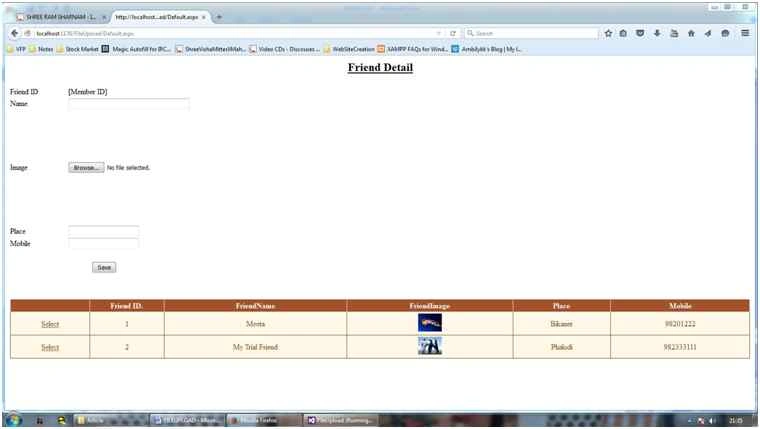
- Update state of application: When you select row of gridview it willchange caption of button as UPDATE otherwise button caption will SAVE.

Please feel free to ask any question related to this article.
kalu singh raoPosted Dec 17, 2015, 11:51 AM
Good one...
Sabyasachi MishraPosted Dec 17, 2015, 7:06 AM
good one
Ankur MistryPosted Dec 17, 2015, 6:51 AM
nice share
Upendra Pratap ShahiPosted Dec 17, 2015, 5:23 AM
nice sir....
Santhakumar MunuswamyPosted Dec 17, 2015, 5:12 AM
Good work. Thanks for sharing us
Vinodh NarayananPosted Dec 17, 2015, 4:14 AM
Good one
Manoj KallaPosted Dec 17, 2015, 2:29 AM
Thank You, Raja
Raja TPosted Dec 17, 2015, 12:52 AM
Nice Sir, Thanks for sharing