Introduction
This article describes a quick and simple approach to programmatically completing a PDF document through the use of the iTextSharp DLL. The article also discusses how one might go about using the iTextSharp DLL to discover and map the fields available within an existing PDF if the programmer has only the PDF but does not have Adobe Designer or even a list of the names of the fields present in the PDF.
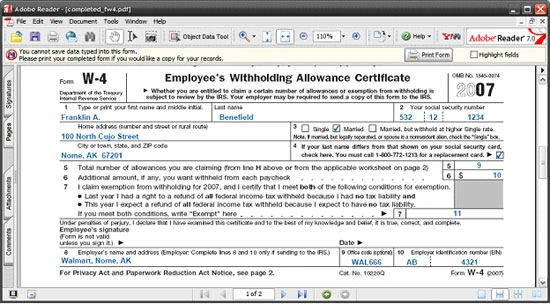
Figure 1: Resulting PDF after Filling in Fields Programmatically.
iTextSharp is a C# port of a Java library written to support the creation and manipulation of PDF document; the project is available for download through SourceForge.net here: http://sourceforge.net/projects/itextsharp/
With the iTextSharp DLL, it is possible to not only populate fields in an existing PDF document but also to dynamically create PDFs. The examples here are limited to a description of the procedures associated with completion of a PDF; the download will contain examples of PDF creation in both Visual Basic and C#.
The examples contained herein are dependent upon the availability of the iTextSharp DLL; use the link provided previously in order to download the DLL locally to your development machine.
In order to demonstrate filling out a PDF using the iTextSharp DLL, I downloaded a copy of the W-4 PDF form from the IRS website. The form contains controls and may be filled out programmatically so it serves as a good example.
PDF documents that do not contain controls; those meant to be printed and filled in with a pencil, cannot be completed using this approach. Of course if you have access to the Adobe tools (Adobe Professional, Adobe Designer), you can always create your own PDFs with controls, or can add controls to existing PDFs. Further, though not demonstrated here, one can also use iTextSharp to create a PDF document with embedded controls.
Getting Started
In order to get started, fire up the Visual Studio 2005 IDE and open the attached solution. The solution consists of a single Win Forms project with a single form.
I have also included a PDF that will be used for demonstration purposes; this form is the IRS W-4 form completed by US taxpayers; however, any PDF with embedded controls (text boxes, check boxes, etc.) is fair game for this approach. Note that a reference to the iTextSharp DLL has been included in the project.
All of the project code is contained with the single Windows form. The form itself contains only a docked textbox used to display all of the field names from an existing PDF document. The completed PDF is generated and stored in the local file system; the PDF is not opened for display by the application.
The application uses the existing PDF as a template and from that template; it creates and populates the new PDF. The template PDF itself is never populated and it is used only to define the format and contents of the completed PDF.

Figure 2: Solution Explorer.
The Code: Main Form
As was previously mentioned, all of the code used in the demonstration application is contained entirely in the project's single Windows form. The following section will describe the contents of the code file.
The file begins with the appropriate library imports needed to support the code. Note that the iTextSharp libraries have been included into the project. The namespace and class declaration are in the default configuration.
- using System;
- using System.Collections;
- using System.ComponentModel;
- using System.Data;
- using System.Drawing;
- using System.Text;
- using System.Windows.Forms;
- using iTextSharp;
- using iTextSharp.text;
- using iTextSharp.text.pdf;
- using iTextSharp.text.xml;
- using System.IO;
- namespace PdfGenerator
- {
- public partial class Form1 : Form
- {
The next section of code contains the default constructor and the form 1 load event handler. During form load, two functions are called; those functions are used to display all of the fields present in the template PDF and to create a new PDF populated with a set of field values.
- public Form1()
- {
- InitializeComponent();
- }
-
- private void Form1_Load(object sender, EventArgs e)
- {
- ListFieldNames();
- FillForm();
- }
The next section of code contained in the demo application defines a function used to collect the names of all of the fields from the target PDF. The field names are displayed in a text box contained in the application's form.
-
-
-
-
-
- private void ListFieldNames()
- {
- string pdfTemplate = @"c:\Temp\PDF\fw4.pdf";
-
- this.Text += " - " + pdfTemplate;
-
- PdfReader pdfReader = new PdfReader(pdfTemplate);
-
-
- StringBuilder sb = new StringBuilder();
- foreach (DictionaryEntry de in pdfReader.AcroFields.Fields)
- {
- sb.Append(de.Key.ToString() + Environment.NewLine);
- }
-
- textBox1.Text = sb.ToString();
- textBox1.SelectionStart = 0;
- }
Figure 3 shows the field names collected from the target PDF using the
ListFieldNames function call. In order to map these fields to specific fields in the PDF, one need only copy this list and pass values to each of the fields to identify them. For example, if the form contains ten fields, setting the value (shown next) to a sequential number will result in the display of the numbers 1 to 10 in each of the fields. One can then track that field value back to the field name using this list as the basis for the map. Once the fields have been identified, the application can be written to pass the correct values to the related field.
Checkbox controls may be a little more challenging to figure out. I tried passing several values to the checkbox controls before lining up a winner. In this example, I tried pass zero, one, true, false, etc. to the field before figuring out that 'yes' sets the check.

Figure 3: The Available PDF Fields.
The next section of code in the demo project is used to fill in the mapped field values. The process is simple enough, the first thing that happens is that that the template file and new file locations are defined and passed to string variables. Once the paths are defined, the code creates an instance of the PDF reader which is used to read the template file, and a PDF stamper which is used to fill in the form fields in the new file. Once the template and target files are set up, the last thing to do is to create an instance of the AcroFields which is populated with all of the fields contained in the target PDF. After the form fields have been captured, the rest of the code is used to fill in each field using the field's SetField function.
In this example, the first worksheet and the W-4 itself are populated with meaningful values whilst the second worksheet is populated with sequential numbers which are then used to map those fields to their location on the PDF.
After the PDF has been filled out, the application reads values from the PDF (the first and last names) in order to generate a message indicating that the W-4 for this person was completed and stored.
- private void FillForm()
- {
- string pdfTemplate = @"c:\Temp\PDF\fw4.pdf";
- string newFile = @"c:\Temp\PDF\completed_fw4.pdf";
- PdfReader pdfReader = new PdfReader(pdfTemplate);
- PdfStamper pdfStamper = new PdfStamper(pdfReader, new FileStream(newFile, FileMode.Create));
- AcroFields pdfFormFields = pdfStamper.AcroFields;
-
-
- pdfFormFields.SetField("f1_01(0)", "1");
- pdfFormFields.SetField("f1_02(0)", "1");
- pdfFormFields.SetField("f1_03(0)", "1");
- pdfFormFields.SetField("f1_04(0)", "8");
- pdfFormFields.SetField("f1_05(0)", "0");
- pdfFormFields.SetField("f1_06(0)", "1");
- pdfFormFields.SetField("f1_07(0)", "16");
- pdfFormFields.SetField("f1_08(0)", "28");
- pdfFormFields.SetField("f1_09(0)", "Franklin A.");
- pdfFormFields.SetField("f1_10(0)", "Benefield");
- pdfFormFields.SetField("f1_11(0)", "532");
- pdfFormFields.SetField("f1_12(0)", "12");
- pdfFormFields.SetField("f1_13(0)", "1234");
-
- pdfFormFields.SetField("c1_01(0)", "0");
- pdfFormFields.SetField("c1_02(0)", "Yes");
- pdfFormFields.SetField("c1_03(0)", "0");
- pdfFormFields.SetField("c1_04(0)", "Yes");
-
- pdfFormFields.SetField("f1_14(0)", "100 North Cujo Street");
- pdfFormFields.SetField("f1_15(0)", "Nome, AK 67201");
- pdfFormFields.SetField("f1_16(0)", "9");
- pdfFormFields.SetField("f1_17(0)", "10");
- pdfFormFields.SetField("f1_18(0)", "11");
- pdfFormFields.SetField("f1_19(0)", "Walmart, Nome, AK");
- pdfFormFields.SetField("f1_20(0)", "WAL666");
- pdfFormFields.SetField("f1_21(0)", "AB");
- pdfFormFields.SetField("f1_22(0)", "4321");
-
-
-
-
- pdfFormFields.SetField("f2_01(0)", "1");
- pdfFormFields.SetField("f2_02(0)", "2");
- pdfFormFields.SetField("f2_03(0)", "3");
- pdfFormFields.SetField("f2_04(0)", "4");
- pdfFormFields.SetField("f2_05(0)", "5");
- pdfFormFields.SetField("f2_06(0)", "6");
- pdfFormFields.SetField("f2_07(0)", "7");
- pdfFormFields.SetField("f2_08(0)", "8");
- pdfFormFields.SetField("f2_09(0)", "9");
- pdfFormFields.SetField("f2_10(0)", "10");
- pdfFormFields.SetField("f2_11(0)", "11");
- pdfFormFields.SetField("f2_12(0)", "12");
- pdfFormFields.SetField("f2_13(0)", "13");
- pdfFormFields.SetField("f2_14(0)", "14");
- pdfFormFields.SetField("f2_15(0)", "15");
- pdfFormFields.SetField("f2_16(0)", "16");
- pdfFormFields.SetField("f2_17(0)", "17");
- pdfFormFields.SetField("f2_18(0)", "18");
- pdfFormFields.SetField("f2_19(0)", "19");
-
- string sTmp = "W-4 Completed for " + pdfFormFields.GetField("f1_09(0)") + " " + pdfFormFields.GetField("f1_10(0)");
- MessageBox.Show(sTmp, "Finished");
-
-
- pdfStamper.FormFlattening = false;
-
- pdfStamper.Close();
- }
To finish up the PDF, it is necessary to determine whether or not additional edits will be permitted to the PDF after it has been programmatically completed. This task is accomplished by setting the FormFlattening value to true or false. If the value is set to false, the resulting PDF will be available for edits, if the value is set to true, the PDF will be locked against further edits.
Once the form has been completed, the PDF stamper is closed and the function terminated.
That wraps up the discussion of the form based demo project.
Summary
This article described an approach to populating a PDF document with values programmatically; this functionality was accomplished using the iTextSharp DLL.
Further, the article described an approach for mapping the fields contained in PDF and may be useful if one is dealing with a PDF authored elsewhere and if the programmer does not have access to Adobe Professional or Adobe Designer. The iTextSharp library is a powerful DLL that supports authoring PDFs as well as using in the manner described in this document; however, when authoring a PDF, it seems that it would be far easier to produce a nice document using the visual environment made available through the use of the Adobe tools. Having said that, if one is dynamically creating PDFs with variable content, the iTextSharp library does provide the tools necessary to support such an effort; with the library, one can create and populate a PDF on the fly.


Farhan YazdaniPosted Sep 12, 2023, 6:25 AM
Working with xla form type it is a different scenario, write now I am working on it and i got null in acrofields,how to work with XFA Form can someone help here
Dinesh GabhanePosted Nov 12, 2019, 5:57 AM
Nice Article. Thanks
Delyan AlexandrovPosted Oct 30, 2019, 9:25 AM
After days of fighting with this kind of thing, I managed to see the light in the tunnel, thanks to your application, source code and detailed documentation. My pdf was malformed - meaning not with fillable cells/forms. So I've found a solution and I think now everything would work. Thanks again.
Frej LindströmPosted Feb 19, 2019, 6:50 AM
Hi, thank you very much. I have a form, but it seems like there are no AcroFields. How can I master this kind of pdf?
S SharmaPosted Aug 14, 2018, 9:00 AM
Thanks for the solution. It works for me in last rush hour to do the similar functionality ready.
Pramod PeyyalaPosted Apr 4, 2018, 5:47 AM
Working very well thanks, But I want Fill this pdf form with database values, dynamically,1)While Getting form fields It is not fetching sequentially, after getting the 1st Form field it fetching random form field id. 1)For Example in My document 1st it is fetching 10th page form field id as 1st form id. 2)The form field name are like (textbox1,textbox2,..textbox55), then how will identify the particular form field id belongs last name or first name???That's why i thought its better to find label name and Id before particular form fields. Please Tell to get form fields sequentially and dynamically Fill pdf with database values.
Chanchal BhardwajPosted Jan 4, 2017, 7:45 AM
I want to check the second option of check box. My code is working fine for checking first option:pdfFormFields.SetField("Check Box26", "Yes"); My checkbox options are Single, Married
Rupinder KaurPosted Jun 22, 2015, 9:28 AM
Hi I tried your code it works fine with the pdf provided by you but if I try to fill my own pdf form it doesn't do anything. I tried debugging actually PdfReader pdfReader = new PdfReader(pdfTemplate); the pdfReader is null when I provide my pdf as template.Please help why it is so?
Webo AL KhayamiPosted May 26, 2015, 4:45 AM
Thanks a lot that what i was looking fori used this code in ASP.Net after changing some parts but when i write DictionaryEntry de it couse error i changed (DictionaryEntry ) to (KeyValuePair<string, iTextSharp.text.pdf.AcroFields.Item>) and it works perfectly thanks again :)
Chirag PatelPosted Nov 26, 2014, 3:50 AM
In Firefox Mozzila browser check box check not working it will print 4 instead of tick mark. Please find following code: pdfStamper.AcroFields.SetField(fd.name, value);
Dan ManPosted Oct 9, 2013, 2:54 PM
I get the following error Error 1 Cannot convert type 'System.Collections.Generic.KeyValuePair<string,iTextSharp.text.pdf.AcroFields.Item>' to 'System.Collections.DictionaryEntry' C:\Users\dan\Desktop\PdfGenerator_CS\PdfGenerator\Form1.cs 51 13 PdfGenerator
Goran MarkovicPosted Mar 10, 2012, 1:25 PM
How to fill pdf fields from my texbox items?
Tolga AltintasPosted Jan 31, 2012, 4:14 AM
Hi thanks for the good introduction !!! My problem is, that the method setField doenst work!! The old values in the pdf are not change, but i get a new pdf document :S Below is my code: string pdfTemplate = @"C:\Users\taltinta\Documents\Visual Studio 2010\WebSites\Lieferantenbewertung\templates\Muster1.pdf"; string newFile = @"C:\Users\taltinta\Documents\Visual Studio 2010\WebSites\Lieferantenbewertung\templates\Muster3.pdf"; PdfReader pdfReader = new PdfReader(pdfTemplate); PdfStamper pdfStamper = new PdfStamper(pdfReader, new FileStream(newFile, FileMode.Create)); AcroFields pdfFormFields = pdfStamper.AcroFields; // set form pdfFormFields // The first worksheet and W-4 form pdfFormFields.SetField("1", "a"); pdfFormFields.SetField("2", "b"); // flatten the form to remove editting options, set it to false // to leave the form open to subsequent manual edits pdfStamper.FormFlattening = false; // close the pdf pdfStamper.Close(); Thanks!
Anil KumarPosted Jun 10, 2011, 6:38 AM
Thanks this helped me.... Bravo !!!
James WilliamsPosted Jan 17, 2011, 2:55 AM
I tried your code and was able to generate a pdf. However, instead of displaying a filled pdf form, the pdf displays this message: "To view the full contents of this document, you need a later version of the PDF viewer." Even after upgrading to the latest version of pdf, I still get this error. Any ideas why I'm running into this issue?
SandraPosted Jan 9, 2010, 8:38 AM
I try to fill a form in pdf with data that is in xml format. In the iText examples for Java, I found a code example using xfa.fillXFAForm(). I am using C# with iTextSharp and can not find the similar method in XFAForm. Does anyone know how to do this in C#?
Tom McKeownPosted Nov 16, 2009, 4:26 PM
I get no exceptions... I dont see the new file being created... string fileName = MapPath(@"docs/Recall Templates.pdf"); string newFile = System.IO.Path.GetFileNameWithoutExtension(fileName) + "_out.pdf"; //PdfDocument doc = PdfReader.Open(fileName, PdfDocumentOpenMode.Import); iTextSharp.text.pdf.PdfReader pdfReader = new iTextSharp.text.pdf.PdfReader(fileName); iTextSharp.text.pdf.PdfStamper pdfStamper = new iTextSharp.text.pdf.PdfStamper(pdfReader, new System.IO.FileStream(newFile, System.IO.FileMode.Create)); iTextSharp.text.pdf.AcroFields fields = pdfReader.AcroFields; iTextSharp.text.pdf.AcroFields.Item item = fields.GetFieldItem("title_mfr"); item.values[0] = "Tom Spines"; //fields.SetField("title_mfr", "Toms Spines"); pdfStamper.FormFlattening = true; pdfStamper.Close(); pdfReader.Close();
TimPosted Sep 29, 2009, 10:48 AM
I was able to use your itextsharp.dll to set text fields of a pdf but I'm struggling to set the href property of an Image Field with your dll. Any assitance with this would be appreciated. Thanks, Tim
P SPosted Aug 15, 2009, 3:28 PM
It's an excellent concept and more or less of a solution to something I am looking for. I was just wondering that is it possible to achieve the same result by creating aspx page where users just fill in the data and on click of a button it saves a filled PDF file. As I am trying to avoid having to install app on each and every users computer.
wendell smithPosted May 22, 2009, 7:06 AM
Do you know if the DLL is compatable with Visual C++ 6.0? wendell smith
Barry CardenPosted Dec 23, 2008, 1:03 PM
I am new to iTextSharp (I think its a grand piece of software) and Adobe and pdf. I am trying to prepopulate pdf forms from a C# program. I am able to do this but after the form has been prepopulated it is not longer editable from Adobe Reader. I need this capability as only some of the fields are prepopulated by the the C# program and this will always be the case. Is there any way around this limitation or am I doing something incorrectly. Barry
Samir ShahPosted Dec 2, 2008, 1:26 PM
Hi, I am trying to add new text field to the form but it's not working. i.e. pdfStamper.AcroFields.Fields.Add(newField, ""); Is it possible to add new field to existing form? How? Thanks in advance. Samir
L HPosted Sep 23, 2008, 4:15 AM
I tried your code, but working on my pdf I got zero returned fields. the pdf is made by Acrobat 8.1. could this be a problem?
Olu DarePosted Sep 18, 2008, 8:01 AM
How can you accomplish the same task interactively? Gven that all information have to be entered as needed and not within the program. And can you make this an installation apps so that the IDE (VB 2005) is not used or needed?
L HPosted Sep 10, 2008, 2:13 AM
Suppose I'm trying to sign pdf documents with your DLL. Is it possible to do it automatically (signatures reside on the computer). Thank you in advance.
D SPosted Mar 4, 2008, 6:13 PM
Hi, I tried your code and it worked fine. For some reason it didnot work with my pdf. I've an editable form similar to your W4. I could not see the names of any of the textboxes or checkboxes in the textbox. Can you help. Thanks.