

Another year has gone by and some things don't change. That's right, paying taxes. What has changed over the years is that taxes have become more and more complicated. If you've ever looked at the 1040 Form, the 1099, the W-2, the Schedule A, B, C and the rest of the alphabet, you probably found yourself wondering which is worse: paying the money to the government or filling out the paperwork. A few years ago, the government heard the cry of the citizen who was up to his neck in forms and tried to ease the process of filing the 1040 by creating the 1040EZ form. This form, which is miraculously only a single page, is a lot less painful than its descendant the 1040. Of course if you are able to take advantage of any of the tax benefits the government provides (such as deductions), you'll need to file the old dependable, but tedious 1040.
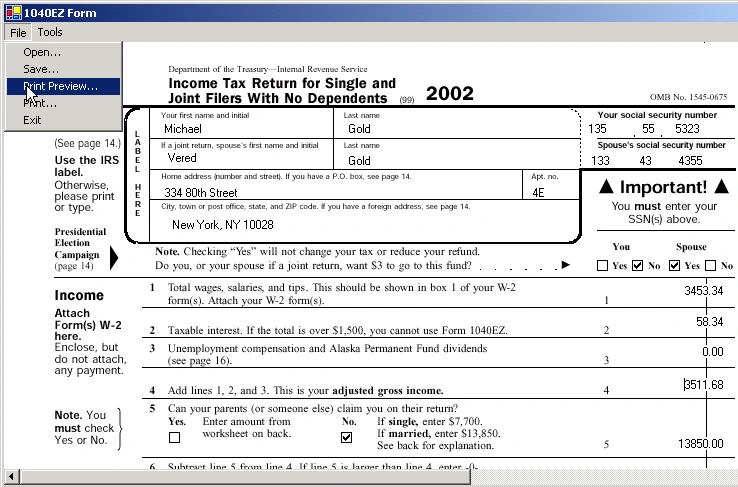
Figure 1 - 1040EZ Form Application
Since the 1040EZ form is only a single page, I thought it would be fun to create a Window Form application that helped you to type into the form. This program will allow you to fill out most of the fields and perform the calculations on certain fields as well. The application also allows you to print the form, print preview the form, open an existing form, and save your current 1040EZ Form. This article is similar to a previous article I wrote on Printing out a W-2 Form. The program in this current article is slightly improved in that it allows you to scroll through the form by setting the AutoScroll property of the form to true. This program is also more generic. Except for the specific calculations for the 1040EZ form, all the drawing, printing and saving of information is done by simply cycling through the controls of the form. The same code could be used for any form (e.g. a driver's license application). Below is the code for saving the information in the controls of the form. Note how we cycle through each control in the form. Then, using the StreamWriter, we write out the content of each control.
Another year has gone by and some things don't change. That's right, paying taxes. What has changed over the years is that taxes have become more and more complicated. If you've ever looked at the 1040 Form, the 1099, the W-2, the Schedule A, B, C and the rest of the alphabet, you probably found yourself wondering which is worse: paying the money to the government or filling out the paperwork. A few years ago, the government heard the cry of the citizen who was up to his neck in forms and tried to ease the process of filing the 1040 by creating the 1040EZ form. This form, which is miraculously only a single page, is a lot less painful than its descendant the 1040. Of course if you are able to take advantage of any of the tax benefits the government provides (such as deductions), you'll need to file the old dependable, but tedious 1040.
Listing 1 - Saving the 1040EZ form contents to an ASCII file
- private void SaveMenu_Click(object sender, System.EventArgs e) {
- // Set the initial directory of the save file dialog to the same path as the application
- saveFileDialog1.InitialDirectory = Application.ExecutablePath.ToString();
- // Check to see if the user picked a file name to save the form information
- if (saveFileDialog1.ShowDialog() == DialogResult.OK) {
- // Create a file stream with the name of the selected filename
- FileStream fs = new FileStream(saveFileDialog1.FileName, FileMode.Create, FileAccess.Write);
- // Use the Stream Writer to write out the information of the 1040EZ form
- StreamWriter sw = new StreamWriter(fs);
- // Cycle through each control in the form.
- foreach(Control c in Controls) {
- // Determine the type of control. For this form we only read TextBoxes and CheckBoxes
- string strType = c.GetType().ToString().Substring(c.GetType().ToString().LastIndexOf(".") + 1);
- // If the control is a TextBox, write out the text contained inside to a line in the file
- if (strType == "TextBox") {
- sw.WriteLine(((TextBox) c).Text.ToString());
- }
- // If the control is a CheckBox, write out a 1 if its checked, 0 if its not
- else if (strType == "CheckBox") {
- if (((CheckBox) c).Checked)
- sw.WriteLine("1");
- else
- sw.WriteLine("0");
- }
- }
- // Close the stream
- sw.Close();
- fs.Close();
- }
- }
John MirelesPosted Mar 12, 2010, 10:19 PM
Mike, great job on the Tax Form.
Robert TurneyPosted Nov 26, 2007, 4:54 PM
I'm sorry to be so dense but I am learning C#. I am confused about what to pass to DrawAll(Graphics g). I've tried the pictureBox1 control, but get this error: Error 2 Argument '1': cannot convert from 'System.Windows.Forms.PictureBox' to 'System.Drawing.Graphics' C:\Documents and Settings\rat\My Documents\Visual Studio 2008\Projects\PrintFormControls\PrintFormControls\Form1.cs 121 21 PrintFormControls. Any help would be great!
Robert TurneyPosted Nov 26, 2007, 4:36 PM
I'm sorry to be so dense but I am learning C#. I am confused about what to pass to DrawAll(Graphics g). I've tried the pictureBox1 control, but get this error: Error 2 Argument '1': cannot convert from 'System.Windows.Forms.PictureBox' to 'System.Drawing.Graphics' C:\Documents and Settings\rat\My Documents\Visual Studio 2008\Projects\PrintFormControls\PrintFormControls\Form1.cs 121 21 PrintFormControls. Any help would be great!
arman sadiaPosted Nov 14, 2007, 10:25 AM
thank you so much Mike it solved my problem with right alignment regards