

Introduction
In this article, let us see how to filter a DataGridView when we type some values in a textbox.
Using the code
- Create a new Windows application. Add a DataGridView and textbox control.

- I have an XML file I will bind to a DataGridView:
XML File 1
<?xml version="1.0" standalone="yes" ?>
- <NewDataSet>
- <Table1>
<Server>Server1</Server>
<Database>Database1</Database>
</Table1>
- <Table1>
<Server>Server2</Server>
<Database>Database2</Database>
</Table1>
- <Table1>
<Server>Server3</Server>
<Database>Database3</Database>
</Table1>
</NewDataSet> - Create two properties of type DataSet and DataView as follows:
public DataSet ds
{
get;
set;
}
public DataView dv
{
get;
set;
}
- In the Form Constructor, create an object of DataSet and DataView:
public Form1()
{
InitializeComponent();
ds = new DataSet();
dv = new DataView();
}
- Now in the form load, read the XML file and save the values into the dataset. Then load the tables into the DataView with the DataTable in the DataSet. Now bind this DataView to the DataGridView:
private void Form1_Load(object sender, EventArgs e)
{
string path = "C:\\XMLFile1.xml";
ds.ReadXml(path);
dv.Table = ds.Tables[0];
dataGridView1.DataSource = dv;
}
- Now in the text_changed property of the textbox, add the following code. Here I am filtering it by the column "Server":
dv.RowFilter = "Server like '%" + textBox1.Text + "%'";
dataGridView1.DataSource = dv;
- Run the application and check.
a. Form Load:
b. Valid data in column server: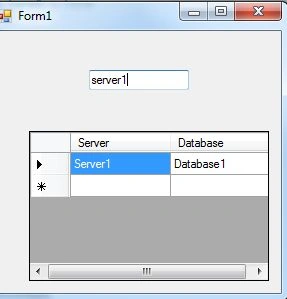
c. Invalid data in Column server:
I have attached the complete source code also.
jo joPosted Apr 26, 2019, 2:05 PM
It works, but how does it work without databinding?
jo joPosted Apr 26, 2019, 1:01 PM
It works.. first not, but then. i had to delete my user.settings. cause i added a fix box as string balblablabla. so much thank you
Eric KanzzPosted Apr 8, 2013, 5:34 AM
cool...works
Santhosh Kumar JayaramanPosted Feb 12, 2013, 9:58 AM
I believe you pull your database records and save into a datatable. Here also am doing the same, i read into xml and dump into datatable. So once you select all your values and dump into datatable,then write the below line dv.Table = ds.Tables[0];
kedar pawgiPosted Feb 12, 2013, 8:32 AM
Hi I am in search of the same type of thing but i want to know how to search from database and please tell me how to do it with ADODB. Thanks in Advance