
In this article I describe powers of numbers. I think we are all familiar with powers of numbers in mathematics. But now you can learn about them in a programming language. So let us first all understand powers of numbers.
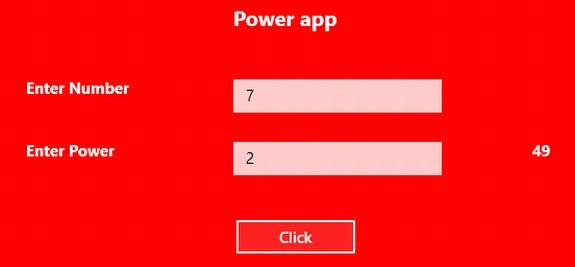
A number has two things, a base and an exponent. An exponent tells you how many times the base is used as a factor and their product is called the power of the number.
Use the following procedure to create a power app.
Step 1
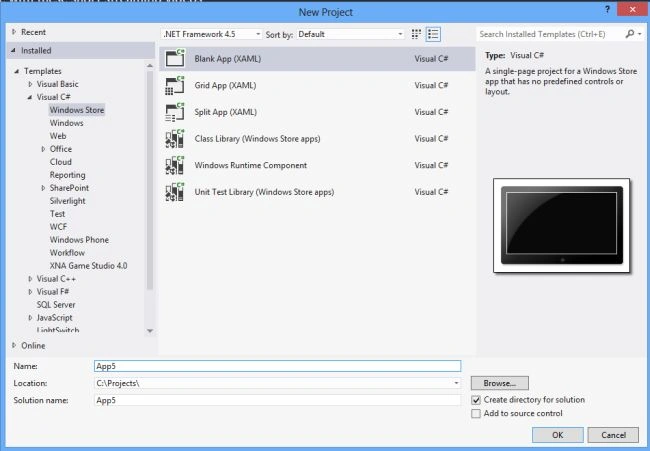
First of all you have to create a New Window Store Application.
- Open Visual Studio 2012
- "File" -> "New" -> "Project..."
- Choose Template: "Visual C#" -> "Window Store app"
- "Blank App (XAML)", then rename the application
Step 2
Write the following simple XAML code for "Mainpage.Xaml" (that is available in Solution Explorer):
<Page
x:Class="Power_app.MainPage"
xmlns="http://schemas.microsoft.com/winfx/2006/xaml/presentation"
xmlns:x="http://schemas.microsoft.com/winfx/2006/xaml"
xmlns:local="using:Power_app"
xmlns:d="http://schemas.microsoft.com/expression/blend/2008"
xmlns:mc="http://schemas.openxmlformats.org/markup-compatibility/2006"
mc:Ignorable="d">
<Grid Background="Red">
<Grid.ColumnDefinitions>
<ColumnDefinition Width="233*"/>
<ColumnDefinition Width="142*"/>
<ColumnDefinition Width="204*"/>
<ColumnDefinition Width="787*"/>
</Grid.ColumnDefinitions>
<Grid.RowDefinitions>
<RowDefinition Height="78*"/>
<RowDefinition Height="49*"/>
<RowDefinition Height="43*"/>
<RowDefinition Height="40*"/>
<RowDefinition Height="38*"/>
<RowDefinition Height="520*"/>
</Grid.RowDefinitions>
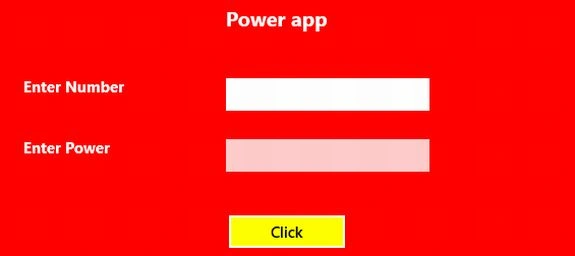
<TextBlock Text="Power app" Foreground="White" FontSize="20" FontWeight="ExtraBold" Grid.Column="2" Grid.Row="1" Grid.ColumnSpan="2"></TextBlock>
<TextBlock Text="Enter Number" Foreground="White" FontSize="15" FontWeight="ExtraBold" Grid.Column="1" Grid.Row="2"></TextBlock>
<TextBox x:Name="textbox1" Grid.Column="2" Grid.Row="2" Width="200" HorizontalAlignment="Left" VerticalAlignment="Top" Height="32" ></TextBox>
Join the conversation! Your thoughts help the community grow.