

You never know when the idea for a script will make an appearance.
I had to work with composite primary keys recently while working on a project for a client. More specifically, I had to create a process that would dynamically (dynamic SQL?! Say it isn’t so?!) handle composite keys in an efficient manner.
Usually, a primary key is just a single column that uniquely identifies a row within a table. However, a composite primary key consisting of 2 or more columns can be created. Regardless if the primary key is singular or composite, it provides identical functionality. In this particular instance, this process would perform data modifications based on the columns that composed the primary key. Thus I needed to be able to determine what columns are in the key.
There is a limit to the number of columns you can have in a composite key. In SQL Server 2016 and newer, the limit is 32 columns and prior to that a primary key could have up to 16 columns. Keep in mind, neither limit is a goal but it’s there if you need it.
The Parts & Pieces
As I started to work on this, my first thought was that it would be helpful to know how many tables had a composite primary key. This would give me an idea on how many tables I was dealing with. Thankfully, SQL Server has this information by using system DMVs (dynamic management views) along with the COL_NAME function.
Note
The COL_NAME function will only work with SQL Server 2008 and newer.
Below is my attempt to get a result of how many columns compose the primary key,
- -- how many columns make up the primary key
- SELECT Schema_name(o.schema_id) AS 'Schema',
- Object_name(i.object_id) AS 'TableName',
- Count(Col_name(ic.object_id, ic.column_id)) AS 'Primary_Key_Column_Count'
- FROM sys.indexes i
- INNER JOIN sys.index_columns ic
- ON i.object_id = ic.object_id
- AND i.index_id = ic.index_id
- INNER JOIN sys.objects o
- ON i.object_id = o.object_id
- INNER JOIN sys.schemas s
- ON o.schema_id = s.schema_id
- WHERE i.is_primary_key = 1
- AND o.type_desc = 'USER_TABLE'
- GROUP BY Object_name(i.object_id),
- o.schema_id
- HAVING Count(1) > 1
- ORDER BY 1
In looking at the AdventureWorks2014 database, the above script will give you an output that looks like this,
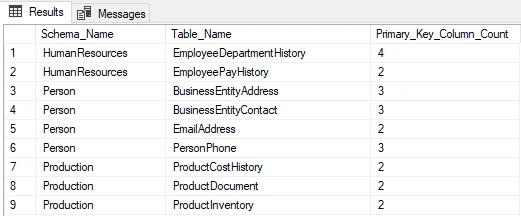
Cool! Now I knew which tables had a primary key comprised of multiple columns as well as how many columns were in the key definition.
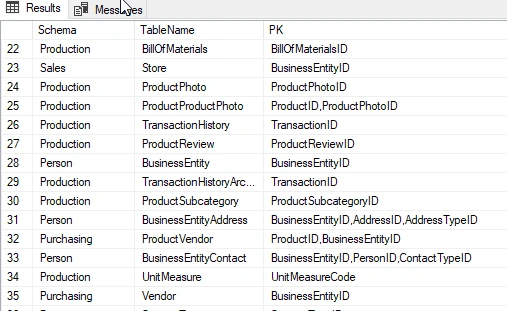
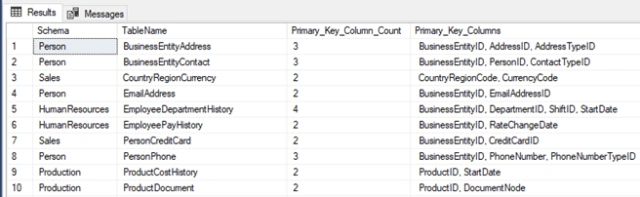
Taking things a step further, I thought that it would be useful to see what columns the primary key is composed of in that same output. This part becomes a little more complicated to gather as we need to get the list of columns, which could be 1 – 32 columns (or 1-16 columns depending on the version of SQL Server) into a comma delimited list.
Using the STUFF function along with XML PATH is a quick and efficient way to generate a comma delimited list of string values.
Thus this script was born,
- SELECT Schema_name(o.schema_id) AS 'Schema',
- Object_name(i2.object_id) AS 'TableName',
- Stuff((SELECT ',' + Col_name(ic.object_id, ic.column_id)
- FROM sys.indexes i1
- INNER JOIN sys.index_columns ic
- ON i1.object_id = ic.object_id
- AND i1.index_id = ic.index_id
- WHERE i1.is_primary_key = 1
- AND i1.object_id = i2.object_id
- AND i1.index_id = i2.index_id
- FOR xml path('')), 1, 1, '') AS PK
- FROM sys.indexes i2
- INNER JOIN sys.objects o
- ON i2.object_id = o.object_id
- WHERE i2.is_primary_key = 1
- AND o.type_desc = 'USER_TABLE'
VENKATESWARULU SPosted Jan 3, 2019, 11:32 PM
Hi ,i need how to create a column name as primary key in sharepoint list
Ankur MistryPosted Aug 7, 2018, 12:37 PM
Good stuff for reading
Viknaraj ManogararajahPosted Jul 15, 2018, 7:24 PM
Nice explanation, thank you for sharing.
Hadshana KamalanathanPosted Jul 15, 2018, 12:54 PM
Thank you for sharing