

Introduction
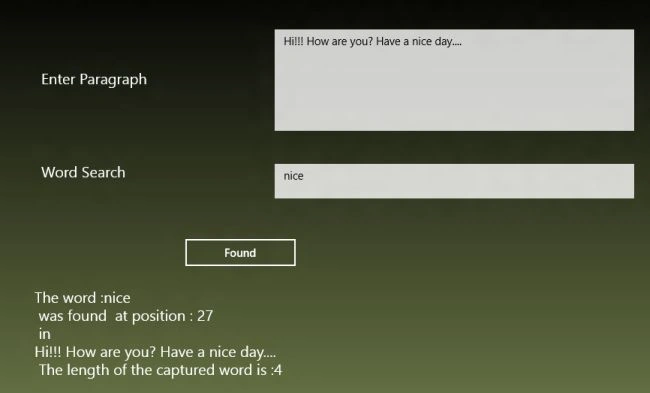
In this article I discuss the Match class of the System.Text.RegularExpression namespace in Windows 8 application. By using this class we can find a particular word, value or letter that matches the given context. By using the Success property of the Match class we can determine whether the word matches or not; true indicates success. Their are various other properties that we can use in the Match class. The Match class represents the results from a single regular expression match. Some of the properties that I use in this application are :
- Value : Gets the captured substring from the input string.
- Index : The position in the original string where the first character of the captured substring is found.
- Length : Gets the length of the captured substring.
- Success : Gets a value indicating whether the match is successful.
Now to see how we find the word in the given paragraph, use the following steps :
Step 1
Open Visual Studio 2012 RC and click File -> New -> Project.
Step 2
A New Project dialog appears, in this select window Metro style inside the Visual C# at the left side pane then select Blank Page in the center pane and after giving the name of your application click ok.
Step 3
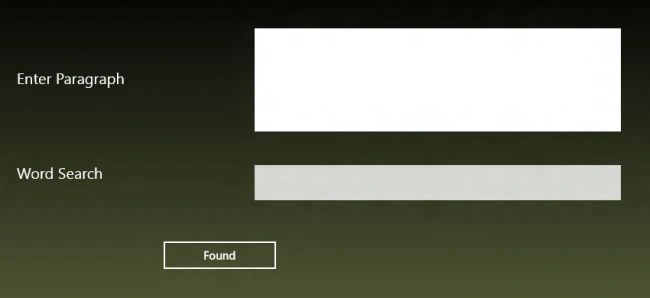
Now to do the designing by writing the code in the MainPage.xaml file as:
<Page
x:Class="practice1.MainPage"
IsTabStop="false"
xmlns="http://schemas.microsoft.com/winfx/2006/xaml/presentation"
xmlns:x="http://schemas.microsoft.com/winfx/2006/xaml"
xmlns:local="using:practice1"
xmlns:d="http://schemas.microsoft.com/expression/blend/2008"
xmlns:mc="http://schemas.openxmlformats.org/markup-compatibility/2006"
mc:Ignorable="d">
<Grid>
<Grid.Background>
<LinearGradientBrush EndPoint="0.5,1" StartPoint="0.5,0">
<GradientStop Color="Black"/>
<GradientStop Color="#FFBFD37D" Offset="1"/>
</LinearGradientBrush>
</Grid.Background>
<TextBlock Name="name" HorizontalAlignment="Left" Margin="91,133,0,0" TextWrapping="Wrap" Text="Enter Paragraph" VerticalAlignment="Top" Height="48" Width="269" FontSize="20"/>
<TextBox Name="paragraph" HorizontalAlignment="Left" Margin="402,78,0,0" TextWrapping="Wrap" Text="" VerticalAlignment="Top" Height="135" Width="479"/>
<TextBlock x:Name="name_Copy" HorizontalAlignment="Left" Margin="91,257,0,0" TextWrapping="Wrap" Text="Word Search" VerticalAlignment="Top" Height="46" Width="269" FontSize="20"/>
Join the conversation! Your thoughts help the community grow.