

Introduction
This is a process to read the value from web.xml file into the servlet. The servlet can get a value from its user without having an HTML form. The value of a parameter can be fetched from web.xml file by using getInitParameter() method of the servlet. The initial parameter can be defined in web.xml file by using the following tags given below as,
- <init-param>,<param-name>,<param-value>
- <servlet>
- <servlet-name>This contains a name to refer the servlet inside this file </servlet-name>
- <servlet-class>This contains class name of the servlet</servlet-class>
- <init-param>
- <param-name>This contains name of the initial parameter</param-name>
- <param-value> This contains value of the initial parameter </param-value>
- </init-param>
- </servlet>
Example
- //using initial parameter in a servlet
- import javax.servlet.*;
- import javax.servlet.http.*;
- import java.io.*;
- public class initParamServ extends HttpServlet
- {
- public void doGet(HttpServletRequest req,HttpServletResponse res)throws IOException,ServletException
- {
- String s1=getInitParameter("gp");
- res.setContentType("text/html");
- PrintWriter out=res.getWriter();
- out.println("<Html><body bgcolor='CYAN'>");
- out.println("<H1><font color='blue'>Today's Gold price<blink>"+s1+"</blink></font></h1>");
- out.println("</Body></html>");
- }
- }
Storing and Compiling
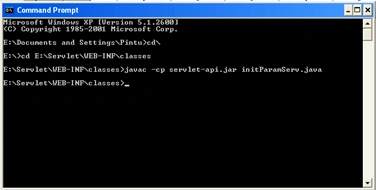
Store the file inside a class folder of the context (E:\Servlet\WEB-INF\classes).
Compile the file as below
javac -cp servlet-api.jar number.java (for tomcat 6.0)
Setting in web.xml file
Note: - Note the Highlighted or bold portion in the below web.xml file, to be added.
- <?xml version="1.0" encoding="ISO-8859-1" ?> -
- <!--
- Licensed to the Apache Software Foundation (ASF) under one or more
- contributor license agreements. See the NOTICE file distributed with
- this work for additional information regarding copyright ownership.
- The ASF licenses this file to You under the Apache License, Version 2.0
- (the "License"); you may not use this file except in compliance with
- the License. You may obtain a copy of the License at
- http://www.apache.org/licenses/LICENSE-2.0
- Unless required by applicable law or agreed to in writing, software
- distributed under the License is distributed on an "AS IS" BASIS,
- WITHOUT WARRANTIES OR CONDITIONS OF ANY KIND, either express or implied.
- See the License for the specific language governing permissions and
- limitations under the License.
- --> <!-- Inject Script Filtered -->
- <web-app xmlns="http://java.sun.com/xml/ns/javaee" xmlns:xsi="http://www.w3.org/2001/XMLSchema-instance" xsi:schemaLocation="http://java.sun.com/xml/ns/javaee
- http://java.sun.com/xml/ns/javaee/web-app_2_5.xsd" version="2.5">
- <servlet>
- <servlet-name>initParamServ</servlet-name>
- <servlet-class>initParamServ</servlet-class>
- <init-param>
- <param-name>gp</param-name>
- <param-value>21500</param-value>
- </init-param>
- </servlet>
- <servlet-mapping>
- <servlet-name>initParamServ</servlet-name>
- <url-pattern>/initParamServ</url-pattern>
- </servlet-mapping>
- </web-app>
Running it in a web browser
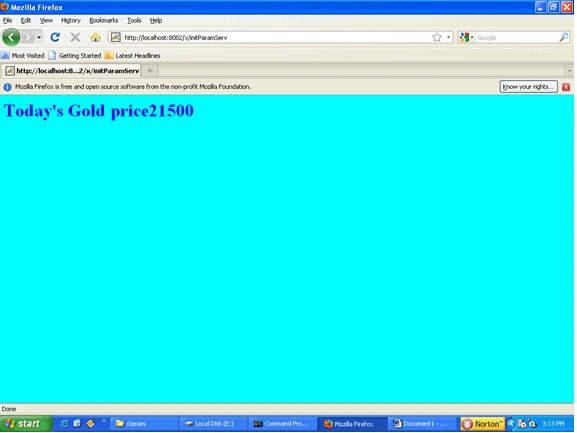
Please use the Mozilla Firefox browser to blink the value because Internet Explorer does not support <blink></blink> tag property.
First start the Apache Tomcat 6.0,
First start the Apache Tomcat 6.0,
Here x is the context path location, which we have to give in the server.xml file, which is present inside the Tomcat installation directory (E:\Program Files\Apache Software Foundation\Tomcat 6.0\conf)
Server.xml settings
Server.xml settings
Note: - In the below server.xml file we have to specify the context path as below.
<Context path="/x" docBase="E:\Servlet" reloadable="true" debug="0" />
Yaduveer SainiPosted Oct 21, 2015, 7:49 AM
Good Job