

Introduction
The Azure OpenAI Service provides powerful pre-trained language models like GPT-4, but out-of-the-box models may not always align perfectly with domain-specific tasks. Fine-tuning these models with custom datasets enhances their performance, ensuring better accuracy and relevance for specialized industries like finance, healthcare, and legal services.
In this article, we will explore why fine-tuning is important, how it differs from prompt engineering, and provide a step-by-step guide to fine-tune Azure OpenAI models using your domain-specific data.
Why Fine-Tune OpenAI Models?
While pre-trained models are great for general-purpose applications, domain-specific tasks often require specialized knowledge and context. Fine-tuning helps.
- Enhancing Model Accuracy: Reducing hallucinations and improving factual accuracy.
- Customizing Responses: Aligning tone, terminology, and context with industry-specific needs.
- Improving Efficiency: Reducing token usage by minimizing the need for excessive prompt engineering.
- Ensuring Compliance: Fine-tuning helps models adhere to specific regulatory standards in sensitive fields like healthcare.
Fine-Tuning vs. Prompt Engineering
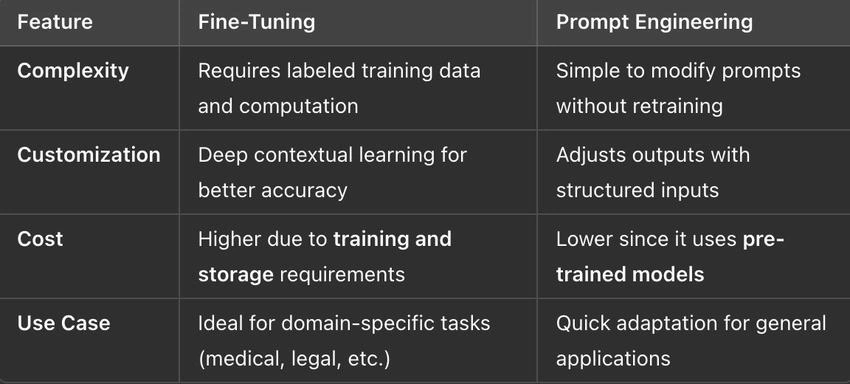
While prompt engineering works well for many tasks, fine-tuning is the preferred approach when higher accuracy and contextual knowledge are needed.
Steps to Fine-Tune an OpenAI Model in Azure
Fine-tuning an Azure OpenAI model follows a structured workflow.
1. Prepare Your Dataset
- Collect domain-specific data in JSON format.
- Each entry should include input-output pairs. Example.
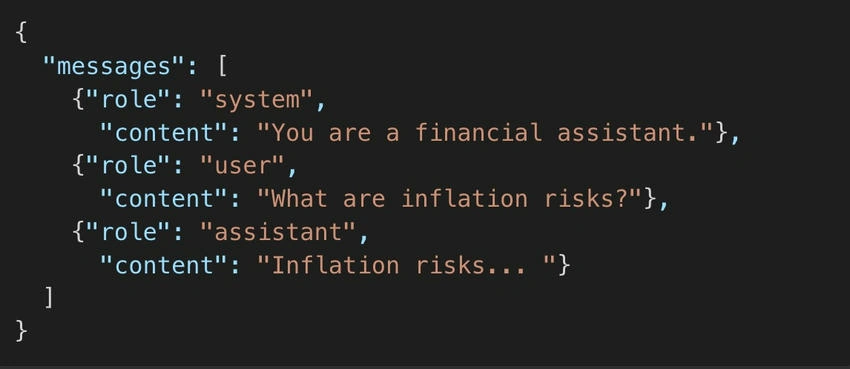
- Store the dataset in Azure Blob Storage for easy access.
2. Upload Dataset to Azure OpenAI
az openai fine-tunes create --training-file "dataset.jsonl" --model "gpt-4"
This command starts the fine-tuning process. Training times vary based on dataset size and complexity.
3. Monitor Fine-Tuning Progress
Track the fine-tuning process in the Azure OpenAI portal or using.
az openai fine-tunes list
Once completed, the fine-tuned model receives a unique model ID for deployment.
4. Deploy the Fine-Tuned Model
After fine-tuning, deploy the model to an Azure OpenAI endpoint.
az openai deploy --model-id "your-custom-model-id" --resource-group "your-rg" --deployment-name "custom-gpt4"
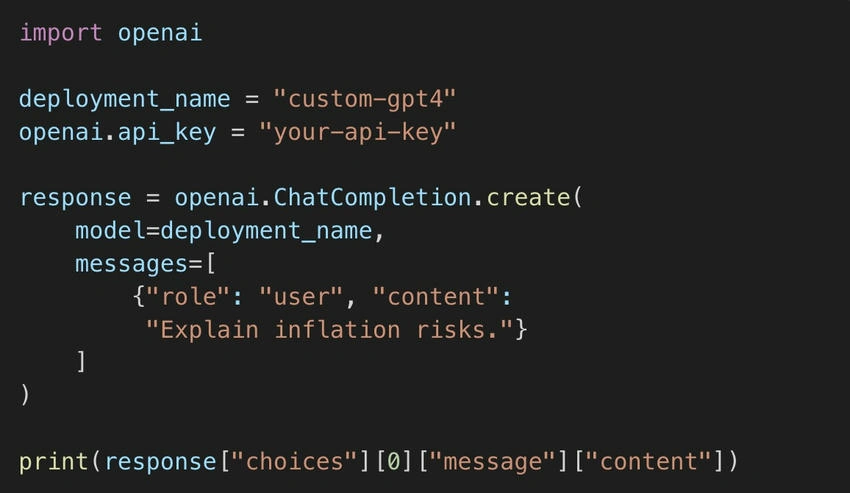
5. Use the Fine-Tuned Model in Applications
Integrate the model into your application using Python.
Best Practices for Fine-Tuning
- Curate High-Quality Data: Clean, structured, and well-labeled data ensures better results.
- Avoid Bias: Include diverse examples to prevent biased responses.
- Test Before Deployment: Run benchmark tests to compare the fine-tuned model against the base model.
- Monitor and Iterate: Continuously evaluate model performance and retrain as needed.
Real-World Applications
Fine-tuning Azure OpenAI models enables AI-driven solutions across multiple industries.
- Healthcare: Summarizing complex medical literature for faster research insights.
- Legal: Providing precise contract analysis by training the model on legal documents.
- Finance: Improving risk analysis with detailed financial forecasting and market insights. Retail – Enhancing customer support chatbots with product-specific responses.
Conclusion
Fine-tuning Azure OpenAI models allows businesses to build domain-specific AI applications with higher accuracy, better compliance, and deeper contextual understanding. By following best practices, organizations can leverage AI to drive productivity and innovation in highly specialized fields.
Ready to start fine-tuning? Explore Azure OpenAI and unlock the full potential of AI customization!
Next Steps
Join the conversation! Your thoughts help the community grow.