Introduction
FCM (Firebase Cloud Messaging) is a cross-platform messaging solution that lets you deliver the messages to one or more devices efficiently, without any delay. This article will explain to you how to create an Android application that can receive push notifications. Previously, we were using Google Cloud Messaging(GCM) in Android to receive push notifications. FCM is the same as GCM but the difference is that FCM lets the users send the notification messages to the devices without creating a server-side code. Because FCM already has a console, we can send push notification from there, to all the devices that are registered for our application.
First, create a project in the Firebase Console. For this, go to
Firebase Console.
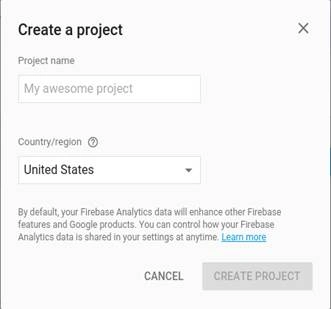
Click on CREATE NEW PROJECT.
Fill Project Name and Country Name. Now, click CREATE PROJECT.
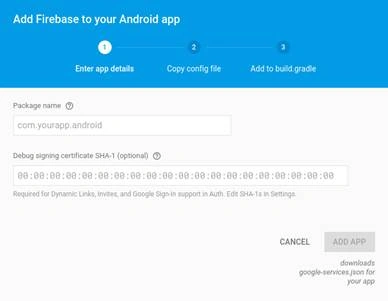
On the next page, click Add Firebase to your Android App.
In the Next window, you need to enter the package name for your Android application and the SHA1 finger print. Enter these values and click ADD APP. Then, one file will be downloaded i.e. google-services.json.
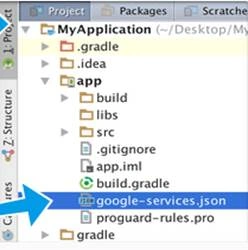
Add this JSON file to your App, like the below screenshot:
Now, add the following dependency in your App's build.gradle file - compile 'com.google.firebase:firebase-messaging:9.2.1'
And, you need to add one more line in the same file for Google Services.
apply plugin: 'com.google.gms.google-services'
Now, your App's Gradle file will look like the following:
- apply plugin: 'com.android.application'
- android {
-
- }
- dependencies {
-
- compile 'com.google.firebase:firebase-messaging:9.2.1'
- }
-
- apply plugin: 'com.google.gms.google-services'
If you want to handle the messages that you receive in the background, then you need to have a service extended from FirebaseMessagingService. The main uses of this file are, receiving notifications in the foregound App, receiving data payloads, sending the upstream messages, and so on. This is why you need to extend this class.
- <service android:name=".MyFirebaseMessagingService">
- <intent-filter>
- <action android:name="com.google.firebase.MESSAGING_EVENT" /> </intent-filter>
- </service>
- <service android:name=".MyFirebaseInstanceIDService">
- <intent-filter>
- <action android:name="com.google.firebase.INSTANCE_ID_EVENT" />
- </intent-filter>
- </service> =
For creation, rotation, and updating of the registration token, we need another service that extends from FirebaseInstanceIdService,
On the initial start-up of the App, FCM SDK generates a registration token for the client App. This registration token is needed for sending messages to the client applications from the server. In the inTokenRefresh(), we will get the token.
- public class MyFirebaseInstanceIDService extends FirebaseInstanceIdService
- {
- @Override
- public void onTokenRefresh() {
-
- String refreshedToken = FirebaseInstanceId.getInstance().getToken();
- Log.e("Token", "Refreshed token: " + refreshedToken);
-
-
- }
- }
The service that extends from FirebaseMessagingService lets us do anything we want with the notification message.
- public class MyFirebaseMessagingService extends FirebaseMessagingService
- {
- @Override
- public void onMessageReceived(RemoteMessage remoteMessage)
- {
-
-
-
-
- Log.e("Message", "From: " + remoteMessage.getFrom());
- Log.e("Message", "Notification Message Body: " + remoteMessage.getNotification().getBody());
- }
- }
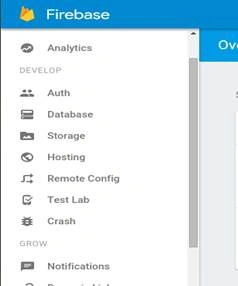
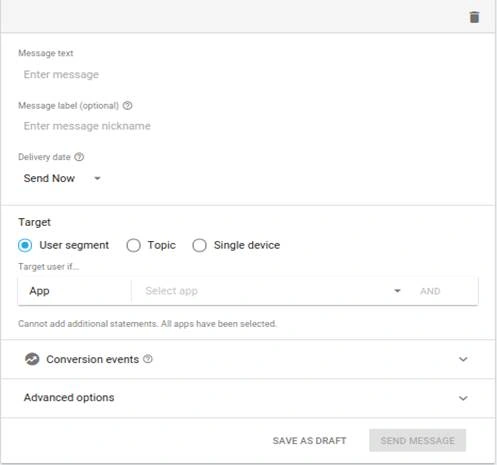
That's it. So the configuration is done now. Now, we can check this without writing any server-side code. In the Firebase Console, there are a menu Notifications clicking which we can see the message history and status. There, click the NEW MESSAGE button.
In that window, fill all the textfields and click SEND MESSAGE.
Summary
In this article, I discussed Firebase Cloud Messaging and how we can create a client application in Android, for receiving push notifications. And also, how to check this with Firebase Console.


 Add this JSON file to your App, like the below screenshot:
 Now, add the following dependency in your App's build.gradle file - compile 'com.google.firebase:firebase-messaging:9.2.1'
And, you need to add one more line in the same file for Google Services.
apply plugin: 'com.google.gms.google-services'
Now, your App's Gradle file will look like the following:
Now, add the following dependency in your App's build.gradle file - compile 'com.google.firebase:firebase-messaging:9.2.1'
And, you need to add one more line in the same file for Google Services.
apply plugin: 'com.google.gms.google-services'
Now, your App's Gradle file will look like the following:
Mayur DighePosted Jul 24, 2016, 6:13 AM
Good Work
kalu singh raoPosted Jul 23, 2016, 1:02 PM
Nice article
Vignesh ManiPosted Jul 23, 2016, 10:11 AM
Nice