

Background
In development there are two types of programmers. Both spend the same amount of time in the office and both are busy writing code. One programmer's code is easily understood and performance is very good and the programmer code is easily understood but the performance is very slow. I like the first programmer because the code runs smoothly and the performance is fast.
Road map
You can see other performance issues in my other articles.
Performance
Performance is a main issue in any program or web application. If performance is slow in an application then we avoid the application. In development life many steps increase the application performance. I will not write every step there. I focus only on looping performance in the current article.

In this article we have two loops, both do the same thing and the output is also the same. If you hear the word loop then think about a for Loop because this loop is the traditional loop. Your mind thinks of something when you hear the word loops. I think the picture looks as in:
- For(,,) //Loops without condition.
- {
- }
The preceding loop is working fine and is an infinite loop because it has no loop terminate condition.
Loops
The C# language has two types of loops, one is a for loop and the other is a foreach loop.

I think that's enough of the loops information. I have already said in this article we will focus on which provides the best performance. Let's move on.
I have a special tool for performance checking both loops. I created a window application with a flowchart.
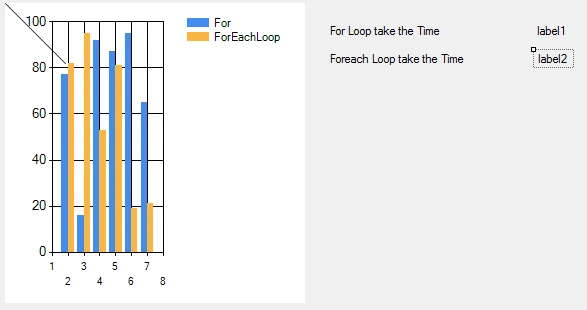
I have two functions.
- ForLoop(); //For Loops
- ForeachLoop(); // ForEach Loop
Make a another function for adding a value in the Data Table. We can check both loop arrays, list and so on but I want to check on the Data Table. So we can make another function for Data table.
- add_value();
-
- private void Form1_Load(object sender, EventArgs e) // Page Load Event call here.
- {
- MessageBox.Show("Wait for some moments");
- add_value(); //Add value in Data Table
- ForLoop(); // For Loop
-
- ForEachLoop(); // Foreach Loop
-
- chart1.Series["For"].ChartType = SeriesChartType.Bar;
- chart1.Series["For"].Color = Color.Red;
- chart1.Series["ForEachLoop"].ChartType =
- SeriesChartType.Bar;
- chart1.Series["ForEachLoop"].Color = Color.Blue;
- }
Add data into the Data Table.
- DataTable dt = new DataTable();
- int j = 0;
- int i = 0;
- public void add_value()
- {
- DataRow row;
- DataColumn col = new DataColumn("id");
- dt.Columns.Add(col);
- for (i = 0; i < 10000000; i++) //
- {
- row = dt.NewRow();
- row["id"] = i;
- dt.Rows.Add(row);
- }
- }
For loop performance
Check out this function. It sets the loop start time.
Check out this function. It sets the loop start time.
- string startingTime = DateTime.Now.ToLongTimeString();
- public void ForLoop()
- {
-
- for (int i = 0; i < dt.Rows.Count; i++)
- {
-
- }
-
- }
- for (int i = 0; i < dt.Rows.Count; i++)
- {
- string s = dt.Rows[i]["id"].ToString(); //Get the value one by one like dt.Rows["Row Index no"]["column Name"].Tostring();
- }
- endtime = DateTime.Now.ToLongTimeString();
- TimeSpan t1 = DateTime.Parse(endtime).Subtract(DateTime.Parse(startingTime));
- chart1.Series["For"].Points.AddXY(j, t1.TotalSeconds); //our chart line move 0 to value of take the loop for complete looping.
- label1.Text = t1.ToString();
With the same process as the for loop, make a function to get the foreach loop performance.
- public void ForEachLoop()
- {
- //empty function .......
- }
- string startingTime = DateTime.Now.ToLongTimeString();
Create the foreach loop.
- foreach (DataRow item in dt.Rows) //dt.rows is collection all row in the dt Data Table.
- {
- string s = item["id"].ToString(); //Item is DataRow so i get the value these type item["column name"].
- }
- endtime = DateTime.Now.ToLongTimeString();
- TimeSpan t1 = DateTime.Parse(endtime).Subtract(DateTime.Parse(startingTime));
- chart1.Series["ForEachLoop"].Points.AddXY
- (j, t1.TotalSeconds);
- label2.Text = t1.ToString();
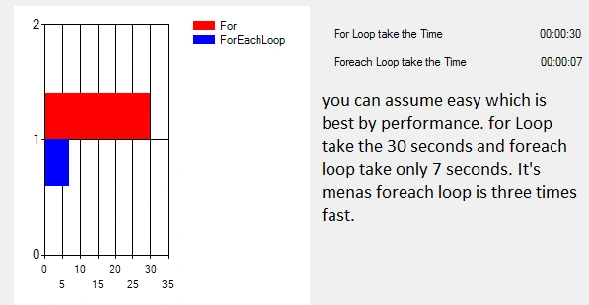
Final word
I am confident about the foreach loop performance.
Joginder BangerPosted Jan 2, 2015, 11:34 PM
himabindeswara rao ....foreach loop working only collection. ....if you have not any type of collection but you want add some value in data table as like example...
Bobby CoolPosted Jan 2, 2015, 5:34 PM
Then why forloop introduced in c#
K P Singh ChundawatPosted Jan 2, 2015, 1:50 AM
Great ...my Confusion is clear now ....Thank you Joginder Banger sir
Manish Kumar ChoudharyPosted Jan 2, 2015, 12:24 AM
Nice one..