

In the past week we said that in Office the best for performance is either between the if statement or the switch statement. I prefer normally an if statement. But I don't know which is the best for performance. So I decided to make a simple program to determine which condition is best. Ok let's check with me.
Note: Output response time may be differ. It depends on your processor and RAM.
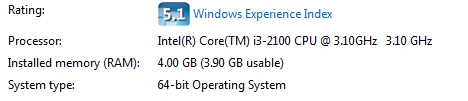
The program output depends on our processor and the RAM. I have used I-3. I shared our system summary information.
I made a Console based application. This application has one single class and four methods.
- static void Main(string[] args)
- {
- Program p = new Program();
- p.GetPerformance(); //first Performance method called here
- p.Getperformance2(); // second Performance Method Called here
- p.GetPerformanceIfcondition();
- p.GetPerformanceSwitchCondition();
- }
Example One
- if(condtion1==true)
- {
- if(condition2==true)
- {
- if(condition3==true)
- {
- Console.WriteLine("Every Condition is True");
- }
- }
- }
- if(condtion1==true && condition2==true && condition3==true)
- {
- Console.WriteLine("Every Condition is True");
- }
We can't assume which one provides the best performance. So I made two separate methods and called them one by one and got the difference in performance.
- p.GetPerformance(); //Example One call here
Set a staring time.
- string startingTime = DateTime.Now.ToLongTimeString();
- if (firstcondition == 10)
- {
- if (secondcondition == 11)
- {
- if (Thridcondition == 12)
- {
- }
- }
- }
- endtime = DateTime.Now.ToLongTimeString();
The complete method is here.
- public void GetPerformance()
- {
- Console.WriteLine("First Method"); //This line execute once time only.
- int firstcondition = 10, secondcondition = 11, Thridcondition = 12;
- string endtime = DateTime.Now.ToLongTimeString();
- string startingTime = DateTime.Now.ToLongTimeString();
- for (int i = 0; i < 1000000000; i++)
- {
- if (firstcondition == 10)
- {
- if (secondcondition == 11)
- {
- if (Thridcondition == 12)
- {
- }
- }
- }
- }
- endtime = DateTime.Now.ToLongTimeString();
- TimeSpan t1 = DateTime.Parse(endtime).Subtract(DateTime.Parse(startingTime));
- Console.WriteLine(t1);
- }
The Getperformance2 call is here.
- p.Getperformance2();
- if (firstcondition == 10 && secondcondition == 11 && Thridcondition == 12)
- {
- }
The loop again works at the same time.
- for (int i = 0; i < 1000000000; i++)
- {
- if (firstcondition == 10 && secondcondition == 11 && Thridcondition == 12)
- {
- }
- }
- public void Getperformance2()
- {
- Console.WriteLine("second Method");
- int firstcondition = 10, secondcondition = 11, Thridcondition = 12;
- string endtime = DateTime.Now.ToShortTimeString();
- string startingTime = DateTime.Now.ToLongTimeString();
- for (int i = 0; i < 1000000000; i++)
- {
- if (firstcondition == 10 && secondcondition == 11 && Thridcondition == 12)
- {
- }
- }
- endtime = DateTime.Now.ToLongTimeString();
- TimeSpan t2 = DateTime.Parse(endtime).Subtract(DateTime.Parse(startingTime));
- Console.WriteLine(t2);
- }
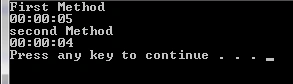
You can check whether both methods were called here and show the difference between both methods. One method is take the time of five seconds and another method is take the time of four seconds. So we can easily decide which is the best for performance.
Final Word
I hope this small article is useful for everyone. If you have any query or problem about this article and the related code then please do not hesitate to drop your comment in the comment box.
Guest UserPosted Dec 31, 2014, 3:05 AM
Hi, I cant see "switch" statement example? Did I miss anything?
Sam HobbsPosted Dec 29, 2014, 9:30 PM
Thank you, Joginder. I think the main question is what provides the best performance for the developer. The switch statement is intended to improve programmer productivity.
Joginder BangerPosted Dec 29, 2014, 6:58 AM
you can check live Demo... https://dotnetfiddle.net/ZFlKey