


Introduction
.NET MAUI, a cross-platform framework, empowers developers to build native mobile and desktop applications using C# and XAML. It enables the creation of apps that seamlessly operate on Android, iOS, macOS, and Windows, all from a unified codebase. This open-source platform is an advancement of Xamarin Forms, expanding its reach to desktop scenarios while enhancing UI controls for improved performance and extensibility.
In this article, we will see how we can implement Flyout Page in .NET MAUI project.
Project Setup
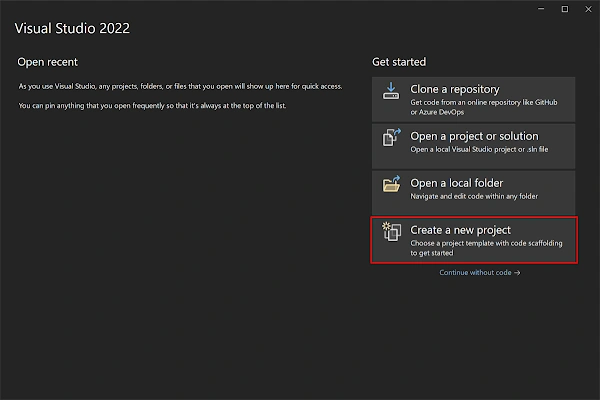
- Launch Visual Studio 2022, and in the start window click Create a new project to create a new project.
- In the Create a new project window, select MAUI in the All project types drop-down, select the .NET MAUI App template, and click the Next button:

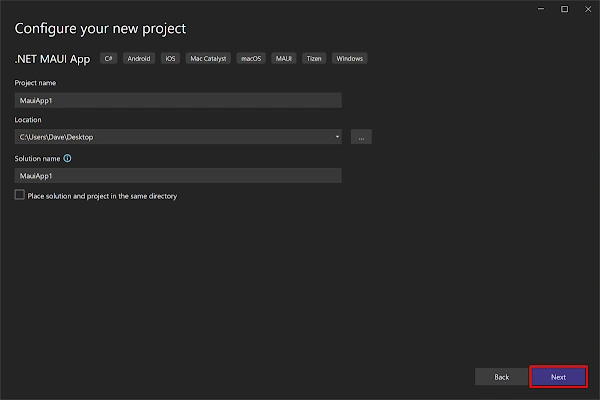
- In the configure your new project window, name your project, choose a suitable location for it, and click the Next button:
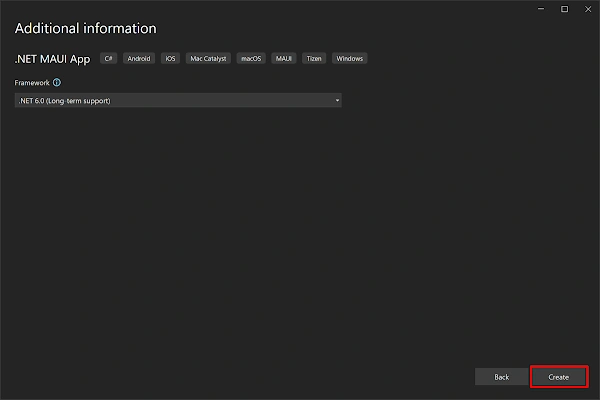
- In the Additional information window, click the Create button:
- Once the project is created, we can able to see the Android, iOS, Windows and other running options in the toolbar. Press the emulator or run button to build and run the app

Implementation
To create a flyout page in a Xamarin.Forms application, you can follow these steps:
- Add a new page as AppFlyoutPage (XAML Flyout Page) and add the following code.
<FlyoutPage xmlns="http://schemas.microsoft.com/dotnet/2021/maui" xmlns:x="http://schemas.microsoft.com/winfx/2009/xaml" xmlns:local="clr-namespace:MauiFlyoutPage" x:Class="MauiFlyoutPage.AppFlyoutPage"> <FlyoutPage.Flyout> <local:MenuPage x:Name="flyoutPage" /> </FlyoutPage.Flyout> <FlyoutPage.Detail> <NavigationPage> <x:Arguments> <local:FirstPage /> </x:Arguments> </NavigationPage> </FlyoutPage.Detail> </FlyoutPage> - Then create a content page "MenuPage" which will be used as master page and add the following code.
<?xml version="1.0" encoding="utf-8" ?> <ContentPage xmlns="http://schemas.microsoft.com/dotnet/2021/maui" xmlns:x="http://schemas.microsoft.com/winfx/2009/xaml" x:Class="MauiFlyoutPage.MenuPage" Title="MenuPage"> <VerticalStackLayout VerticalOptions="Center" HorizontalOptions="Center"> <Button x:Name="btn" x:FieldModifier="public" Text="Open Second Page" VerticalOptions="Center" HorizontalOptions="Center"/> </VerticalStackLayout> </ContentPage> - Open code behind and add the following code.
namespace MauiFlyoutPage; public partial class AppFlyoutPage : FlyoutPage { public AppFlyoutPage() { InitializeComponent(); flyoutPage.btn.Clicked += OpenSecondPageClicked; } private void OpenSecondPageClicked(object sender, EventArgs e) { if (!((IFlyoutPageController)this).ShouldShowSplitMode) IsPresented = false; Detail = new NavigationPage(new SecondPage()); } } - Here, "flyoutPage.btn" present in the master screen and accessed from the flyout screen using XAML field modifier."
- In the same way, created two pages as "FirstPage" and "SecondPage" to navigate between the screens in the flyout menu.
- Now, when we running the application, can able see a flyout menu on the left side and the detail content on the right side. Tapping on the button in the flyout master will update the detail content accordingly.
Full Code
namespace MauiFlyoutPage;

public partial class App : Application
{
	public App()
	{
		InitializeComponent();

		MainPage = new AppFlyoutPage();
	}
}
<FlyoutPage xmlns="http://schemas.microsoft.com/dotnet/2021/maui"
            xmlns:x="http://schemas.microsoft.com/winfx/2009/xaml"
            xmlns:local="clr-namespace:MauiFlyoutPage"
            x:Class="MauiFlyoutPage.AppFlyoutPage">
    <FlyoutPage.Flyout>
        <local:MenuPage x:Name="flyoutPage" />
    </FlyoutPage.Flyout>
    <FlyoutPage.Detail>
        <NavigationPage>
            <x:Arguments>
                <local:FirstPage />
            </x:Arguments>
        </NavigationPage>
    </FlyoutPage.Detail>
</FlyoutPage>
namespace MauiFlyoutPage;

public partial class AppFlyoutPage : FlyoutPage
{
	public AppFlyoutPage()
	{
		InitializeComponent();
        flyoutPage.btn.Clicked += OpenSecondPageClicked;
    }

    private void OpenSecondPageClicked(object sender, EventArgs e)
    {
        if (!((IFlyoutPageController)this).ShouldShowSplitMode)
            IsPresented = false;
        Detail = new NavigationPage(new SecondPage());
    }
}
<?xml version="1.0" encoding="utf-8" ?>
<ContentPage xmlns="http://schemas.microsoft.com/dotnet/2021/maui"
             xmlns:x="http://schemas.microsoft.com/winfx/2009/xaml"
             x:Class="MauiFlyoutPage.FirstPage"
             Title="FirstPage">
    <VerticalStackLayout HorizontalOptions="Center"
                         VerticalOptions="Center">
        <Label
            Text="First Page"
            VerticalOptions="Center"
            HorizontalOptions="Center" />
    </VerticalStackLayout>
</ContentPage>
<?xml version="1.0" encoding="utf-8" ?>
<ContentPage xmlns="http://schemas.microsoft.com/dotnet/2021/maui"
             xmlns:x="http://schemas.microsoft.com/winfx/2009/xaml"
             x:Class="MauiFlyoutPage.MenuPage"
             Title="MenuPage">
    <VerticalStackLayout VerticalOptions="Center"
                         HorizontalOptions="Center">
        <Button
            x:Name="btn"
            x:FieldModifier="public"
            Text="Open Second Page"
            VerticalOptions="Center"
            HorizontalOptions="Center"/>
    </VerticalStackLayout>
</ContentPage>
<?xml version="1.0" encoding="utf-8" ?>
<ContentPage xmlns="http://schemas.microsoft.com/dotnet/2021/maui"
             xmlns:x="http://schemas.microsoft.com/winfx/2009/xaml"
             x:Class="MauiFlyoutPage.SecondPage"
             Title="SecondPage">
    <VerticalStackLayout VerticalOptions="Center"
                         HorizontalOptions="Center">
        <Label
            Text="Second Page"
            VerticalOptions="Center"
            HorizontalOptions="Center" />
    </VerticalStackLayout>
</ContentPage>
Demo
Download Code
You can download the code from GitHub. If you have any doubts, feel free to post a comment. If you liked this article and it is useful to you, do like, share the article & star the repository on GitHub.
References
Join the conversation! Your thoughts help the community grow.