

In Web.Config File
Here we show you a basic example of what a web.config file
looks like when it has be set to use form authentication. I will go in further
detail and explain the tags.
<?xml
version="1.0"?>
<configuration>
<system.web>
<authentication mode="Forms">
<forms
loginUrl="login.aspx"
protection="All"
timeout="30">
<credentials
passwordFormat="Clear">
<user
name="admin"
password="adminpwd"/>
<user
name="coder"
password="coderpwd"/>
</credentials>
</forms>
</authentication>
<authorization>
<!--After checking username and password ,Allow
the user 'admin'and don't allow the user 'coder'-->
<allow users="admin"/>
<deny users="coder"/>
</authorization>
<compilation
debug="true"/></system.web>
</configuration>
In web.config I use <authentication> tag.
<authentication>
tag
Here we come to our first tag for authentication, which is then called
<authentication>.
We see that there is one attribute for this tag and it specifies the type of
authentication that will be applied to this site. The choices are
Windows|Forms|Passport|None. In this Article I am going to l focuses on
Forms authentication
This <authentication > is used to check the user 'username' and 'password' is valid are not.Here username and password have to mention in a tag called <user>.it takes two attributes 'name' and 'password'.One <user> tag stores only one user username and password.if your going to check more than one user then you have to wrtie another <user> tag.
After checking User username and password by using <authentication> it goes to <authorization>.
<credentials>
tag
This is an optional section if you want to specify the
username/password combinations in here. We will first discuss authentication
with passwords in the web.config file and I will later highlight how you can
store the usernames and passwords in a
database or XML
file. The credentials tag also has an attribute called passwordFormat. Your
choices for password format are:
Clear|SHA1|MD5. We
still stick with clear text passwords for now and talk about encrypting the
passwords further down.
<authorization> authorization is used to give access rights to a
particular user or more users.and it is also used not to give access rights to a
particular user or more users.
It has two tags <allow> and <deny>.it takes 'users' atributes.here users attributes is used to set a username or to give a username
Example: <authorization>
<!--After checking username and password ,Allow the user 'admin'and don't
allow the user 'coder'-->
<allow users="admin"/>
<deny users="coder"/>
</authorization>
Giving access to all users:
<authorization>
<!--After checking username and password ,Allow all
the users-->
<allow users="*"/>
</authorization>
Not to Allow any users :
<authorization>
<!--After checking username and password ,Not to
Allow any users-->
<deny users="*"/>
</authorization>
Giving Access to all unknown users:
<authorization>
<!--After checking username and password ,Allow all
unknown users-->
<allow users="?"/>
</authorization>
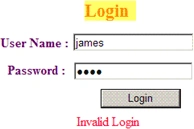
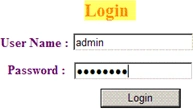
Create a Login page with with two textboes as username and password, and keep one button as login
<!DOCTYPE html PUBLIC "-//W3C//DTD XHTML 1.0 Transitional//EN" "http://www.w3.org/TR/xhtml1/DTD/xhtml1-transitional.dtd">
<html
xmlns="http://www.w3.org/1999/xhtml"
>
<head
runat="server">
<title>Untitled
Page</title>
Md RaquibPosted May 8, 2018, 1:05 PM
This is only for 2 users that is fixed in web.config file . how we can work when username and password are saved in database ..
anil babuPosted Sep 10, 2012, 3:27 AM
How to secure my webpages using Form based authentication? plz give me example with database
subbarao kPosted Jun 28, 2010, 10:08 AM
for this login page we have to write any code for sql conn also i want web.confi