

Introduction
In
Part 1 of this article series we have discussed how to Display Data with
FormView Control. Now in this article we will discuss how to use Paging in
FormView Control.
Paging with FormView Control
We can enable users to navigate through a set of data items by enabling paging.
We can allow the FormView control to automatically render the paging interface
or we can use a PagerTemplate to customize the paging interface. The page given
below automatically will render an additional row that contains buttons for
navigating between data items.
<%@
Page Language="VB"
%>
<!DOCTYPE html PUBLIC "-//W3C//DTD XHTML 1.0 Transitional//EN" "http://www.w3.org/TR/xhtml1/DTD/xhtml1-transitional.dtd">
<script runat="server">
</script>
<html
xmlns="http://www.w3.org/1999/xhtml">
<head
id="Head1"
runat="server">
<style
type="text/css">
html
{
background-color:silver;
}
#content
{
margin:auto;
width:400px;
padding:10px;
background-color:white;
font:14px
Georgia,Serif;
}
a
{
color:blue;
}
</style>
<title></title>
</head>
<body>
<form
id="form1"
runat="server">
<div id="content">
<asp:FormView
id="frmBooks"
DataSourceID="SqlDataSource1"
AllowPaging="true"
Runat="server">
<ItemTemplate>
<b><u><%#
Eval("TITLE")%></u></b>
<br
/>
<b>Serial
Number:</b>
<%#
Eval("ID")%>
<br
/>
<b>Author:</b>
<%#
Eval("AUTHOR")%>
<br
/>
<b>Price:</b>
<%#
Eval("PRICE")%>
</ItemTemplate>
</asp:FormView>
<asp:SqlDataSource
ID="SqlDataSource1"
runat="server"
ConnectionString="<%$
ConnectionStrings:DatabaseConnectionString1 %>"
ProviderName="<%$
ConnectionStrings:DatabaseConnectionString1.ProviderName
%>"
SelectCommand="SELECT
[ID], [TITLE], [AUTHOR], [PRICE] FROM [BOOK_LIST]">
</asp:SqlDataSource>
</div>
</form>
</body>
</html>
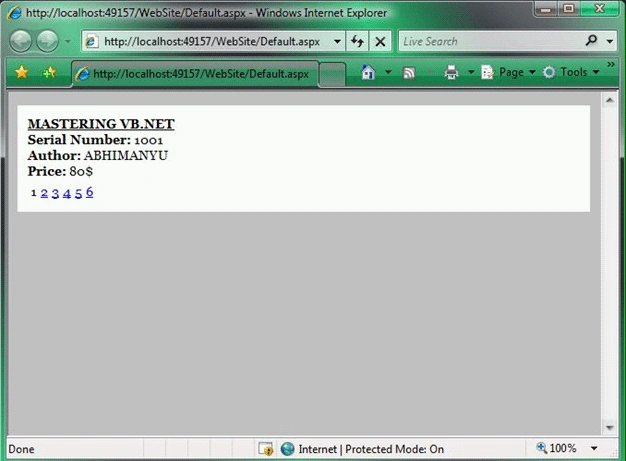
In above code, FormView included an AllowPaging property that is assigned the
value True. Adding this property generates the paging interface automatically.
Unlike the DetailsView and GridView controls, the FormView control does not
support AJAX.
We can customize the appearance of the automatically rendered paging interface
with the PagerSettings property, which exposes the PagerSettings class. The
PagerSettings class supports the following properties:
- FirstPageImageUrl: Enables us to display an image for the first page link.
- FirstPageText: Enables us to specify the text for the first page link.
- LastPageImageUrl: Enables us to display an image for the last page link.
- LastPageText: Enables us to specify the text for the last page link.
- Mode: Enables us to select a display mode for the pager user interface. Possible values are NextPrevious, NextPreviousFirstLast, Numeric, and NumericFirstLast.
Join the conversation! Your thoughts help the community grow.