

Foundry IQ is Microsoft’s new “knowledge layer” that helps AI agents find and use the correct enterprise data, even when user questions are messy, and data is spread across many systems. It builds on Azure AI Search and adds more intelligent retrieval, security, and orchestration so your agents deliver better answers with less plumbing.
Why Foundry IQ is needed
People no longer ask AI tools clean, short questions; they type long, half‑finished thoughts and still expect correct answers. In companies, the data needed to answer those questions usually lives in many places: data lakes, SharePoint, internal apps, and even the public web.
Foundry IQ’s goal is to:
Connect AI agents to all this scattered data as if it were one knowledge layer.
Handle the complex parts of retrieval (searching, ranking, decomposing queries) behind the scenes.
Key concept: knowledge bases and sources
At the center of Foundry IQ is the knowledge base.
A knowledge base represents one domain, like “factory technicians”, “HR”, or “sales”.
It knows how to pull information from many knowledge sources, such as:
Data lake or blob storage (manuals, PDFs, markdown).
SharePoint / M365 documents (policies, internal docs).
Public web content (standards, docs).
External systems via MCP (for example, GitHub issues).
Agents stay simple: they focus on task instructions, tools, and UX, while the knowledge base focuses on “where and how to get the right data.”
How indexing and remote retrieval work
Foundry IQ supports two primary methods for retrieving data during question time.
Indexed sources:
Content (like PDFs in blob storage or OneLake) is ingested, chunked, vectorized, and stored in an index.
Indexes are kept up to date as data changes.
Great for large document sets that must be searched quickly.
Remote sources:
No full copy; Foundry IQ calls systems live at query time (for example, web, some SharePoint or applications).
Good when data must be real‑time or cannot be re‑indexed.
Both indexed and remote sources feed into the same ranking and re‑ranking pipeline so results are combined and ordered by relevance.
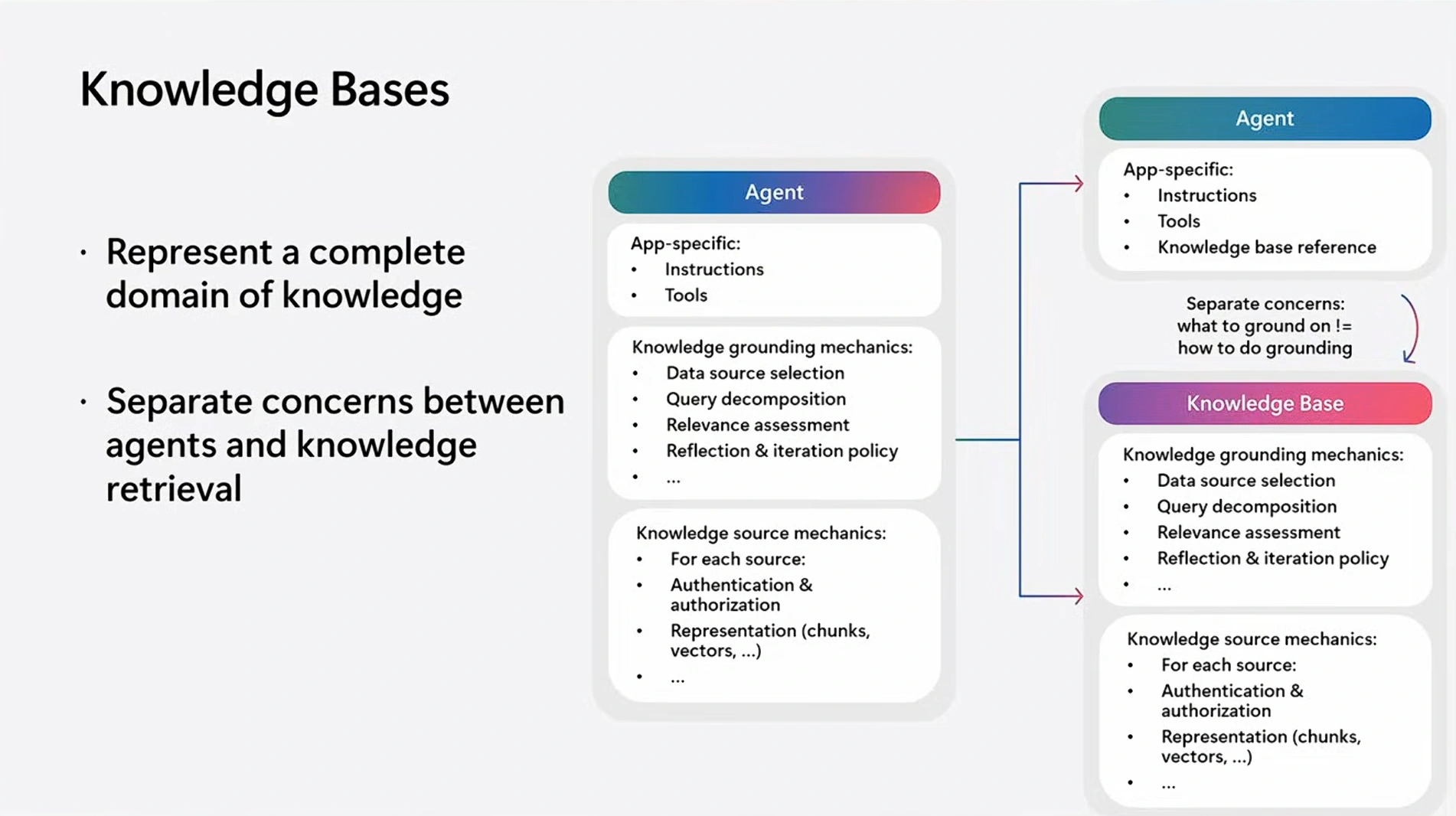
Image source: Microsoft.com
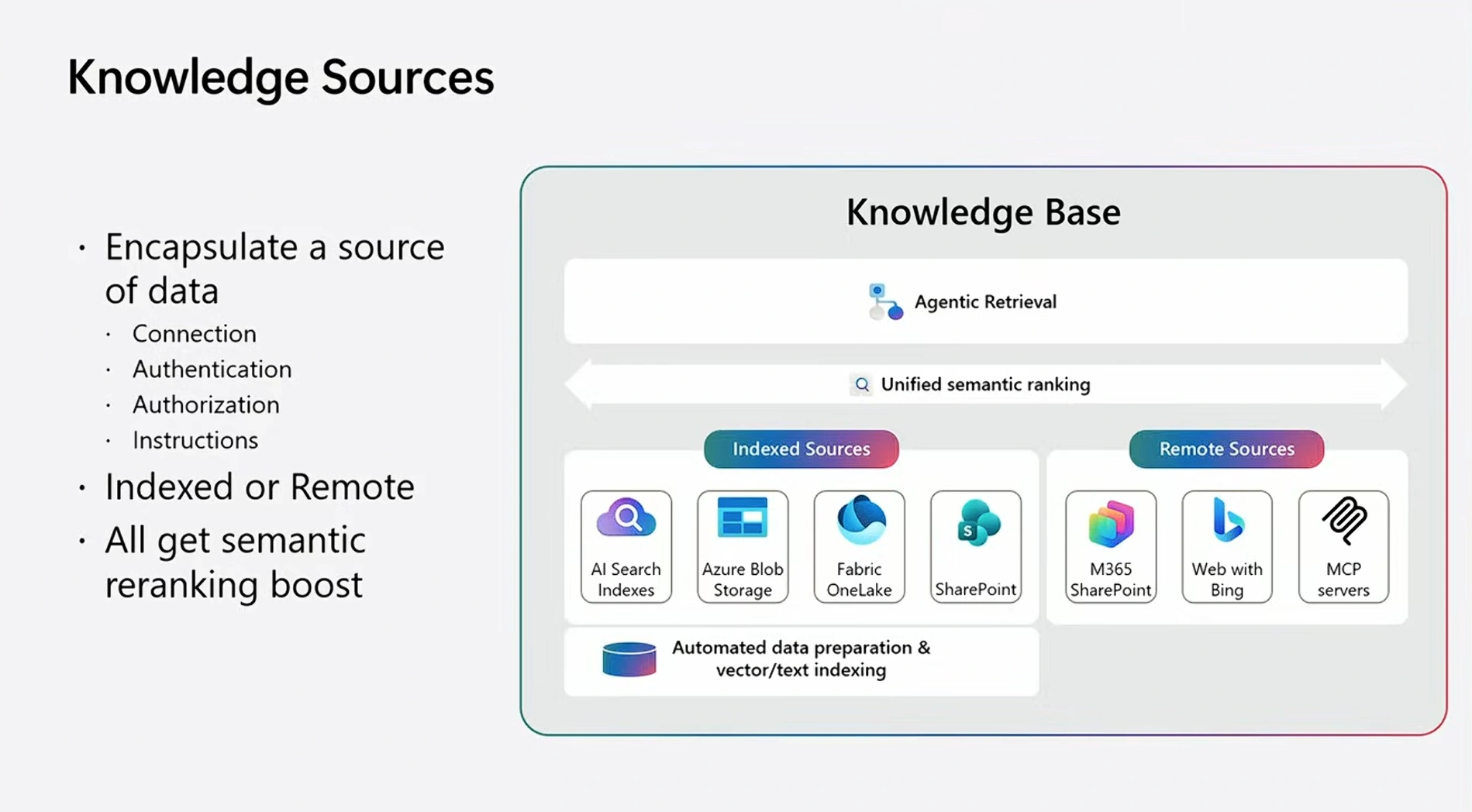
Image source: Microsoft.com
Example: technician agent in a factory
The talk uses a factory technician agent as a live demo.
A technician types a long, messy question mixing part labels, light codes, and power cord info.
The relevant data lives in:
Machine manuals in OneLake/blob.
Repair policies in SharePoint.
External safety standard on the web (for example, UL817).
With one question:
The agent calls its factory knowledge base.
Foundry IQ pulls and combines pieces from manuals, policies, and the web.
The agent responds with clear steps and references, without you wiring every data source manually in the agent prompt.
Building a knowledge base and agent (high‑level steps)
From the demo, the basic flow looks like this:
Create a knowledge base in Foundry (for example, “Factory KB”).
Add knowledge sources, such as:
Blob container with machine specs.
OneLake or SharePoint with policies.
Optional: MCP source like GitHub issues for software problems.
Choose an embedding model and (optionally) a completion model for planning and synthesis.
Let Foundry IQ index content and keep it fresh.
Create an agent, give it instructions, then attach the knowledge base under “Knowledge → Connect to Foundry IQ”.
Chat with the agent; it now “knows” everything in that knowledge base.
You can later update the knowledge base (add/share sources, tweak settings) without changing every agent that uses it.
Agentic retrieval: how Foundry IQ answers hard questions
Foundry IQ does more than a simple vector search; it uses an agentic retrieval loop.
For each request it can:
Plan the query: break one messy question into smaller, focused sub‑queries.
Choose sources: decide which knowledge sources to call (for example, “manuals”, “policies”, “web standard”).
Run multiple retrievals in parallel.
Re‑rank results using multi‑stage ranking (including an SLM and optional full LLM checks).
Decide if it has enough good evidence; if not, iterate, re‑plan, and search again.
You can pick modes like “minimal”, “low”, and “medium” to trade latency for answer quality: faster modes do less work; deeper modes do more planning and checks.
Using Foundry IQ from Azure AI Search
Foundry IQ is built on Azure AI Search knowledge bases.
You can create and use knowledge bases entirely inside Foundry.
Or you can access them directly from Azure AI Search SDKs and portal using a KnowledgeBaseRetrievalClient and the
retrievemethod.Existing Azure AI Search customers can add knowledge bases on top of their current indexes and combine them.
This gives flexibility: start from Foundry or from Azure AI Search, but use the same knowledge layer.
Connecting external systems with MCP
For systems that are not natively indexed or are third‑party apps, Foundry IQ can use Model Context Protocol (MCP) servers.
Example from the talk: connect GitHub’s MCP server and its SearchIssues tool.
In the knowledge base, you add an MCP source and optional steering instructions (for example, “query one word at a time” for better search).
Foundry IQ treats MCP results as items in retrieval, re‑ranks them, and blends them with other sources.
MCP support is in private preview but designed to make it easy to plug in your own internal apps or niche SaaS systems.
Content understanding and multimodal documents
When indexing content, Foundry IQ can use Azure content understanding for higher quality extraction.
You can choose:
Minimal extraction: faster and cheaper, but simpler.
Standard extraction: uses content understanding for better OCR, PDF parsing, layout, and tables.
It also supports images and diagrams:
Can embed images.
Can “verbalize” images into text descriptions so charts, schematics, and screenshots become searchable.
Security, access control, and labels
Foundry IQ respects enterprise security and governance.
You can choose whether retrieval uses the user’s identity or the agent’s identity.
Access control from sources like Azure Data Lake or SharePoint is carried into indexes so users only see documents they are allowed to see.
Integration with Microsoft Purview sensitivity labels:
Encrypted labeled documents can still be indexed (through Purview).
Labels are preserved and enforced at query time.
Labels can be surfaced back in the app UI, just like in Office.
How Microsoft evaluates Foundry IQ
The team runs extensive offline evaluations to make sure Foundry IQ actually improves retrieval and answers. Highlights from the talk:
Agentic retrieval vs. naive search: around 36% improvement in answer scores on difficult queries, with gains between 16% and 60% across datasets.
Fragmented data: Even when data is split across many indexes, Foundry IQ can rebuild context and keep high answer scores; when indexes are damaged, adding web grounding recovers much of the lost quality.
Adaptive effort: Fast and full exit checks help the system spend more time only on hard questions, balancing speed and quality.
Foundry IQ gives your agents a brain for retrieval—planning, searching, and stitching together the right pieces of data—so they can answer messy real‑world questions over all your enterprise knowledge, securely and reliably.
Join the conversation! Your thoughts help the community grow.