
Why the Naive Approach Breaks Down
The most direct implementation is often to deserialize the JSON and immediately start generating the document in the same method. For a small, fixed document, this can be perfectly adequate.
Problems tend to appear when requirements change:
The JSON schema changes. A field is renamed, removed, or made optional. Code that accesses the data directly may only discover the problem at runtime.
A second document type is introduced. Logic for formatting dates, calculating values, or building tables can become duplicated across multiple document-generation methods.
Business logic becomes mixed with rendering logic. Calculating a total or deciding whether to show a discount line has nothing to do with Word specifically, but it's interleaved with document API calls, so testing it means instantiating the Word engine just to check a number.
Testing becomes unnecessarily expensive. If calculations are performed while constructing a document, testing them may require creating document objects even though no document output is relevant to the test.
These problems are not specific to JSON or Word. They come from combining three different responsibilities:
Understanding and validating the input data.
Preparing the data according to application rules.
Turning that prepared data into a document.
Keeping those responsibilities separate gives each part a smaller and clearer job.
A Three-Layer Pipeline
The pipeline used in this example has three layers:
Data layer: Deserializes the JSON payload into strongly typed C# objects and performs basic validation.
Transformation layer: Calculates derived values, applies business rules, and prepares data for rendering.
Rendering layer: Converts the prepared data into the target document format.
The flow is straightforward:
JSON → Data Layer → Transformation Layer → Rendering Layer → Word
The important point is that the first two layers do not need to know anything about Word.
For example, adding a field to the JSON model is primarily a data-layer change. Changing how a line total is calculated belongs in the transformation layer. Changing the appearance of a table belongs in the rendering layer.
This is not intended to be a framework or a large abstraction. The goal is simply to establish boundaries that make changes easier to locate and test.
Data Layer: From JSON to Strongly Typed Models
The first layer converts the incoming JSON into objects that the rest of the application can work with.
It is possible to pass a JsonDocument, dictionary, or dynamic object through the entire pipeline. That can be convenient for very small scripts, but it also means assumptions about the JSON structure are spread throughout the code.
A strongly typed model makes that structure explicit.
Consider this order confirmation payload:
{
  "orderId": "ORD-10492",
  "customerName": "Jordan Ellis",
  "orderDate": "2026-09-10",
  "items": [
    { "name": "Wireless Mouse", "quantity": 2, "unitPrice": 24.99 },
    { "name": "USB-C Hub", "quantity": 1, "unitPrice": 39.50 }
  ],
  "totalAmount": 89.48
}
The corresponding C# models can be kept simple:
public class OrderConfirmation
{
    public string OrderId { get; set; }
    public string CustomerName { get; set; }
    public DateTime OrderDate { get; set; }
    public List<OrderItem> Items { get; set; }
    public decimal TotalAmount { get; set; }
}

public class OrderItem
{
    public string Name { get; set; }
    public int Quantity { get; set; }
    public decimal UnitPrice { get; set; }
}
Deserializing with System.Text.Json requires only a small amount of code:
var order = JsonSerializer.Deserialize<OrderConfirmation>(
    jsonPayload,
    new JsonSerializerOptions { PropertyNameCaseInsensitive = true }
);
The result is now a normal C# object rather than a collection of loosely typed values. Nested JSON arrays are represented by List<OrderItem>, so later code does not need to repeatedly inspect property names or perform casts.
This layer is also a sensible place for input validation. Successful deserialization does not necessarily mean that the data is usable.
For example:
if (order.Items == null || order.Items.Count == 0)
{
    throw new InvalidOperationException(
        $"Order {order.OrderId} has no line items and cannot be rendered.");
}
Failing early gives the caller a meaningful error instead of allowing invalid input to travel through the pipeline and produce an incomplete document.
Transformation Layer: Preparing Data for Rendering
Once the input has been typed and validated, the next step is to prepare it for rendering.
This layer is where application-specific rules belong. Typical operations include:
Calculating derived values.
Filtering or aggregating records.
Applying conditional business rules.
Flattening nested data into a simpler structure.
It is useful to keep presentation formatting out of this layer. A monetary value can remain a decimal rather than becoming a formatted currency string. A date can remain a DateTime rather than being converted into display text.
For the order example, a separate view model can represent the data needed by the document:
public class OrderConfirmationView
{
    public string OrderId { get; set; }
    public string CustomerName { get; set; }
    public DateTime OrderDate { get; set; }
    public List<OrderLineView> Lines { get; set; }
    public decimal TotalAmount { get; set; }
}

public class OrderLineView
{
    public string Name { get; set; }
    public int Quantity { get; set; }
    public decimal UnitPrice { get; set; }
    public decimal LineTotal { get; set; }
}
The transformation itself can then remain independent of any document API:
public static class OrderConfirmationTransformer
{
    public static OrderConfirmationView Prepare(OrderConfirmation order)
    {
        return new OrderConfirmationView
        {
            OrderId = order.OrderId,
            CustomerName = order.CustomerName,
            OrderDate = order.OrderDate,
            Lines = order.Items.Select(item => new OrderLineView
            {
                Name = item.Name,
                Quantity = item.Quantity,
                UnitPrice = item.UnitPrice,
                LineTotal = item.Quantity * item.UnitPrice
            }).ToList(),
            TotalAmount = order.TotalAmount
        };
    }
}
Notice that this code knows nothing about .docx, paragraphs, tables, or formatting.
That separation is useful because the same prepared data could potentially be consumed by different output formats. The transformation layer describes the information that needs to be presented rather than the mechanics of presenting it.
Rendering Layer: Generating the Word Document
The final layer takes the prepared view model and creates the actual Word document.
For a .docx file, the Open XML SDK provides access to the document structure used by Word. Unlike the previous layers, this part of the pipeline deals directly with document elements such as paragraphs, runs, tables, and cells.
The renderer can therefore focus on one task: mapping the prepared data to those document elements.
using DocumentFormat.OpenXml;
using DocumentFormat.OpenXml.Packaging;
using DocumentFormat.OpenXml.Wordprocessing;

public static class OrderConfirmationRenderer
{
    // Units: dxa (1 inch = 1440 dxa); total width = 8400 dxa (~5.83 inches)
    private const int Col1 = 3600; // Item
    private const int Col2 = 1200; // Qty
    private const int Col3 = 1800; // Unit Price
    private const int Col4 = 1800; // Line Total

    public static void Render(OrderConfirmationView view, string outputPath)
    {
        using var document = WordprocessingDocument.Create(outputPath, DocumentFormat.OpenXml.WordprocessingDocumentType.Document);

        var mainPart = document.AddMainDocumentPart();
        mainPart.Document = new Document();
        var body = new Body();

        // Title
        body.Append(new Paragraph(new Run(new Text($"Order Confirmation — {view.OrderId}"))));

        // Customer
        body.Append(new Paragraph(new Run(new Text($"Customer: {view.CustomerName}"))));

        // Date
        body.Append(new Paragraph(new Run(new Text($"Date: {view.OrderDate:MMMM d, yyyy}"))));

        var table = new Table();

        // Set overall table width and borders
        table.AppendChild(new TableProperties(new TableWidth { Width = (Col1 + Col2 + Col3 + Col4).ToString(), Type = TableWidthUnitValues.Dxa }, new TableBorders(new TopBorder { Val = BorderValues.Single, Size = 4 }, new BottomBorder { Val = BorderValues.Single, Size = 4 }, new LeftBorder { Val = BorderValues.Single, Size = 4 }, new RightBorder { Val = BorderValues.Single, Size = 4 }, new InsideHorizontalBorder { Val = BorderValues.Single, Size = 4 }, new InsideVerticalBorder { Val = BorderValues.Single, Size = 4 })));

        // Define table columns to control each column's width
        table.AppendChild(new TableGrid(new GridColumn { Width = Col1.ToString() }, new GridColumn { Width = Col2.ToString() }, new GridColumn { Width = Col3.ToString() }, new GridColumn { Width = Col4.ToString() }));

        // Header row
        var headerRow = new TableRow();
        foreach (var (header, width) in new[] { ("Item", Col1), ("Qty", Col2), ("Unit Price", Col3), ("Line Total", Col4) }) { headerRow.Append(CreateCell(header, width, bold: true)); }
        table.Append(headerRow);

        // Data rows
        foreach (var line in view.Lines)
        {
            var row = new TableRow();
            row.Append(CreateCell(line.Name, Col1), CreateCell(line.Quantity.ToString(), Col2), CreateCell(line.UnitPrice.ToString("C"), Col3), CreateCell(line.LineTotal.ToString("C"), Col4));
            table.Append(row);
        }

        body.Append(table);

        // Total
        body.Append(new Paragraph(new Run(new Text($"Total: {view.TotalAmount:C}"))));

        mainPart.Document.Append(body);
        mainPart.Document.Save();
    }

    // Create a cell with fixed width and no wrap
    private static TableCell CreateCell(string value, int width, bool bold = false)
    {
        var runProperties = new RunProperties();
        if (bold) { runProperties.Append(new Bold()); }
        var run = new Run(runProperties, new Text(value));
        var paragraph = new Paragraph(run);
        return new TableCell(new TableCellProperties(new TableCellWidth { Width = width.ToString(), Type = TableWidthUnitValues.Dxa }, new NoWrap()), paragraph);
    }
}
The code is more verbose than the data and transformation layers because the Open XML document model exposes the structure of a Word file explicitly. That is a useful distinction to keep in mind: document rendering naturally deals with output-specific details, while the earlier layers should not.
The renderer reads the prepared model and maps each value to a document element. It does not calculate line totals, inspect JSON properties, or decide whether the incoming data is valid.
That separation keeps the rendering code focused even when the document layout becomes more involved.
Testing the Transformation Layer
One practical benefit of separating transformation from rendering is that business logic can be tested without creating a document.
For example, the calculation of a line total can be tested directly:
[Fact]
public void Prepare_CalculatesLineTotalCorrectly()
{
    var order = new OrderConfirmation
    {
        Items = new List<OrderItem>
        {
            new OrderItem { Name = "Widget", Quantity = 3, UnitPrice = 10.00m }
        }
    };

    var view = OrderConfirmationTransformer.Prepare(order);

    Assert.Equal(30.00m, view.Lines[0].LineTotal);
}
The assertion checks the underlying decimal value rather than a formatted currency string. This keeps the test focused on the business rule rather than on presentation.
Rendering tests can then focus on different questions: Was the expected number of rows created? Does the generated document contain the expected text? Is the output file valid?
The two kinds of tests have different responsibilities because the two parts of the pipeline have different responsibilities.
Putting the Pipeline Together
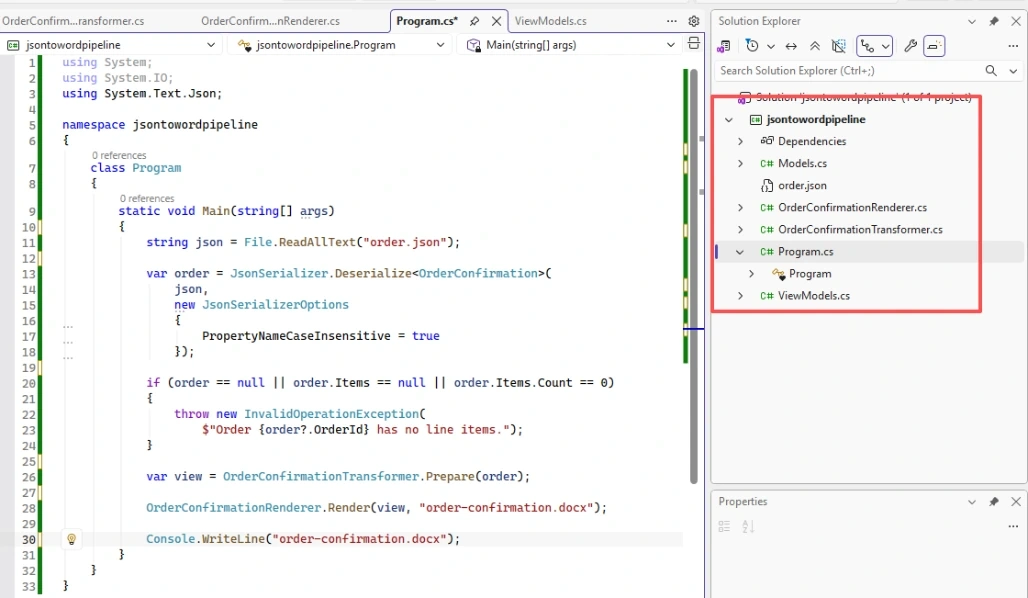
Once the three layers are separated, the application code that connects them remains small:
string json = File.ReadAllText("order.json");

var order = JsonSerializer.Deserialize<OrderConfirmation>(json, new JsonSerializerOptions { PropertyNameCaseInsensitive = true });

if (order.Items == null || order.Items.Count == 0)
{
    throw new InvalidOperationException($"Order {order.OrderId} has no line items.");
}

var view = OrderConfirmationTransformer.Prepare(order);

OrderConfirmationRenderer.Render(view, "order-confirmation.docx");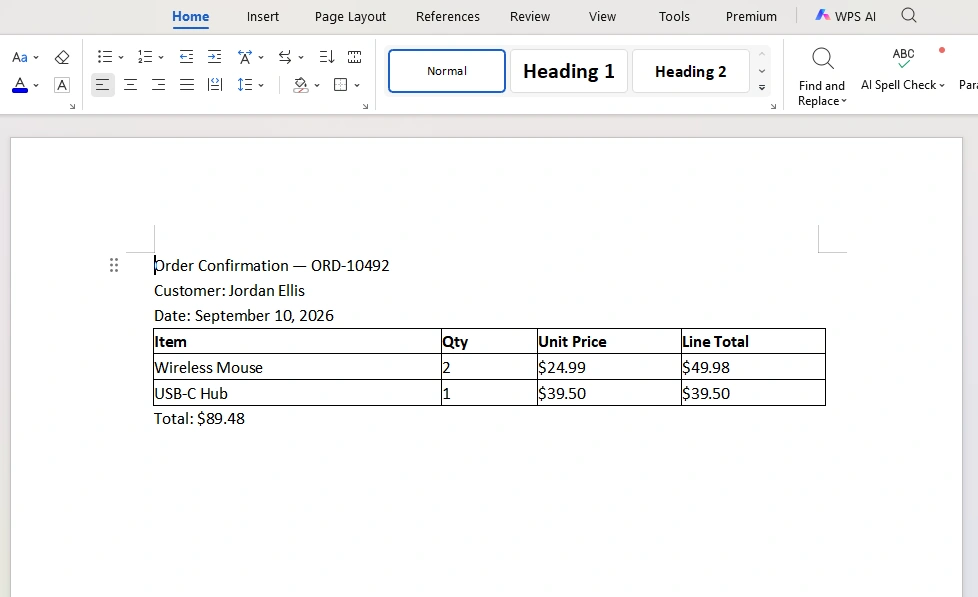
With the sample JSON, the resulting document contains the order information, a table of line items, and the calculated totals.
More importantly, each step has a clearly defined responsibility:
JSON
↓
Strongly typed model
↓
Validated and transformed data
↓
Document renderer
↓
DOCX
The benefit is not necessarily fewer lines of code. The benefit is that a future change has a more obvious place to go.
Extending the Pipeline to Other Outputs
The same structure can be used when an application needs more than one document format:
┌→ Word Renderer
JSON → Data → Transformation ─┼→ PDF Renderer
└→ HTML Renderer
The data and transformation layers can remain shared because they do not depend on the final output format.
For example, an application could use the same order model and transformation logic for a Word confirmation and an HTML email. The rendering implementations would differ, but the business rules for calculating line totals would not need to be duplicated.
This approach is especially useful when document requirements evolve over time. Instead of building one large method that knows about every possible output format, each renderer can focus on the representation it produces.
Conclusion
A JSON-to-Word workflow does not need a large framework to remain maintainable. A small separation between data handling, transformation, and rendering is often enough.
The data layer establishes a reliable input model. The transformation layer handles calculations and business rules without depending on document APIs. The rendering layer turns those prepared values into the required document format.
When document generation starts as a few lines of code, this separation may seem unnecessary. As soon as the input schema, business rules, or output requirements begin to change, however, having a clear place for each responsibility can make those changes much easier to manage.
Join the conversation! Your thoughts help the community grow.