

Turn your GraphRAG MCP server into an intelligent conversational agent
Introduction
In Part 1, we built a knowledge graph from company documents using Microsoft GraphRAG. In Part 2, we exposed that graph as an MCP server so any compatible client could discover and query it. In this part, we connect both pieces to build a Knowledge Captain: a conversational agent that automatically decides how to search your knowledge graph based on your question.
The agent uses Microsoft Agent Framework (MAF), a library that orchestrates AI agents with tool access and conversation memory. When you ask "Who leads Project Alpha?", the agent recognizes it as an entity question and calls local_search. When you ask "What are the main strategic initiatives?", it recognizes a thematic question and calls global_search. You write no routing logic — GPT-4o reads a system prompt and makes that decision on its own.
What You'll Learn
How Microsoft Agent Framework works and how it differs from direct API calls
How
MCPStreamableHTTPToolconnects an agent to an MCP serverSystem prompt-based tool routing: why it works and when to use it
How to maintain conversation memory across multiple questions
The real transport difference between SSE (Part 2) and Streamable HTTP (Part 3)
What Changed Since Part 2
| Change | Part 2 | Part 3 |
|---|---|---|
| MCP transport | SSE (/sse) | Streamable HTTP (/mcp) |
| Primary client | MCP Inspector (browser) | Agent Framework (MCPStreamableHTTPTool) |
| Tool selection | Manual (user picks the tool) | Automatic (GPT-4o decides via system prompt) |
| Conversation memory | None | AgentSession maintains history |
Prerequisites
Completed Part 2 (or have a running MCP server on port 8011)
Python 3.11+
Poetry installed
Azure OpenAI with a GPT-4o deployment
Understanding the Architecture
Before writing any code, it's worth understanding how the pieces fit together. The system has three layers:
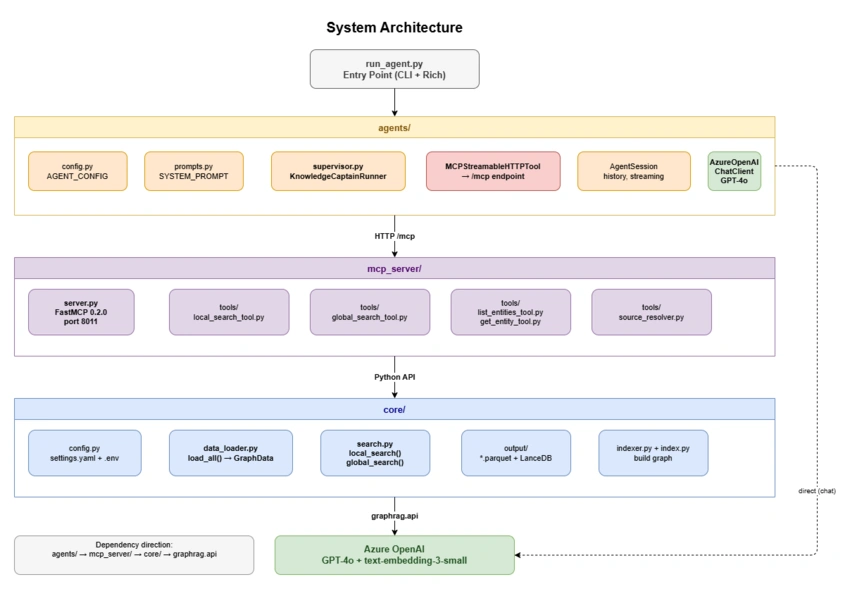
Part 3 system architecture — run_agent.py entry point connects to agents/, which calls mcp_server/ over Streamable HTTP, which calls core/ using the GraphRAG Python API
Three-layer architecture with strict dependency direction: agents/ → mcp_server/ → core/ → GraphRAG. Each layer has exactly one responsibility and nothing leaks across boundaries.
┌──────────────────────────────────────────────────────┐
│  run_agent.py  (CLI entry point)                     │
│  Interactive prompt loop, Rich-formatted output      │
└────────────────────────┬─────────────────────────────┘
                         │
                         ▼
┌──────────────────────────────────────────────────────┐
│  agents/ (Microsoft Agent Framework)                 │
│  Knowledge Captain agent, GPT-4o, AgentSession       │
│  MCPStreamableHTTPTool → connects to MCP server      │
└────────────────────────┬─────────────────────────────┘
                         │ Streamable HTTP  /mcp  port 8011
                         ▼
┌──────────────────────────────────────────────────────┐
│  mcp_server/ (FastMCP 0.2.0)                         │
│  5 tools: local_search, global_search,               │
│           list_entities, get_entity,                 │
│           search_knowledge_graph                     │
└────────────────────────┬─────────────────────────────┘
                         │
                         ▼
┌──────────────────────────────────────────────────────┐
│  core/ (GraphRAG 3.0.1)                              │
│  147 entities · 263 relationships · 32 communities   │
│  LanceDB + Parquet · Azure OpenAI                    │
└──────────────────────────────────────────────────────┘
The key principle here is the same as Part 2: each layer has exactly one responsibility. The agent layer decides which tool to call. The MCP server translates that call into GraphRAG API calls. The core/ layer does the actual graph traversal. Nothing leaks across boundaries.
How a Single Question Flows Through the System
When you type "Who leads Project Alpha?", this happens:

Request flow — 14 steps from the user's question through the CLI, two GPT-4o calls, MCPStreamableHTTPTool, MCP server, and GraphRAG core, back to the user
Full request path: two round trips to Azure OpenAI. The first call decides which tool to use; the second call composes the natural language answer from the tool's result.
run_agent.pysends the question toKnowledgeCaptainRunner.ask()The agent combines your question with its system prompt and sends both to GPT-4o
GPT-4o sees the prompt guidance ("use
local_searchfor entity questions") and returns a tool call forlocal_searchMCPStreamableHTTPToolserializes that tool call and POSTs it tohttp://localhost:8011/mcpThe MCP server deserializes the call, invokes
local_search_tool(), which callscore.local_search()GraphRAG searches the entity graph and returns a response
The result travels back up the chain; GPT-4o formats it as a natural language answer
run_agent.pydisplays the answer with Rich formatting
The agent never opens a Parquet file. GraphRAG never knows there is an agent. MCP is the contract between them.
Project Structure
maf-graphrag-series/
├── core/                    # GraphRAG wrapper (Parts 1 and 2, unchanged)
├── mcp_server/              # MCP server (Part 2, small update to transport)
│   └── server.py            # Changed from sse_app() to streamable_http_app()
├── agents/                  # NEW — Agent Framework layer
│   ├── __init__.py          # Public API re-exports
│   ├── config.py            # Azure OpenAI + MCP configuration
│   ├── prompts.py           # System prompts for tool routing
│   └── supervisor.py        # Agent creation and KnowledgeCaptainRunner
├── run_agent.py             # Interactive CLI
└── run_mcp_server.py        # MCP server startup (unchanged)
The MCP server from Part 2 needed only one line changed. Everything else in mcp_server/ stayed exactly the same. That's the payoff of clean layer separation: adding an agent layer required touching almost nothing in the layers below.
The Transport Upgrade: SSE to Streamable HTTP
Part 2 used SSE (Server-Sent Events) as the MCP transport, which works well for browser-based clients like MCP Inspector. Microsoft Agent Framework's MCPStreamableHTTPTool requires Streamable HTTP, a bidirectional HTTP-based transport defined in the MCP specification.
The only change in mcp_server/server.py is on the last line of server setup:
# Part 2 — SSE (for MCP Inspector and browser clients)
app = mcp.sse_app()

# Part 3 — Streamable HTTP (for MCPStreamableHTTPTool)
app = mcp.streamable_http_app()
The tools, their logic, and everything in core/ are untouched. The change in endpoint also shifts from /sse to /mcp. Agent Framework clients POST to http://localhost:8011/mcp; the MCP Inspector in Streamable HTTP mode connects to the same URL.
If you use MCP Inspector after this change, update the transport setting in the Inspector UI from "SSE" to "Streamable HTTP" and update the URL to
http://localhost:8011/mcp. The Inspector supports both transports, so testing with it still works exactly as before.
Building the Agent Layer
Step 1: Configuration (agents/config.py)
The AgentConfig dataclass holds all the values the agent needs to connect to Azure OpenAI and the MCP server:
from dataclasses import dataclass, field
import os

@dataclassclass AgentConfig:
    azure_endpoint: str = field(
        default_factory=lambda: os.getenv("AZURE_OPENAI_ENDPOINT", "")
    )
    deployment_name: str = field(
        default_factory=lambda: os.getenv("AZURE_OPENAI_CHAT_DEPLOYMENT", "gpt-4o")
    )
    api_key: str = field(
        default_factory=lambda: os.getenv("AZURE_OPENAI_API_KEY", "")
    )
    api_version: str = field(
        default_factory=lambda: os.getenv("AZURE_OPENAI_API_VERSION", "2024-10-21")
    )
    mcp_server_url: str = field(
        default_factory=lambda: os.getenv("MCP_SERVER_URL", "http://127.0.0.1:8011/mcp")
    )

    def __post_init__(self) -> None:
        if not self.azure_endpoint:
            raise ValueError("AZURE_OPENAI_ENDPOINT is required.")
No secrets hardcoded, no magic strings inside business logic. All values come from environment variables. The __post_init__ validation fails fast at startup if a required variable is missing rather than failing silently at query time.
Four environment variables cover everything:
AZURE_OPENAI_ENDPOINT=https://your-resource.openai.azure.com/
AZURE_OPENAI_API_KEY=your-api-key-here
AZURE_OPENAI_CHAT_DEPLOYMENT=gpt-4o
MCP_SERVER_URL=http://127.0.0.1:8011/mcp
Step 2: System Prompt (agents/prompts.py)
The system prompt is the most important piece of routing logic in the whole agent. It tells GPT-4o exactly what each tool does and when to prefer it:
KNOWLEDGE_CAPTAIN_PROMPT = """You are the Knowledge Captain, an expert assistant
with access to a knowledge graph about TechVenture Inc via GraphRAG.

## Available Tools (via graphrag MCP)

1. **local_search** - Use for entity-focused questions:
   - Questions about specific people ("Who leads Project Alpha?")
   - Relationship questions ("What is the connection between X and Y?")

2. **global_search** - Use for thematic or pattern questions:
   - Organizational overviews ("What are the main projects?")
   - Cross-cutting themes ("What technologies are used?")

3. **list_entities** - Use to browse available entities by type.

4. **get_entity** - Use for detailed info about one known entity.

## Guidelines
1. Analyze the question to select the appropriate tool.
2. For specific entity questions, use local_search.
3. For broad organizational questions, use global_search.
4. If information is not available in the graph, say so clearly.
"""
A few things worth noting about this prompt:
The examples are concrete ("Who leads Project Alpha?" not "factual questions"). Concrete examples help GPT-4o generalize correctly.
Tool descriptions match the docstrings in
mcp_server/server.py. MCP sends those docstrings to the agent automatically; the system prompt reinforces them with usage patterns.The last guideline ("say so clearly if not available") prevents hallucinated answers when GraphRAG returns no relevant context.
Step 3: Creating the Agent (agents/supervisor.py)
Agent Framework separates three concerns: the LLM client, the tools it can use, and the agent that coordinates them.
Creating the Azure OpenAI client:
from agent_framework.azure import AzureOpenAIChatClient

def create_azure_client():
    config = get_agent_config()
    return AzureOpenAIChatClient(
        endpoint=config.azure_endpoint,
        deployment_name=config.deployment_name,
        api_key=config.api_key or None,  # None triggers Azure AD auth
        api_version=config.api_version,
    )
Passing api_key=None tells the client to use Azure Identity (DefaultAzureCredential) instead of an API key. This is useful in environments where you use az login or managed identity.
Creating the MCP tool:
from agent_framework import MCPStreamableHTTPTool

def create_mcp_tool(mcp_url: str | None = None) -> MCPStreamableHTTPTool:
    config = get_agent_config()
    url = mcp_url or config.mcp_server_url

    # Auto-correct URLs that still point to the old SSE endpoint
    if url.endswith("/sse"):
        url = url.replace("/sse", "/mcp")
    elif not url.endswith("/mcp"):
        url = url.rstrip("/") + "/mcp"

    return MCPStreamableHTTPTool(
        name="graphrag",
        url=url,
        description="Query the GraphRAG knowledge graph"
    )
The URL correction avoids a common mistake: if MCP_SERVER_URL in your .env still holds the Part 2 SSE address, the agent silently fixes it. Fail-safe defaults are worth the three lines.
Assembling the agent:
from agent_framework import Agent

def create_knowledge_captain(
    mcp_url: str | None = None,
    system_prompt: str | None = None,
) -> tuple[MCPStreamableHTTPTool, Agent]:
    client = create_azure_client()
    mcp_tool = create_mcp_tool(mcp_url)

    agent = Agent(
        client=client,
        name="knowledge_captain",
        instructions=system_prompt or KNOWLEDGE_CAPTAIN_PROMPT,
        tools=[mcp_tool],
    )

    return mcp_tool, agent
The agent receives the MCP tool as a list. When GPT-4o decides to call local_search, Agent Framework handles the full MCP protocol exchange, serialization, deserialization, and error handling. You pass a list of tools; you get back a reasoning engine.
Step 4: Conversation Memory and the Runner
KnowledgeCaptainRunner wraps the agent in a context manager that handles the MCP connection lifecycle and maintains conversation history:
from agent_framework import AgentSession

class KnowledgeCaptainRunner:
    def __init__(self, mcp_url=None, system_prompt=None):
        self.mcp_tool, self.agent = create_knowledge_captain(
            mcp_url=mcp_url,
            system_prompt=system_prompt,
        )
        self._session = None

    async def __aenter__(self):
        await self.mcp_tool.__aenter__()   # Connect to MCP server
        self._session = AgentSession()     # Initialize conversation history
        return self

    async def __aexit__(self, *args):
        await self.mcp_tool.__aexit__(*args)  # Disconnect cleanly

    async def ask(self, question: str) -> AgentResponse:
        result = await self.agent.run(question, session=self._session)
        return AgentResponse(text=result.text)

    def clear_history(self):
        self._session = AgentSession()  # Fresh session, same connection
AgentSession stores the full message history: your questions, the agent's tool calls, and its responses. Each call to ask() appends to that history, so follow-up questions like "What about their budget?" work naturally because GPT-4o can see the prior context.
clear_history() creates a new session without disconnecting from the MCP server. This is useful when switching topics mid-session; you want a clean slate for the LLM context without the cost of reconnecting.
Why System Prompt Routing?
For this tutorial, GPT-4o reads the prompt and selects the right tool on its own. There is no separate routing model, no classifiers, and no keyword matching. This is worth a brief explanation because there is a common alternative: using a small language model (SLM) as a lightweight pre-filter to classify queries before they reach the main LLM.
| Approach | Latency | Complexity | When to use |
|---|---|---|---|
| System prompt routing | Low | Low | Tutorial scale, clear tool boundaries |
| SLM pre-filter + GPT-4o | Slightly higher | High | High-volume production (1000+ queries/day) |
For tutorial-scale usage, the difference in cost and latency is marginal. Azure OpenAI charges per token consumed (see the official pricing page for current GPT-4o rates); adding an SLM pre-filter introduces an extra model call per query, which increases both cost and operational complexity without meaningful benefit at low volumes.
The system prompt approach is simpler to implement, easier to debug (prompt changes are visible in one file), and it lets GPT-4o use the full context of each question to make a nuanced decision rather than a binary classification.
At production scale, if you are processing thousands of queries per day and want to reduce the number of GPT-4o calls, SLM pre-filtering can route trivially classifiable queries without engaging the larger model. For now, the simple approach is the right one.
Running the Agent
Before starting the agent, the MCP server must be running. Open two terminals:
# Terminal 1: Start the MCP server
poetry run python run_mcp_server.py
🚀 Starting GraphRAG MCP Server
   Server: graphrag-mcp v1.0.0
   URL: http://127.0.0.1:8011
   GraphRAG Root: .

🔗 Connect:
   Agent Framework: http://127.0.0.1:8011/mcp
   MCP Inspector: Transport=Streamable HTTP, URL=http://127.0.0.1:8011/mcp
# Terminal 2: Start the agent
poetry run python run_agent.py
You should see:
╭─── 🤖 Part 3: Supervisor Agent Pattern ───╮
│ Knowledge Captain - GraphRAG Agent         │
│                                            │
│ Ask questions about TechVenture Inc.       │
│ Commands: clear · quit                     │
╰────────────────────────────────────────────╯

✓ Connected to MCP Server

You:
A Live Session
Here's a real session showing tool selection in action:


Conversation Memory in Practice
The follow-up question "What about Project Beta? Who leads that one?" works because AgentSession carries the prior exchange. GPT-4o sees "Who leads Project Alpha?" in context and knows that "that one" in the follow-up refers to a project. Without session memory, the second question would be uninterpretable.
Use clear to reset the context when switching topics:
You: clear
✓ Conversation history cleared.

You: Tell me about the GraphRAG incident.
Clearing is useful when you want to ask an unrelated question and do not want prior context to influence the answer.
Programmatic Usage
The KnowledgeCaptainRunner is designed to be embedded in larger applications, not just the interactive CLI:
import asyncio
from agents import KnowledgeCaptainRunner

async def main():
    async with KnowledgeCaptainRunner() as runner:
        # Entity question - agent calls local_search
        answer = await runner.ask("Who leads Project Alpha?")
        print(answer.text)

        # Follow-up - session memory carries forward
        answer = await runner.ask("What technologies does that project use?")
        print(answer.text)

        # Reset and switch topic
        runner.clear_history()

        # Thematic question - agent calls global_search
        answer = await runner.ask("What are the main organizational themes?")
        print(answer.text)

asyncio.run(main())
The async with block ensures the MCP connection closes cleanly even if an exception occurs. If the MCP server is not running when the context enters, you get a ConnectionError with a clear message instead of a cryptic timeout.
What Happens Under the Hood
It is worth walking through what Agent Framework actually does during a runner.ask() call, because it clarifies where each piece of the system is doing work.
1. Message construction
Agent Framework takes your question and prepends the system prompt. If AgentSession has prior messages, those are included too. The full conversation history is assembled into a single messages array.
2. GPT-4o tool decision
This array is sent to Azure OpenAI. GPT-4o returns one of two things: a plain text response (if it can answer without tools), or a tool_call object specifying the tool name and arguments. For "Who leads Project Alpha?" the response will be a tool call to local_search with query="Who leads Project Alpha?".
3. MCP protocol exchange
MCPStreamableHTTPTool serializes the tool call into an MCP JSON-RPC request and POSTs it to http://localhost:8011/mcp. The MCP server deserializes the request, routes it to the correct function in mcp_server/server.py, and returns the tool result.
4. Final answer generation
Agent Framework appends the tool result to the message history and sends everything back to GPT-4o. GPT-4o now has the raw GraphRAG output and uses it to compose a natural language answer. This final response is what you receive from result.text.
The round trip looks like this:
Your question
    → [Agent Framework: system prompt + history + question] → Azure OpenAI (GPT-4o)
    ← tool_call: local_search(query="...")
    → [MCPStreamableHTTPTool: JSON-RPC POST] → MCP Server (port 8011)
    ← tool result: {answer: "...", context: {...}, sources: [...]}
    → [Agent Framework: tool result appended to history] → Azure OpenAI (GPT-4o)
    ← Final answer text
Two round trips to Azure OpenAI per question: one to decide the tool, one to format the final answer. This is why latency is in the 2 to 4 second range for local search.
Key Lessons from Implementation
The /mcp endpoint is not the /sse endpoint
This is the most common mistake when moving from Part 2 to Part 3. MCPStreamableHTTPTool does not connect to /sse. If you point it at the SSE endpoint, the connection will appear to succeed but tool calls will fail silently or return unexpected responses. Always use /mcp with Agent Framework.
FastMCP version 0.2.0 is pinned intentionally
The FastMCP constructor API changes between minor versions. Later versions add keyword arguments that 0.2.0 does not accept, so passing version= or other parameters will raise a TypeError. The pyproject.toml pins fastmcp = "0.2.0" to keep the tutorial reproducible. Do not run poetry update fastmcp without reviewing the changelog.
Suppress LiteLLM logs for global search
Global search triggers 20 to 30 parallel LLM calls for map-reduce across communities. By default, LiteLLM logs each API call at INFO level, flooding the terminal. The server adds this block near the top of server.py:
import logging
logging.basicConfig(level=logging.WARNING)
for name in ("litellm", "graphrag", "httpx", "openai"):
    logging.getLogger(name).setLevel(logging.WARNING)
Without this, a single global search will print 60-plus lines of HTTP debug output before you see the answer.
System prompt quality directly affects tool selection accuracy
A vague system prompt ("use the right tool for each question") leads to inconsistent tool selection. Concrete examples in the prompt ("Who leads X?", "What are the main themes?") give GPT-4o clear patterns to match against. Spend more time on the prompt than on the routing code; it is doing the real work.
The MCP server must be running before the agent starts
MCPStreamableHTTPTool.__aenter__() makes a connection to the MCP server immediately. If the server is not up, the async with block raises a ConnectionError. The interactive CLI catches this and prints an actionable hint. In production code, consider adding a health check before entering the context.
What's Next
In Part 4, we will move from a single agent to a workflow with multiple specialized agents. Instead of one Knowledge Captain that handles everything, we will build a supervisor that delegates to specialist agents: a research agent for fact-finding, a synthesis agent for thematic analysis, and a report agent for structured output. The MCP server stays the same — workflows just add more orchestration on top.
The architecture we built in Parts 1 through 3 is designed with this in mind. Each layer has one job, and the MCP protocol is the boundary between them. Adding agents, changing models, or swapping transport protocols should touch one layer without breaking the others.
This is Part 3 of an 8-part series on building enterprise knowledge agents with Microsoft GraphRAG and Azure OpenAI. Part 4 will cover multi-agent workflow patterns.
Join the conversation! Your thoughts help the community grow.