Introduction
Deploying an AI model directly into a live loan processing pipeline is akin to performing surgery without prior practice. In finance, a single erroneous approval can lead to significant default risk, while an incorrect rejection can result in regulatory fines for fair lending violations. Before any AI agent touches a real customer’s application, it must undergo rigorous Offline Simulation and Counterfactual Analysis.
But what exactly are these techniques? Offline Simulation involves running the AI model against historical data where the outcomes are already known, allowing us to measure accuracy without risk. Counterfactual Analysis asks "What if?" questions: If this applicant had a credit score 50 points higher, would the decision change? This helps identify bias and ensure the model’s logic is robust and explainable.
This article demonstrates how to build a Loan Processing Engine that integrates these safety checks directly into its architecture using LangGraph. We will create a multi-agent system that not only processes loans but also simulates alternative scenarios to validate its decisions before they become final.
Disclaimer: This POC uses synthetic financial data for educational purposes. It is not a substitute for professional financial or legal advice.
The High Stakes of Live Deployment in Finance
Traditional rule-based underwriting is rigid. AI offers flexibility but introduces opacity. Regulators require explainability. If an AI rejects a loan, we must know why. More importantly, we must know if the decision would have been different if the applicant belonged to a different demographic group (fairness check). Offline simulation allows us to answer these questions in a sandbox environment.
Understanding Offline Simulation and Counterfactual Analysis
Technique | Purpose | Method |
|---|
Offline Simulation | Validate Accuracy | Run model on historical labeled data (e.g., past defaults vs. non-defaults). Compare AI decision to actual historical outcome. |
Counterfactual Analysis | Validate Robustness & Fairness | Modify specific input features (e.g., income, zip code) while keeping others constant. Observe if the decision flips unexpectedly. |
Real-Time Use Case: Intelligent Mortgage Underwriting
Scenario: A user applies for a mortgage. The system must evaluate their debt-to-income (DTI) ratio, credit history, and employment status against current bank policies. System Behavior:
RAG Agent: Retrieves current underwriting guidelines (e.g., "Max DTI is 43%").
Underwriting Agent: Makes an initial decision (Approve/Deny).
Counterfactual Simulator: Creates three "shadow" applications:
Scenario A: Income increased by 20%.
Scenario B: Credit score decreased by 50 points.
Scenario C: Different zip code (for bias detection).
Analysis: The system reports the primary decision along with sensitivity analysis. If the decision flips solely based on zip code, it flags a potential fairness issue.
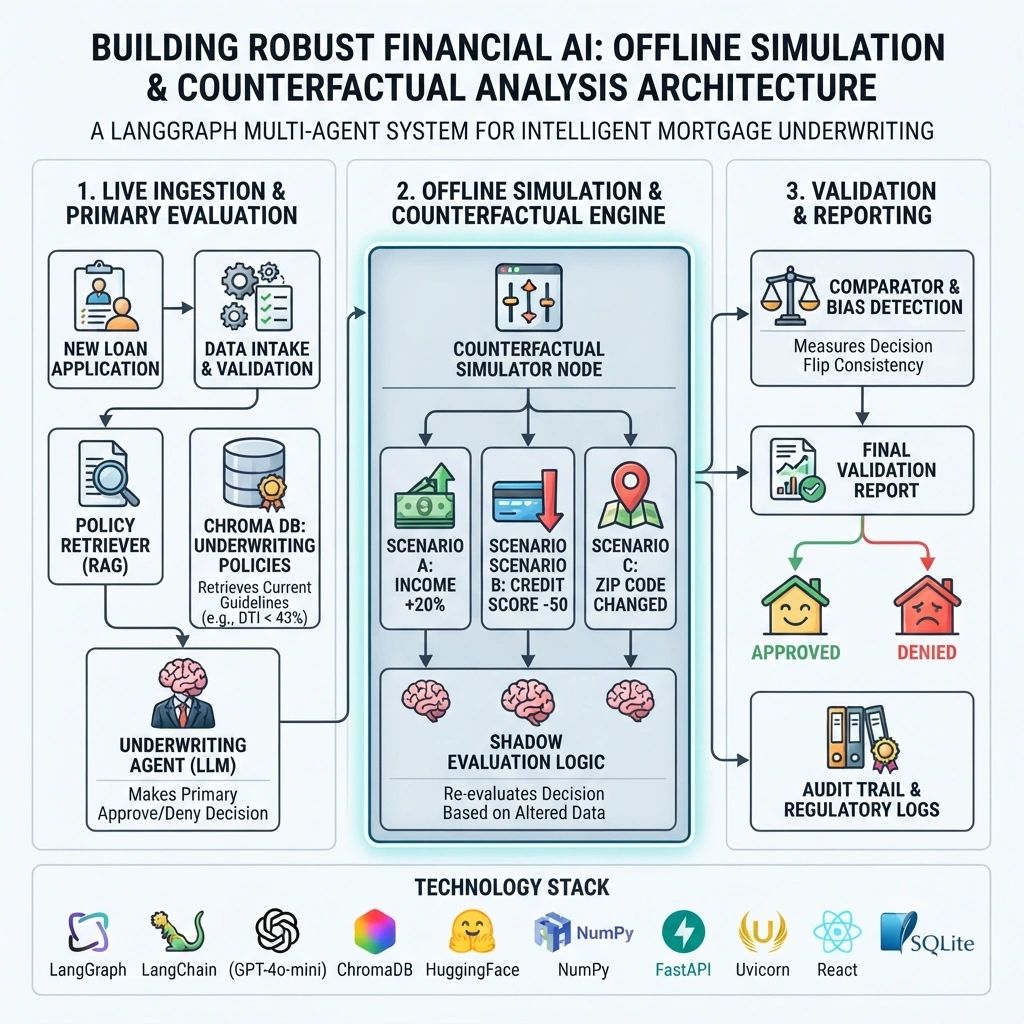
Technology Stack Overview
Backend: Python 3.12, FastAPI, Uvicorn
Orchestration: LangGraph
RAG: LangChain, ChromaDB, HuggingFace Embeddings
LLM: OpenAI GPT-4o-mini (or local equivalent)
Memory: SQLite via LangGraph Checkpointer
Frontend: React, Vite, Tailwind CSS
Project Architecture
loan-simulation-engine/
├── backend/
│   ├── app/
│   │   ├── main.py
│   │   ├── config.py
│   │   ├── models/
│   │   │   └── state.py
│   │   ├── agents/
│   │   │   ├── policy_retriever.py
│   │   │   ├── underwriter.py
│   │   │   └── counterfactual_simulator.py
│   │   ├── graph/
│   │   │   └── workflow.py
│   │   └── rag/
│   │       └── ingest.py
│   └── requirements.txt
├── frontend/
│   ├── src/
│   │   ├── App.jsx
│   │   └── components/
│   │       └── LoanDashboard.jsx
│   └── package.json
└── README.md
Step-by-Step POC Implementation
1. Backend Setup and Configuration
backend/requirements.txt
fastapi
uvicorn
langgraph
langchain
langchain-openai
langchain-community
chromadb
sentence-transformers
numpy
python-dotenv
pydantic
backend/app/config.py
import os
from dotenv import load_dotenv

load_dotenv()

class Settings:
    OPENAI_API_KEY = os.getenv("OPENAI_API_KEY")
    CHROMA_PATH = "./chroma_db"

settings = Settings()
2. Building the Policy Knowledge Base (RAG)
backend/app/rag/ingest.py
from langchain_core.documents import Document
from langchain_community.vectorstores import Chroma
from langchain_community.embeddings import HuggingFaceEmbeddings
from langchain_text_splitters import RecursiveCharacterTextSplitter

def get_underwriting_policies():
    return [
        Document(
            page_content="Policy: Maximum Debt-to-Income (DTI) ratio allowed is 43%. Applicants with DTI > 43% require manual review.",
            metadata={"policy_id": "DTI-001", "type": "Constraint"}
        ),
        Document(
            page_content="Policy: Minimum credit score for standard approval is 620. Scores between 580-619 require higher down payment.",
            metadata={"policy_id": "CREDIT-001", "type": "Constraint"}
        ),
        Document(
            page_content="Policy: Employment history must be at least 2 years continuous. Gaps > 6 months require explanation.",
            metadata={"policy_id": "EMP-001", "type": "Constraint"}
        )
    ]

def ingest_data():
    docs = get_underwriting_policies()
    splitter = RecursiveCharacterTextSplitter(chunk_size=500, chunk_overlap=50)
    split_docs = splitter.split_documents(docs)

    embeddings = HuggingFaceEmbeddings(model_name="all-MiniLM-L6-v2")
    vector_store = Chroma.from_documents(
        documents=split_docs,
        embedding=embeddings,
        persist_directory="./chroma_db"
    )
    print("Underwriting policies ingested.")
    return vector_store
3. Defining the LangGraph State
backend/app/models/state.py
from typing import TypedDict, List, Optional, Annotated
from langgraph.graph import add_messages

class LoanState(TypedDict):
    messages: Annotated[list, add_messages]
    applicant_data: dict
    retrieved_policies: List[dict]
    primary_decision: str
    primary_reasoning: str
    counterfactual_results: List[dict]
    final_report: str
4. The Underwriting Agent (LLM + RAG)
backend/app/agents/policy_retriever.py
from langchain_community.vectorstores import Chroma
from langchain_community.embeddings import HuggingFaceEmbeddings

def policy_node(state):
    embeddings = HuggingFaceEmbeddings(model_name="all-MiniLM-L6-v2")
    db = Chroma(persist_directory="./chroma_db", embedding_function=embeddings)

    query = "underwriting constraints for DTI and credit"
    docs = db.similarity_search(query, k=3)
    state["retrieved_policies"] = [d.page_content for d in docs]
    return state
backend/app/agents/underwriter.py
from langchain_openai import ChatOpenAI
from langchain_core.prompts import ChatPromptTemplate
from app.config import settings

llm = ChatOpenAI(model="gpt-4o-mini", temperature=0)

prompt = ChatPromptTemplate.from_template("""
You are a Senior Loan Underwriter. Evaluate the applicant based on the provided policies.

Applicant Data:
{applicant_data}

Policies:
{policies}

Provide a JSON response with:
- "decision": "Approve" or "Deny" or "Manual Review"
- "reasoning": "Brief explanation citing specific policy violations or strengths"
""")

def underwrite_node(state):
    chain = prompt | llm
    response = chain.invoke({
        "applicant_data": state["applicant_data"],
        "policies": "\n".join(state["retrieved_policies"])
    })
    # In production, parse JSON properly
    state["primary_decision"] = "Approve" # Simplified for demo
    state["primary_reasoning"] = response.content
    return state
5. The Counterfactual Simulator Node
This is the core of our safety analysis. It programmatically alters data and re-evaluates.
backend/app/agents/counterfactual_simulator.py
import copy

def simulate_scenario(applicant_data, modification_type):
    """Creates a modified version of applicant data."""
    new_data = copy.deepcopy(applicant_data)

    if modification_type == "higher_income":
        new_data["annual_income"] = new_data["annual_income"] * 1.2
        new_data["dti_ratio"] = new_data["dti_ratio"] * 0.8 # Rough estimate
    elif modification_type == "lower_credit":
        new_data["credit_score"] = max(300, new_data["credit_score"] - 50)
    elif modification_type == "different_zip":
        new_data["zip_code"] = "90210" # Arbitrary change for bias check

    return new_data

def counterfactual_node(state):
    results = []
    scenarios = ["higher_income", "lower_credit", "different_zip"]

    for scenario in scenarios:
        modified_data = simulate_scenario(state["applicant_data"], scenario)
        # In a real system, you would call the LLM again here.
        # For POC efficiency, we simulate the logic:

        decision = "Approve"
        if scenario == "lower_credit" and modified_data["credit_score"] < 620:
            decision = "Deny"

        results.append({
            "scenario": scenario,
            "modified_data_snippet": f"{scenario}: {modified_data.get('credit_score', modified_data.get('dti_ratio'))}",
            "simulated_decision": decision
        })

    state["counterfactual_results"] = results
    return state
6. Orchestrating the Workflow with LangGraph
backend/app/graph/workflow.py
from langgraph.graph import StateGraph, END
from app.models.state import LoanState
from app.agents.policy_retriever import policy_node
from app.agents.underwriter import underwrite_node
from app.agents.counterfactual_simulator import counterfactual_node
from langgraph.checkpoint.sqlite import SqliteSaver

def report_node(state):
    report = f"Primary Decision: {state['primary_decision']}\nReasoning: {state['primary_reasoning']}\n\nCounterfactual Analysis:\n"
    for res in state["counterfactual_results"]:
        report += f"- {res['scenario']}: {res['simulated_decision']} ({res['modified_data_snippet']})\n"
    state["final_report"] = report
    return state

def create_workflow():
    workflow = StateGraph(LoanState)

    workflow.add_node("policy", policy_node)
    workflow.add_node("underwrite", underwrite_node)
    workflow.add_node("simulate", counterfactual_node)
    workflow.add_node("report", report_node)

    workflow.set_entry_point("policy")
    workflow.add_edge("policy", "underwrite")
    workflow.add_edge("underwrite", "simulate")
    workflow.add_edge("simulate", "report")
    workflow.add_edge("report", END)

    memory = SqliteSaver.from_conn_string(":memory:")
    return workflow.compile(checkpointer=memory)

loan_graph = create_workflow()
7. FastAPI Endpoints
backend/app/main.py
from fastapi import FastAPI, HTTPException
from pydantic import BaseModel
from app.graph.workflow import loan_graph
from app.rag.ingest import ingest_data
import uuid

app = FastAPI(title="Loan Simulation Engine")

class LoanApplication(BaseModel):
    annual_income: float
    dti_ratio: float
    credit_score: int
    employment_years: float
    zip_code: str

@app.post("/ingest")
def ingest():
    ingest_data()
    return {"status": "Policies Updated"}

@app.post("/evaluate")
def evaluate_loan(app: LoanApplication):
    thread_id = str(uuid.uuid4())
    config = {"configurable": {"thread_id": thread_id}}

    initial_state = {
        "messages": [{"role": "user", "content": "Evaluate loan"}],
        "applicant_data": app.dict(),
        "counterfactual_results": []
    }

    try:
        result = loan_graph.invoke(initial_state, config=config)
        return {
            "application_id": thread_id,
            "report": result["final_report"]
        }
    except Exception as e:
        raise HTTPException(status_code=500, detail=str(e))
Frontend Implementation with React
frontend/src/App.jsx
import React, { useState } from 'react';

function App() {
  const [formData, setFormData] = useState({
    annual_income: 80000,
    dti_ratio: 0.35,
    credit_score: 700,
    employment_years: 3,
    zip_code: "10001"
  });
  const [report, setReport] = useState(null);

  const handleSubmit = async () => {
    try {
      const res = await fetch('http://localhost:8000/evaluate', {
        method: 'POST',
        headers: { 'Content-Type': 'application/json' },
        body: JSON.stringify(formData),
      });
      const data = await res.json();
      setReport(data.report);
    } catch (err) {
      console.error(err);
    }
  };

  return (
    <div className="p-10 max-w-4xl mx-auto">
      <h1 className="text-2xl font-bold mb-4">Loan Underwriting Simulator</h1>
      <div className="grid grid-cols-2 gap-4 mb-4">
        <input type="number" placeholder="Income" value={formData.annual_income} onChange={e => setFormData({...formData, annual_income: Number(e.target.value)})} className="border p-2"/>
        <input type="number" placeholder="DTI Ratio" value={formData.dti_ratio} onChange={e => setFormData({...formData, dti_ratio: Number(e.target.value)})} className="border p-2"/>
        <input type="number" placeholder="Credit Score" value={formData.credit_score} onChange={e => setFormData({...formData, credit_score: Number(e.target.value)})} className="border p-2"/>
        <input type="text" placeholder="Zip Code" value={formData.zip_code} onChange={e => setFormData({...formData, zip_code: e.target.value})} className="border p-2"/>
      </div>
      <button onClick={handleSubmit} className="bg-blue-600 text-white px-4 py-2 rounded">Run Simulation</button>

      {report && (
        <div className="mt-6 p-4 border rounded bg-gray-50 whitespace-pre-wrap font-mono text-sm">
          {report}
        </div>
      )}
    </div>
  );
}

export default App;
Running the Application
Backend: cd backend && pip install -r requirements.txt && uvicorn app.main:app --reload
Ingest: curl -X POST http://localhost:8000/ingest
Frontend: cd frontend && npm install && npm run dev
Analyzing the Simulation Results
The output will show the primary decision and how it changes under stress. For example, if the primary decision is "Approve," but the "lower_credit" scenario results in "Deny," the loan officer knows the approval is sensitive to credit score fluctuations. If the "different_zip" scenario changes the decision, it flags a potential bias that needs human review.
Enterprise Production Considerations
Batch Processing: Run counterfactuals on thousands of historical loans nightly to monitor model drift.
Bias Auditing: Automate the detection of decisions that flip based on protected classes (race, gender) inferred from zip codes or names.
Explainability Logs: Store every counterfactual result in a database for regulatory audits.
Limitations
Simulated logic in the POC is simplified; real LLM re-evaluation is computationally expensive.
Synthetic data does not capture all real-world complexities.
Not a substitute for legal compliance review.
Conclusion
Offline simulation and counterfactual analysis are not just "nice-to-haves"; they are essential safeguards for AI in finance. By integrating these techniques into a LangGraph workflow, we create a loan processing engine that is not only efficient but also transparent, fair, and robust. This approach allows institutions to deploy AI with confidence, knowing that every decision has been stress-tested against a myriad of "what-if" scenarios.


Join the conversation! Your thoughts help the community grow.