

Building an AI agent is only the beginning. The harder question is: how do you understand what your agent is actually doing in production, and find problems you didn't know existed?
Microsoft has introduced Insights in Foundry as a public preview capability. It analyzes production agent traces, identifies recurring patterns, and turns them into findings your team can review.
A practical example: an Accounts Payable agent
The scenario below is hypothetical, and all numbers are illustrative.
A company deploys an Accounts Payable agent. It receives supplier invoices, extracts the data, checks purchase orders, validates tax information, and submits approved invoices to the accounting system.
The dashboard looks healthy:
97% successful executions
4.5 seconds average response time
3,200 tokens average consumption
Low error rate
Then complaints arrive: some invoices take far too long. Averages hide this. A small group of slow invoices barely moves the mean, which is why p95 and p99 latency matter. Even so, the dashboard tells you that some runs are slow, not why.
Step 1: Production traces are generated.
Every interaction produces telemetry. In one trace, the agent processes an invoice with this sequence:
Extract invoice → PO Lookup → Tax Validation → PO Lookup → Supplier Validation → PO Lookup → SubmitThe invoice is processed successfully. Nothing failed.
Step 2: Insights surfaces a recurring pattern.
After analyzing many traces, an insight might read:
"The agent repeatedly calls the purchase-order lookup tool during invoice processing, increasing latency and token consumption."
That is more useful than knowing some invoices are slow. It offers a hypothesis and points to representative traces.
Step 3: The team investigates.
Reviewing the traces confirms the pattern. The agent re-fetches the same PO data three times per invoice. This isn't an Azure outage or necessarily a model failure. It's a workflow-design problem.
Step 4: The team fixes the agent.
The PO data is retrieved once and kept in the agent's execution context for later steps.
Before: PO API → Tax API → PO API → Supplier API → PO API
After: PO API (store result) → Tax Validation → Supplier Validation → Submit
This reduces tool calls, latency, token use, API traffic, and points of failure. One caveat: if a PO can change mid-process, the stored result needs a refresh rule. Depending on how the agent is built, the fix may be a prompt or instruction change rather than a code change.
Step 5: Turn the finding into an evaluation.
Fixing the problem isn't enough. The team encodes it as a test:
For any invoice trace, the agent makes no more than one PO lookup call. Checked by a code-based evaluator on tool-call counts.
Now every future agent version is tested against the behavior. The loop becomes:
Production behavior → Insight → Investigation → Fix → Evaluation → New deployment
Another example: a confident answer without a source
Consider a tax agent that answers GST questions from an approved knowledge base. A user asks, "What GST rate should we apply to this transaction?" The answer looks reasonable, but a review of traces shows that when the source document is missing or ambiguous, the agent sometimes answers anyway instead of asking for more information.
The fix is an instruction change: "If the tax classification can't be established from an approved source, don't infer the rate. Ask for the missing information or escalate."
The matching evaluation is a concrete test case: an ambiguous transaction description where the expected behavior is a clarifying question, not a rate.
For finance, tax, legal, and healthcare applications, the principal matters: a successful response is not necessarily a correct response. Patterns like this are the kind of thing teams should look for, because success and error metrics won't capture them.
Where Insights fits in the architecture
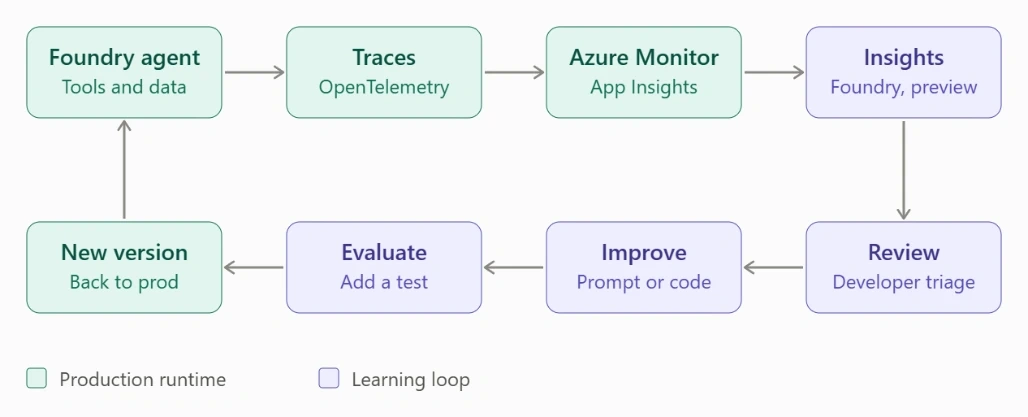
Insights sit inside a broader engineering lifecycle. It isn't just another dashboard.
Why this matters for finance and professional services
In invoice processing, reconciliation, tax research, audit documentation, and compliance checks, the biggest risk often isn't a crash. It's an agent that consistently behaves incorrectly while appearing operationally healthy. For example:
A reconciliation agent that accepts transactions with missing GSTIN information
An audit agent that falls back on secondary sources when the approved policy is unavailable
An invoice agent that repeatedly calls the same ERP API
These are behavioral patterns, not infrastructure failures.
The larger lesson
The future of enterprise AI won't be measured only by how capable the model is. It will depend on whether organizations can answer:
What is my agent doing, and why?
Is the behavior recurring, and is it acceptable?
Can we turn what we learn into better evaluations?
That's a more mature lifecycle: Build → Deploy → Observe → Discover → Validate → Improve → Evaluate → Repeat.
Insights doesn't replace monitoring, evaluations, security controls, or human review. It adds a layer that helps move from watching individual interactions to understanding recurring behavior across production agents.
Microsoft currently documents Insights in Foundry as a public preview, so evaluate its capabilities and limitations before relying on it for production-critical decisions.
Technical documentation: Microsoft Learn, Use Insights in Foundry
Summary
Building an AI agent is only the beginning. Insights in Foundry helps teams analyze production agent traces, identify recurring behavioral patterns, investigate their causes, turn confirmed findings into evaluations, and improve future agent versions. The resulting lifecycle—Build → Deploy → Observe → Discover → Validate → Improve → Evaluate → Repeat—helps organizations move beyond basic monitoring toward a more mature approach to understanding and improving enterprise AI behavior.
Join the conversation! Your thoughts help the community grow.