

Microsoft has announced some new keywords and some new behavior of C# 6.0 in Visual Studio 2015.
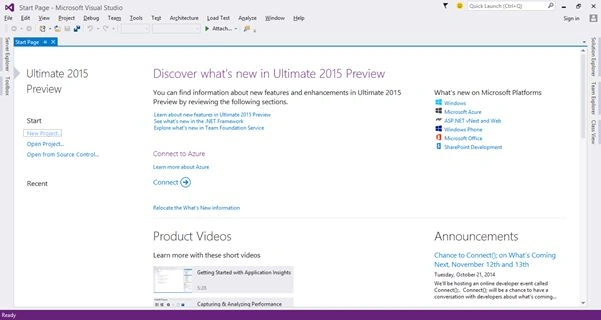
In this article, we will learn the following topics.
- using Static.
- Auto property initializer.
- Dictionary Initializer.
- nameof Expression.
- New way for Exception filters.
- await in catch and finally block.
- Null – Conditional Operator.
- Expression – Bodied Methods
- Easily format strings – String interpolation
For testing all
Open Visual Studio 2015 and select "File" -> "New" -> "Project...".

Click OK and then you will get a solution that you will see in the Solution Explorer.
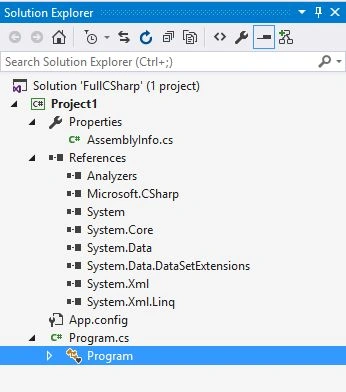
Now just do something with your program.cs file to test your compile time code.
1. using Static
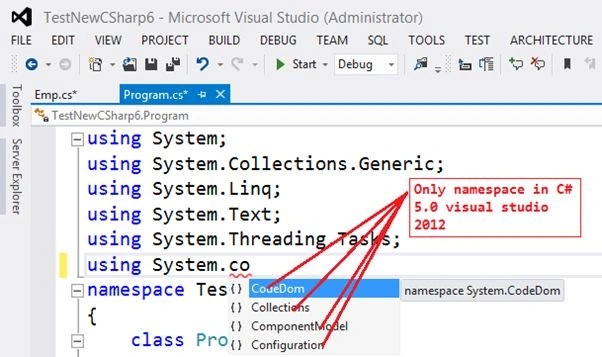
This is a new concept in C# 6.0 that allows us to use any class that is static as a namespace that is very useful for every developer in that code file where we need to call the static methods from a static class like in a number of times we need to call many methods from Convert.ToInt32() or Console.Write(),Console.WriteLine() so we need to write the class name first then the method name every time in C# 5.0. In C# 6.0 however Microsoft announced a new behavior to our cs compiler that allows me to call all the static methods from the static class without the name of the classes because now we need to first use our static class name in starting with all the namespaces.
- In C# 5.0
- using System;
- using System.Collections.Generic;
- using System.Linq;
- using System.Text;
- using System.Threading.Tasks;
- namespace TestNewCSharp6
- {
- class Program
- {
- static void Main(string[] args)
- {
- Console.WriteLine("Enter first value ");
- int val1 =Convert.ToInt32(Console.ReadLine());
- Console.WriteLine("Enter next value ");
- int val2 = Convert.ToInt32(Console.ReadLine());
- Console.WriteLine("sum : {0}", (val1 + val2));
- Console.ReadLine();
- }
- }
- }
- using System;
- using System.Collections.Generic;
- using System.Linq;
- using System.Text;
- using System.Threading.Tasks;
- using static System.Convert;
- using static System.Console;
- namespace Project1
- {
- class Program
- {
- static void Main(string[] args)
- {
- WriteLine("Enter first value ");
- int val1 = ToInt32(ReadLine());
- WriteLine("Enter next value ");
- int val2 = ToInt32(ReadLine());
- WriteLine("sum : {0}", (val1+val2));
- ReadLine();
- }
- }
- }
In C# 6.0
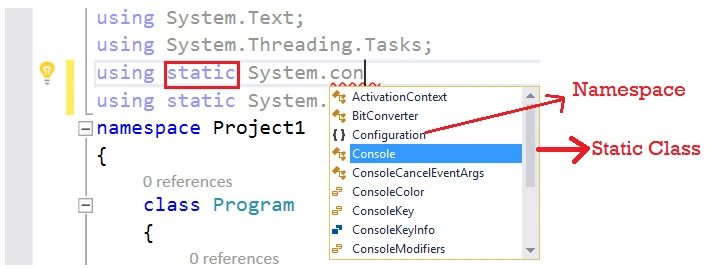
Code in 5.0
Output
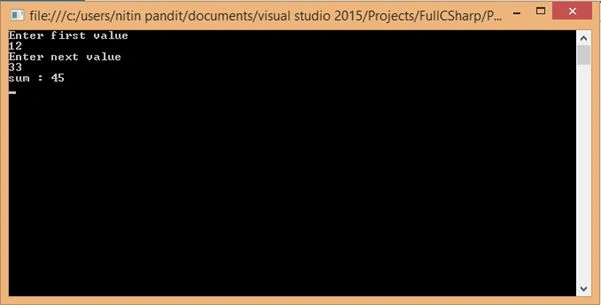
2. Auto property initializer
Auto property initializer is a new concept to set the value of a property during of property declaration. We can set the default value of a read=only property, it means a property that only has a {get;} attribute. In the previous version of C# 5.0 we can set the values of the property in the default constructor of the class. Let's have an example. Suppose we need to set some property's value of a class as in the following:
- using System;
- using System.Collections.Generic;
- using System.Linq;
- using System.Text;
- namespace TestNewCSharp6
- {
- class Emp
- {
- public Emp()
- {
- Name = "nitin";
- Age = 25;
- Salary = 999;
- }
- public string Name { get; set; }
- public int Age { get; set; }
- public int Salary { get;private set; }
- }
- }
- using System;
- using System.Collections.Generic;
- using System.Linq;
- using System.Text;
- using System.Threading.Tasks;
- namespace Project2
- {
- class Emp
- {
- public string Name { get; set; }="nitin";
- public int Age { get; set; }=25;
- public int Salary { get; }=999;
- }
- }
In C# 5.0

Code
In C# 6.0
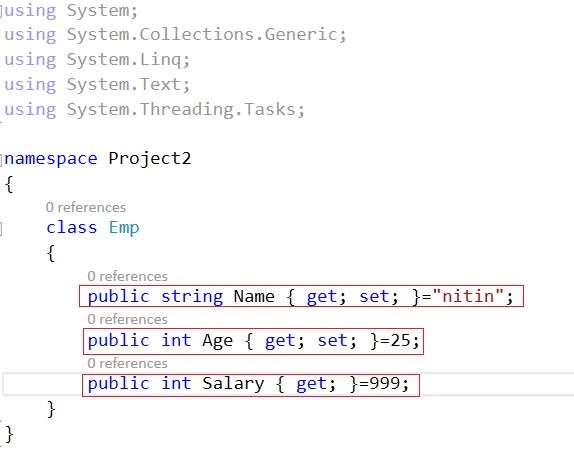
Code
3. Dictionary Initializer
Dictionary initializer is a new concept in C# 6.0. We can directly initialize a value of a key in a Dictionary Collection with it, either the key in the collection would be a string data type or any other data type. Let's see the declaration syntax in both versions like in C# 5.0 and also in C# 6.0 respectively.
- C# 5.0
- using System;
- using System.Collections.Generic;
- using System.Data;
- using System.Linq;
- using System.Text;
- using System.Threading.Tasks;
- namespace TestNewCSharp6
- {
- class Program
- {
- static void Main(string[] args)
- {
- Dictionary<string, string> dicStr = new Dictionary<string, string>()
- {
- {"Nitin","Noida"},
- {"Sonu","Baraut"},
- {"Rahul","Delhi"},
- };
- dicStr["Mohan"] = "Noida";
- foreach (var item in dicStr)
- {
- Console.WriteLine(item.Key+" "+ item.Value);
- }
- Console.WriteLine("********************************************************************");
- Dictionary<int, string> dicInt = new Dictionary<int, string>()
- {
- {1,"Nitin"},
- {2,"Sonu"},
- {3,"Mohan"},
- };
- dicInt[4] = "Rahul";
- foreach (var item in dicInt)
- {
- Console.WriteLine(item.Key + " " + item.Value);
- }
- Console.Read();
- }
- }
- }
- using System;
- using System.Collections.Generic;
- using System.Data;
- using System.Linq;
- using System.Text;
- using System.Threading.Tasks;
- namespace Project3
- {
- class Program
- {
- static void Main(string[] args)
- {
- Dictionary<string, string> dicStr = new Dictionary<string, string>()
- {
- ["Nitin"]="Noida",
- ["Sonu"]="Baraut",
- ["Rahul"]="Delhi",
- };
- dicStr["Mohan"] = "Noida";
- foreach (var item in dicStr)
- {
- Console.WriteLine(item.Key + " " + item.Value);
- }
- Console.WriteLine("********************************************************************");
- Dictionary<int, string> dicInt = new Dictionary<int, string>()
- {
- [1]="Nitin",
- [2]="Sonu",
- [3]="Mohan"
- };
- dicInt[4] = "Rahul";
- foreach (var item in dicInt)
- {
- Console.WriteLine(item.Key + " " + item.Value);
- }
- Console.Read();
- }
- }
- }
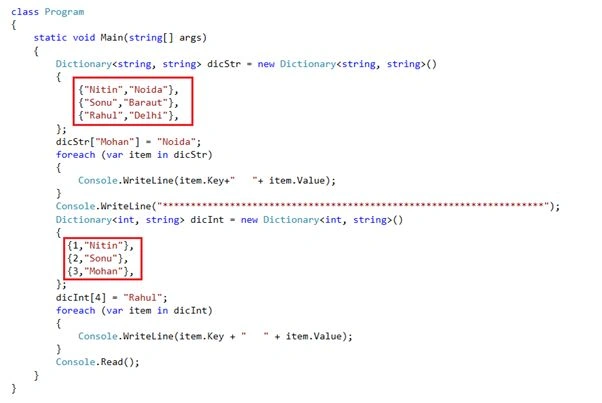
Code
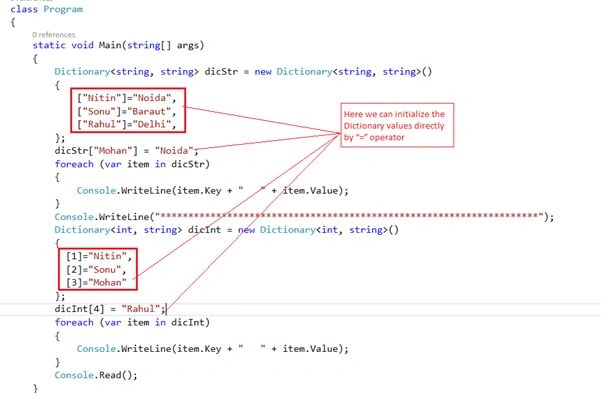
Code
Output

4. nameof Expression
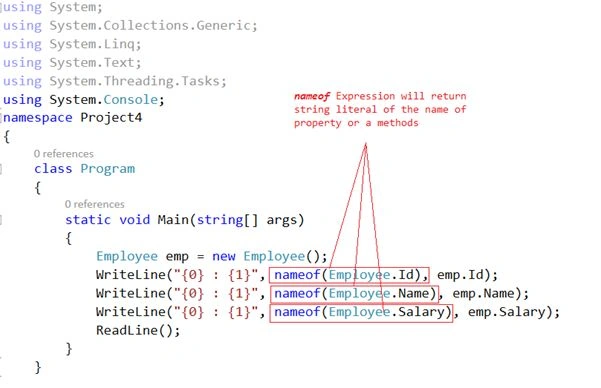
nameof is new keyword in C# 6.0 and it's very useful from a developer's point of view because when we need to use a property, function or a data member name into a message as a string so we need to use the name as hard-coded in “name” in the string and in the future my property or method's name will be changed so it must change all the messages in every form or every page so it's very complicated to remember that how many number of times you already use the name of them in your project code files and this avoids having hardcoded strings to be specified in our code as well as avoids explicit use of reflection to get the names. Let's have an example.
- using System;
- using System.Collections.Generic;
- using System.Linq;
- using System.Text;
- using System.Threading.Tasks;
- using System.Console;
- namespace Project4
- {
- class Program
- {
- static void Main(string[] args)
- {
- Employee emp = new Employee();
- WriteLine("{0} : {1}", nameof(Employee.Id), emp.Id);
- WriteLine("{0} : {1}", nameof(Employee.Name), emp.Name);
- WriteLine("{0} : {1}", nameof(Employee.Salary), emp.Salary);
- ReadLine();
- }
- }
- class Employee
- {
- public int Id { get; set; } = 101;
- public string Name { get; set; } = "Nitin";
- public int Salary { get; set; } = 9999;
- }
- }
We have a class:
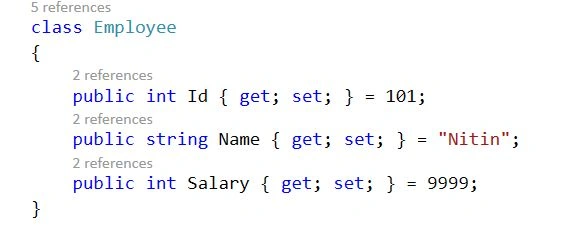
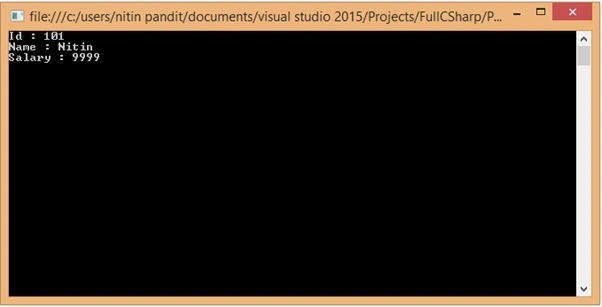
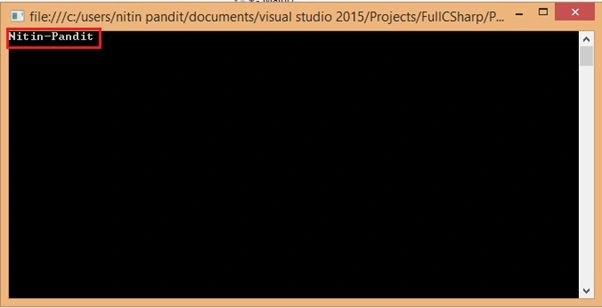
And we need to show the values of this class property to the console and also if we need to print the name of my property too with the message so in C# 6.0 we can use the nameof expression rather than hardcode the name of the property.
Output
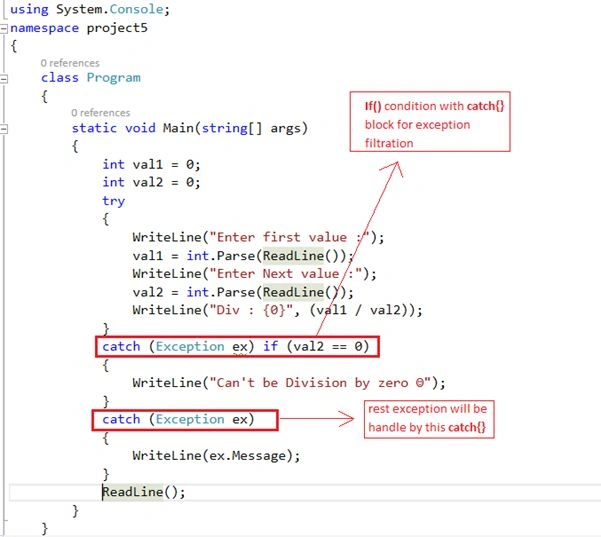
Code






Anandu G NathPosted Jan 6, 2024, 9:46 AM
Informative Nitin Pandit
amit pandeyPosted Apr 9, 2021, 4:12 AM
For exception filter "if" keyword is not working. Is it correct? We have to use "when".
Hemendra ShekharPosted Jan 29, 2021, 6:33 PM
Fantastic article..you made it very easy to understand
Sandip G PatilPosted Mar 9, 2019, 7:14 AM
Nice article....
Archana NareshPosted Dec 5, 2018, 5:54 AM
Nice Article !
shyam mahanwarPosted Oct 26, 2018, 7:50 AM
Nice one. Easy to understand
subhashis nayakPosted Mar 12, 2017, 6:15 PM
"\{FirstName}---\{LastName}" it wont work for string interpolation instead we can use in the below way$"{FirstName}---{LastName}"
subhashis nayakPosted Mar 12, 2017, 5:35 PM
Explained very nicely... easy to understand.
subhashis nayakPosted Mar 12, 2017, 5:34 PM
Please modify the exception filter code. The code should be catch(Exception ex) when(secondNumber == 0){....}
Babloo KumarPosted Nov 14, 2016, 10:15 AM
Very nice article sir. It is very helpful
Poonam ChoudharyPosted Nov 8, 2016, 8:35 AM
Great Article..It sounds so simple. Easy to understand
BeginnerPosted Oct 26, 2016, 1:07 AM
Great effort!!! Nice Article
Aleena SaviourPosted Oct 24, 2016, 7:02 AM
Useful and simple explanation
Rahul Pushpendu BhaskarPosted Oct 24, 2016, 3:06 AM
Good one..
Aakash MauryaPosted Oct 24, 2016, 3:03 AM
Its really a great efforts
kalu singh raoPosted Jul 26, 2016, 9:30 AM
Nice share
Viresh RajputPosted Jun 29, 2016, 10:14 AM
Very nice and easy explanation. Thanks Nitin. :)
Ankush BindraPosted Mar 28, 2016, 2:05 AM
Good explanation with wonderful stuff...
Anil JhaPosted Mar 2, 2016, 5:07 AM
very well explained
Pankaj Kumar ChoudharyPosted Feb 22, 2016, 11:18 AM
Nice Explain Sir.........
Sr KarthigaPosted Feb 19, 2016, 5:57 AM
Nice Explanation
KaustubhPosted Jan 15, 2016, 3:40 AM
nice share, very helpful !
vijender akulaPosted Nov 18, 2015, 5:16 AM
Great job Nitin
vijender akulaPosted Nov 18, 2015, 5:15 AM
Nice explanation any once can understand easily ..
Sabyasachi MishraPosted Oct 23, 2015, 12:28 AM
Good one
Rajeesh MenothPosted Sep 11, 2015, 4:00 AM
Great...:)
jackPosted Sep 1, 2015, 5:08 AM
String interpolation change to $"{var1, var2}"
jackPosted Sep 1, 2015, 5:07 AM
Exception filter now using "when" to replace "if"
Rajendra TaradalePosted Aug 21, 2015, 5:29 AM
very well explained :)
Paras Mal MaliPosted May 26, 2015, 3:14 AM
Nice article Sir....
Pankaj Kumar ChoudharyPosted May 25, 2015, 8:09 PM
Great Article Sir............
Santhakumar MunuswamyPosted May 25, 2015, 2:41 PM
Thanks for good work
Mahesh ChandPosted May 25, 2015, 12:58 PM
Great job Nitin Pandit. Wow! Crazy number of comments.
Kaavya TamilvananPosted Apr 28, 2015, 3:00 PM
Cooool .... very useful article .. Good work Nitin :)
Neetu GuptaPosted Apr 25, 2015, 2:51 PM
Excellent article sir.very well explained. Very easy to understand..Thanks a lot sir for the post
Nirmal HotaPosted Mar 5, 2015, 8:19 AM
Very good Nitin Pandit . I must say, excellent article and explained in nice way. Good work :)
Prasham SabadraPosted Feb 26, 2015, 5:24 PM
Thanks for sharing. Nice Article!
Subbulakshmi MaheshPosted Feb 13, 2015, 3:08 AM
very good examples. easy to understand . nice
pratik ghumrePosted Jan 23, 2015, 8:09 AM
Great Explanation ,hopes to get more information in near future from you , thank a lot
Nitin PanditPosted Jan 22, 2015, 9:41 PM
Thanks a lot
Thiago MoreiraPosted Jan 22, 2015, 8:34 AM
Great job My Friend!
Vishal KadamPosted Jan 21, 2015, 8:15 AM
Perfect explanation with easy to understandable comparison.
Nitin PanditPosted Jan 19, 2015, 4:48 AM
thnq 2 all :)
Ankur ChauhanPosted Jan 19, 2015, 4:25 AM
Kya batt kya batt......................
RS PrajapatiPosted Jan 19, 2015, 12:53 AM
Excellent Work
Naveen NautiyalPosted Jan 15, 2015, 1:39 AM
Excellent sir..
Hemant SrivastavaPosted Jan 8, 2015, 10:32 AM
Just noticed one thing.. In 'Dictionary Initializer' section, it seems like C# 5.0 and C# 6.0 code got duplicated or I'm missing something.
Hemant SrivastavaPosted Jan 8, 2015, 10:30 AM
Good explanation and quite informative!
Pankaj BajajPosted Jan 7, 2015, 8:21 AM
Great Nitin, Lots of learning in a single page
Rasmita DashPosted Jan 6, 2015, 2:38 AM
Great job...
Nitin PanditPosted Jan 6, 2015, 1:18 AM
thnq :)
Ramchand RepallePosted Jan 5, 2015, 8:59 AM
Great Article..
Anupam SinghPosted Jan 4, 2015, 2:57 AM
Full coverage in 1 shot. :). Thank for sharing these valuable features Nitin Pandit.
Manish Kumar ChoudharyPosted Jan 4, 2015, 1:39 AM
Great collections. .
Ranjeet PatilPosted Jan 3, 2015, 9:46 AM
nice features...thanks nitin..:)
Gaurav Kumar AroraPosted Jan 2, 2015, 8:24 AM
Nice to see all at one place
Humayun Kabir MamunPosted Jan 2, 2015, 7:34 AM
Nice...
Saravanakumar RPosted Dec 31, 2014, 11:21 AM
Awesome article
Utkarsh KunwarPosted Dec 31, 2014, 7:55 AM
gr8 article bro! keep it up
Viresh RajputPosted Dec 31, 2014, 5:11 AM
Nitin Bro ,Very nice,Please keep it up
Vipin TyagiPosted Dec 31, 2014, 4:42 AM
fist time when i write awesome one on fb I just read it very politely but here I can say that this article is Fabulous.Most interesting feature is that "Write Less Get More"
Guest UserPosted Dec 31, 2014, 3:51 AM
Nitin Pandit I call it mini e-book!
Guest UserPosted Dec 31, 2014, 3:51 AM
Really fantastic @Nitin Pan
Kiranteja JallepalliPosted Dec 31, 2014, 3:04 AM
very nice
sabarimalai iyyappanPosted Dec 31, 2014, 1:52 AM
Good Article.Thanks for your valuable sharing to keep us up to date .
Atul GuptaPosted Dec 31, 2014, 12:33 AM
What a Nice Article Nitin, Keep It Up!!
K P Singh ChundawatPosted Dec 30, 2014, 11:37 PM
good ....thanks for sharing...
Dinesh BeniwalPosted Dec 30, 2014, 11:25 PM
Great work Nitin, appreciate your hard work.
Manish Kumar ChoudharyPosted Dec 30, 2014, 11:25 PM
Nice Information..
Veena SardaPosted Dec 30, 2014, 11:12 PM
Good one
Gaurav KumarPosted Dec 30, 2014, 11:11 PM
Nice Graphical Representation Nitin Pandit sir very informative article you covered all new features
Vithal WadjePosted Dec 30, 2014, 10:46 PM
nice sir
Pramod ThakurPosted Dec 30, 2014, 9:47 PM
Nice article.. very helpful.. thx for sharing :)