

In this article, I am trying to explain how to integrate a FullCalender with ASP.NET.
Step 1: First we will download the sample code from the FullCalender URL.
Step 2: Now will try to integrate it into an ASP.NET Application. We'll create a new WebApplication. In that web application we will add FullCalender.js and require CSS files in proper folders.
Step 3: Now we will add the following files to the Master Page:
<script src="Scripts/jquery-1.4.1.js" type="text/javascript"></script>
<script src="Scripts/fullcalendar.js" type="text/javascript"></script>
<link href="Styles/fullcalendar.css" rel="stylesheet" type="text/css" />
<link href="Styles/Site.css" rel="stylesheet" type="text/css" />
Step 4: Now we will add a Div tag inside the Default.aspx page:
<div id="fullcal">
</div>
Step 5: Now we will add a jQuery function to call events:
<script type="text/javascript">
$(document).ready(function () {
	$.ajax({
		type: "POST",
		contentType: "application/json",
|		data: "{}",
		url: "Default.aspx/GetEvents",
		dataType: "json",
		success: function (data) {
			$('div[id*=fullcal]').fullCalendar({
				header: {
					left: 'prev,next today',
					center: 'title',
					right: 'month,agendaWeek,agendaDay'
					},
				editable: true,
				events: $.map(data.d, function (item, i)
				{
					var event = new Object();
					event.id = item.EventID;
					event.start = new Date(item.StartDate);
					event.end = new Date(item.EndDate);
					event.title = item.EventName;
					event.url = item.Url;
					event.ImageType = item.ImageType;
					return event;
				}),
				eventRender: function (event, eventElement)
				{
					if (event.ImageType)
					{
						if (eventElement.find('span.fc-event-time').length)
						{
							eventElement.find('span.fc-event-time').before($(GetImage(event.ImageType)));
						}
						else {
							eventElement.find('span.fc-event-title').before($(GetImage(event.ImageType)));
						}
					}
				},
				loading: function (bool)
				{
					if (bool) $('#loading').show();
					else $('#loading').hide();}});
				},
				error: function (XMLHttpRequest, textStatus, errorThrown)
				{debugger;}});$('#loading').hide();$('div[id*=fullcal]').show();
			});
		function GetImage(type)
		{
			if (type == 0) {
				return "<br/><img src = 'Styles/Images/attendance.png' style='width:24px;height:24px'/><br/>"
			}
			else if (type == 1) {
				return "<br/><img src = 'Styles/Images/not_available.png' style='width:24px;height:24px'/><br/>"
			}
			else
			return "<br/><img src = 'Styles/Images/not_available.png' style='width:24px;height:24px'/><br/>"
		}
</script>
Here is the output of the Full Calendar. You will also see an image associated with the events:
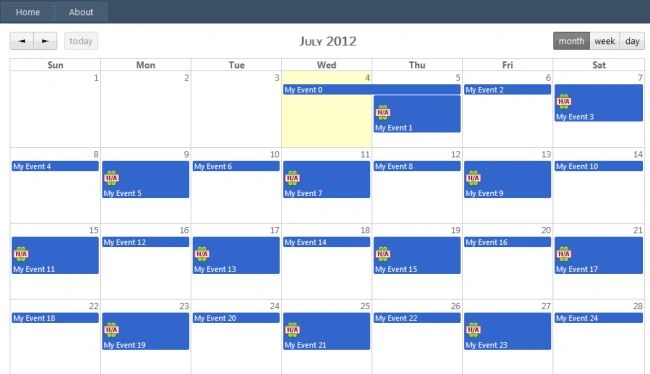
Happy Coding.
Pushkar DeshmanePosted May 16, 2018, 2:07 AM
I tried this same, but there is a problem while eventRender. I am not able to find what is wrong, but script stops working in between. Please help
test testPosted Aug 28, 2017, 10:18 PM
Thanks, this is working on me, But how can i change the color per event?
Pooja VermaPosted Feb 27, 2017, 2:41 AM
Not working in mozilla??
Ravi Kumar SirigineediPosted Feb 21, 2017, 11:56 PM
Hello Amit, It's working in IE, Google Chrome but not in Mozilla Firefox browser. Any fix required to add to existing code??
Karthikeyan MlpPosted Jun 24, 2016, 12:50 AM
Nice post thanks!!!
Hari KrishnaPosted Apr 11, 2016, 5:42 AM
Can u help me pls
Hari KrishnaPosted Apr 11, 2016, 5:42 AM
Hi amit it was not working in mozilla browser.Everything ok that event color was not binded.
Kemal CankurtPosted Jan 22, 2016, 8:14 AM
Hello. How can I write the GetEvents method in code behind?
ROHAN THAKURPosted Sep 25, 2015, 2:14 PM
nice article sir...
Former memberPosted May 1, 2015, 3:21 AM
nice concept of fullcalendar js you can modify as per your requirements to same as google calendar.
PreetiPosted Apr 18, 2015, 9:15 AM
Nice article and saved my time. Thanks
Former memberPosted Jan 29, 2015, 7:16 AM
jquery configt issues
Vtor MartinsPosted Jan 22, 2015, 6:42 AM
I've done this the guide step by step only I'm trying to use this on a WebApplication I've been working with and it's not working, it's like it can't find the files or something because nothing and I mean nothing shows on the div I created... any ideas?
Vtor MartinsPosted Jan 22, 2015, 6:41 AM
Hey guys.
paras vasiyaPosted Sep 10, 2014, 3:11 AM
but how to add repeated task in like some task repeat every only Monday and some one is repeat only Friday.....
paras vasiyaPosted Sep 10, 2014, 2:59 AM
it's appreciated
paras vasiyaPosted Sep 10, 2014, 2:59 AM
good nice.......
paras vasiyaPosted Sep 10, 2014, 2:58 AM
hj
Hiten ChauhanPosted Sep 5, 2014, 10:05 AM
Thankssssss Amiiiiiiiitttttttttttttttttttttt
Hiten ChauhanPosted Sep 5, 2014, 10:04 AM
Heyyyyy Guyyyy I have Got the Solution...........Demo Are perfect Working in Mozilla Firefox............................... Pleaze Chnage The Date format In Coding Side as below:- StartDate = DateTime.Now.AddDays(i).ToString("yyyy-MM-dd"),
Hiten ChauhanPosted Sep 5, 2014, 9:09 AM
This Is work Perfectly In chrome ,But Event not supported in mozzila plz find this solution urgently
PiyushPosted Jul 10, 2014, 3:41 AM
it's urgent
PiyushPosted Jul 10, 2014, 3:41 AM
hi...nice article...need little help...how to pass query string value in this example..because i found it is tightly coupled with event "Default.aspx/......eventname".......so,anyone help me how to pass query string id..i want it for filteration using dropdownlist.
mohamad dahshouryPosted Jun 12, 2014, 4:48 AM
i want display calender with Arabic month
Ashish SharmaPosted Feb 10, 2014, 1:01 AM
I got the calendar display, but events are not showing up. I chk with fire bug and the ajax request is returning proper response
Former memberPosted Apr 9, 2013, 5:52 AM
It Not Working Dear
Piyush ChandralaPosted Feb 14, 2013, 1:04 AM
It Not Working Dear.
Nishantha HettigodaPosted Oct 3, 2012, 12:05 AM
excellent
girish upadhyayPosted Sep 14, 2012, 3:13 PM
Please sent the full code to me. It is worth use for using the calendar. I nned it for one of my application. [email protected] is my id. Thanks, Girish Upadhyaya
girish upadhyayPosted Sep 14, 2012, 3:12 PM
Hi Amit Ji.... Could you please send me the latest solution for the above said project as It is throwing some error. My name is girish upadhyaya and my email id is [email protected]. I am in need of need by monday. Thanks a lot in advance.
Amit PatelPosted Jul 5, 2012, 3:02 AM
Mahesh, it is good but it's not working (Event are not showing) in mozila right now i am working on it to resolve mozila issue.
Gohil JayendrasinhPosted Jul 5, 2012, 1:45 AM
Ext JS Calendar is also the option of jQuery http://ext.ensible.com/ http://ext.ensible.com/deploy/1.0.2/examples/
Gohil JayendrasinhPosted Jul 5, 2012, 1:41 AM
Good One.. jQuery Full Calender flexible and good performance for large data source. I can use it in one education management systems for session planning...
Mahesh ChandPosted Jul 5, 2012, 1:12 AM
Nice. I was looking for something like this. Is is free? How's performance if you have tried in a complex application.