

Introduction
In this article I will explain how to detect gas using Arduino Mega. The gas sensor can easily find gas leaking at a place. When the gas is detected it can measure the range of the gas sensor.
-
Arduino Mega 2560
-
Gas Sensor
-
Buzzer
-
Bread Board
-
Led
-
Hookup wires.
Connection:
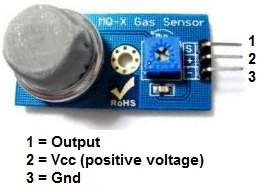
Figure 1: Gas Sensor
-
Take the Output pin to the Analog pin of the A0 in the Arduino Mega board.
-
Take the Vcc pin to the +5v of the ArduinoMega board.
-
Take the Gnd pin to the Gnd of the ArduinoMega board.
Step 2: Connection from the LED to the Arduino Mega2560
-
Positive pin = 10;
-
Negative pin = Gnd;
Step 3: Connection from the Buzzer to the Arduino Mega2560
-
Take the positive pin and connect to the Digital pin of 05 to the Arduino Mega board.
-
Take the negative pin and connect to the Gnd of the ArduinoMega board.
Programming:
- const int sensorpin = A0; // sensor output pin to Arduino analog A0 pin
- int led = 10;
- int buzzer = 5;
- int sensorValue = 0;
- void setup()
- {
- pinMode(led, OUTPUT);
- pinMode(buzzer, OUTPUT);
- Serial.begin(9600); //Initialize serial port - 9600 bps
- }
- void loop()
- {
- Serial.println("Welcome to c#corner");
- sensorValue = analogRead(sensorpin);
- Serial.println(sensorValue);
- if (sensorValue < 100)
- {
- Serial.println("LPG Value");
- Serial.println("LED on");
- digitalWrite(led, HIGH);
- digitalWrite(buzzer, HIGH);
- delay(1000);
- }
- digitalWrite(led, LOW);
- digitalWrite(buzzer, LOW);
- delay(sensorValue);
- }
Explanation:
-
When the gas is detected the LED will be ON and the Buzzer also produced the sound.
-
Then we can see the reading in the serial monitor.
-
When the Gas is detected the LED can be HIGH.
Output:
Serial Monitor:
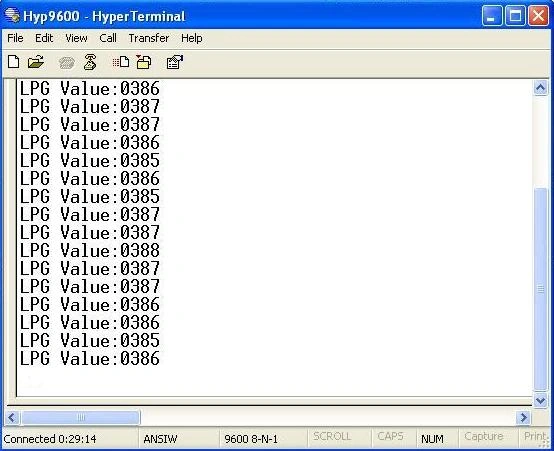
Figure 2: serial Monitor Display
Output:
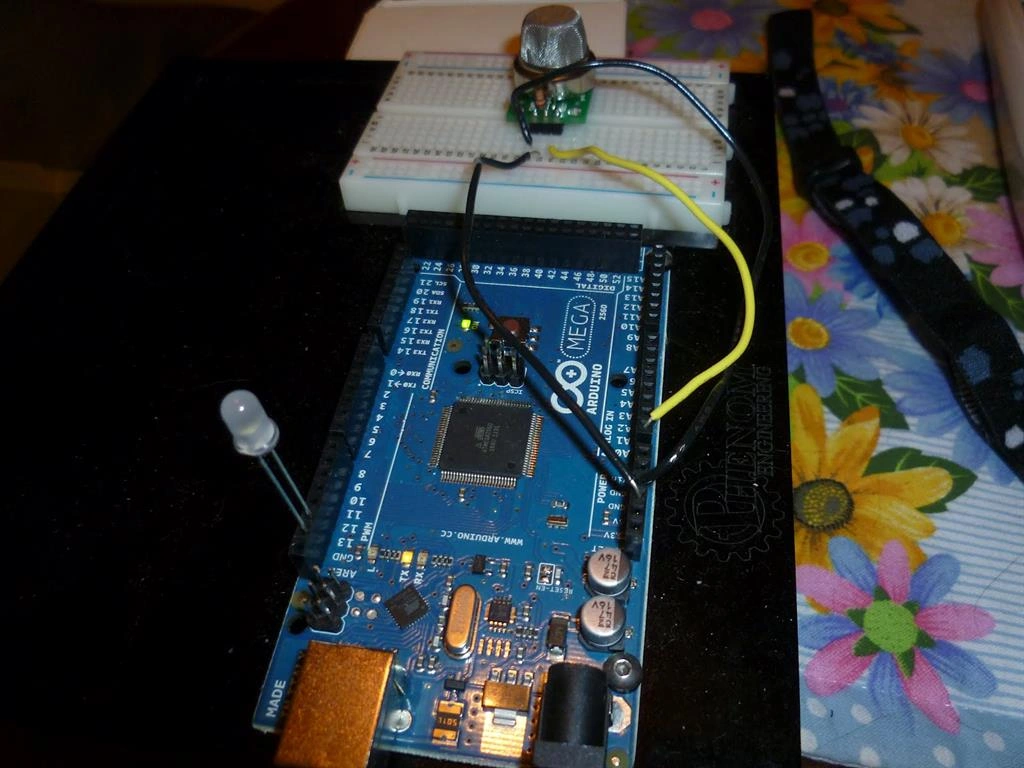
Figure 3: Output
Read more articles on Arduino:
Sr KarthigaPosted Feb 29, 2016, 7:45 PM
thank you asfend sir
Sr KarthigaPosted Feb 29, 2016, 7:45 PM
thank you jithil sir
Asfend YarPosted Feb 29, 2016, 2:22 PM
nice
Jithil JohnPosted Feb 15, 2016, 10:55 PM
Good one
Sr KarthigaPosted Feb 15, 2016, 7:16 AM
Thank you raja sir
Sr KarthigaPosted Feb 15, 2016, 7:16 AM
Thank you sibeesh sir
Sr KarthigaPosted Feb 15, 2016, 7:16 AM
Thank you gowtham sir
Sr KarthigaPosted Feb 15, 2016, 7:15 AM
Thank you santhakumar sir
Raja TPosted Feb 15, 2016, 3:05 AM
Nice,Thanks for sharing
Sibeesh VenuPosted Feb 15, 2016, 12:36 AM
Nice Share
Gowtham KPosted Feb 13, 2016, 11:31 AM
Nice share
Santhakumar MunuswamyPosted Feb 13, 2016, 2:58 AM
Thanks for nice share
Sr KarthigaPosted Feb 13, 2016, 2:32 AM
Thank you Pramod sir
Pramod ThakurPosted Feb 13, 2016, 12:30 AM
Good one..
Sr KarthigaPosted Feb 13, 2016, 12:24 AM
Thanks Shubham sir
Shubham KumarPosted Feb 12, 2016, 11:41 PM
nice
Sr KarthigaPosted Feb 12, 2016, 7:36 PM
Thank you kumaresh sir
Kumaresh RajalingamPosted Feb 12, 2016, 11:42 AM
Nice share