
In the .NET Framework library,
six namespaces define managed GDI+: System.Drawing, System.Drawing.Design,
System.Drawing.Drawing2D, System.Drawing.Imaging, system.Drawing.Printing, and
System.Drawing.Text. Figure 1.3 shows these namespaces. To use any of the
classes defined in these namespaces, you must include them in your application.
NOTE
The .NET Framework class library is also referred as the .NET runtime class
library or base class library (BCL).
This section will provide an overview of GDI+ namespaces, their contents, and
why and when to use them.
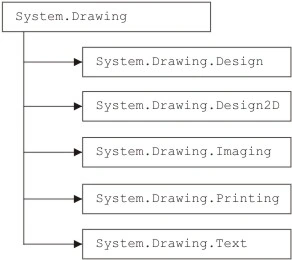
FIGURE 1.3: The GDI+ namespaces in the .NET Framework Library
The System.Drawing Namespace
The System.Drawing namespace defines basic GDI+ functionality. This namespace
contains the Graphics class, which provides methods for filling and drawing
graphics objects. It also provides classes that encapsulate GDI+ primitives such
as rectangles, points, brushes, and pens. Brush and its derived classes are use
to fill interiors of graphics objects such as ellipses, rectangles, and polygons
with the specified color and pattern. The Pen class is used to draw lines and
curves with s specified color.
Table 1.1 briefly describes the classes of the System.Drawing namespace.
The System.Drawing namespace also contains some structures that we will be using
throughout the article. These structures are CharacterRange, Color, Point,
PointF, Rectangle, RectangleF, Size, and SizeF.
TABLE 1.1: System.Drawing classes
Class | Description |
Bitmap | Encapsulates a bitmap, which is an image (with its properties) stored in pixel format. |
Brush | An abstract base class that cannot be instantiated directly. The Brush class provides functionality used by its derived brush class and represents a brush graphics object. A brush is used to fill the interior of a graphical shape with a specified color. |
Brushes | Represents brushes with all the standard colors. This class has a static member for each standard color. For example, Brushes.Blue represents a blue brush. |
ColorConverter | Provides methods and properties to convert colors from one type to another. |
ColorTranslator | Provides various methods to translate color from one type to another. |
Font | Provides members to define the format of font text, name, face, size and styles. The Font class also provides methods to create a Font object from a window handle to a device context or window handle. |
Fontconverter | Provides members that convert fonts from one type to another. |
FontFamily | Defines a group of typefaces having a similar basic design and certain variations in styles. |
Graphics | A key class that encapsulates drawing surfaces. Among many other things, the Graphics class provides members to draw and fill graphical objects. |
Icon | Represents a Window icon. The Icon class provides members to define the size, width, and height of an icon. |
IconConverter | Provides members to convert an Icon object from one type to another. |
Image | Provides members to define the size, height, width, and format of an image. The Image class also provides methods to create Image objects from a file, a window handle, or a stream; and to save, rotate, and flip images. It is an abstract base class, and its functionality is used though its derived classes: Bitmap, Icon, and Metafile. |
ImageAnimator | Provides methods to start and stop animation, and to update frames for an image that has time-based frames. |
ImageConvertor | Provides members to convert Image objects from one type to another. |
ImageFormatConvertor | Defines members that can be used to convert images from one format to another. |
Pen | Define a pen with a specified color and width. A pen is used to draw graphical objects such as a line, a rectangle, a curve, or an ellipse. |
Pens | Provides static members for all the standard colors. For example, Pens.Red represents a red pen. |
PointConverter | Defines members that can be used to convert Point objects from one type to another. |
Rectangle.Converter | Defines members that can be used to convert Rectangle objects from one type to another. |
Region | Represents a region in GDI+, which describes the interior of a graphic shape. |
SizeConverter | Defines members that can be used to convert size from one type to another. |
SolidBrush | Inherited from the Brush class. This class defines a solid brush of a single color. |
StringFormat | Provides members to define text format, including alignment, trimming and line spacing, display manipulations, and OpenType features. |
SystemBrushes | Defines static properties. Each property is a SolidBrush object with a Windows display element such as Highlight, HighlightText, or ActiveBorder. |
SystemColors | Defines static properties of a Color structure. |
SystemIcons | Defines static properties for Windows systemwide icons. |
SystemPens | Defines static properties. Each property is a Pen object with the color of a Windows display element and a width of 1. |
TextureBrush | Inherited from the Brush class. This class defines a brush that has an image as its texture. |
ToolboxBitmapAttribute | Defines the images associated with a specified component. |
The System.Drawing.Design Namespace
As its name suggest, the System.Drawing.Design namespace provides additional functionality to develop design-time controls such as custom toolbox items, graphics editors, and type converters. The classes of the System.Drawing.Design namespace are described briefly in Table 1.2.
Beside the classes discussed in Table 1.2, the System.Drawing.Design namespace also define a few interfaces, delegates, and enumerations. Table 1.3 lists the interfaces defined in the namespace.
The System.Drawing.Drawing2D Namespace
The System.Drawing.Drawing2D Namespace defines functionality to develop advanced two-dimensional and vector graphics applications. This namespace provides classes for graphics containers, blending, advanced brushes, matrices, and transformation. Table 1.4 briefly describes these classes.
Beside the classes discussed in Table 1.4, the System.Drawing.Drawing2D Namespace provides dozens of enumerations.
The System.Drawing.Imaging Namespace
Basic imaging functionality is defined in the System.Drawing.Imaging namespace. The System.Drawing.Imaging namespace provides functionality for advanced imaging. Before an application uses classes from this namespace, it must reference the System.Drawing.Imaging namespace.
Table 1.5 briefly describes the classes of the System.Drawing.Imaging namespace.
The System.Drawing.Printing Namespace
The System.Drawing.Printing namespace defines printing-related classes and types in GDI+. Before an application uses classes from this namespace, it must include the namespace.
Table 1.6 briefly discusses the classes provided by the System.Drawing.Printing namespace.
The System.Drawing.Text Namespace
The System.Drawing.Text namespace contains only a few classes related to advanced GDI+ typography functionality. Before an application uses classes from this namespace, it must include the namespace. Table 1.7 describes these classes.
TABLE 1.2: System.Drawing.Design classes
| Class | Description |
BitmapEditor | User interface (UI) for selecting bitmaps using a Properties window. |
CategoryNameCollection | Collection of categories. |
FontEditor | UI for selecting and configuring fonts. |
ImageEditor | UI for selecting images in a Properties window. |
PaintValueEventArgs | Provides data for the PaintValue event. |
PropertyValueUIItem | Provides information about the property value UI for a property. |
ToolboxComponents- | Provides data for the ComponentsCreated event, which occurs when components are added to the toolbox. |
ToolboxComponents-CreateingEventArgs | Provides data for the ComponentsCreating event, which occurs when components are added to the toolbox. |
Toolbox Item | Provides a base implementation of a toolbox item. |
ToolboxItemCollection | Collection of toolbox items. |
UITypeEditor | Provides a base class that can be used to design value editors. |
TABLE 1.3: System.Drawing.Design Interfaces
Interface | Description |
IPopertyValueUIService | Manages the property list of the Properties windows. |
ItoolboxService | Provides access to the toolbox. |
ItoolboxUSer | Test the toolbox for toolbox item support capabilities and selects the current tool. |
Join the conversation! Your thoughts help the community grow.