Introduce
A QR code (quick response code) is a two dimensional barcode that stores information about the item to which it is attached. The information can be plain text, URL, email address, vCard information, etc.
In this article, you’ll learn how to generate QR code image in C# using free Spire.Barcode instead of using any ‘barcode fonts’. The reasons are that the code to create QR code image with Spire.Barcode is pretty simply, this component also enables programmers to draw most common linear and 2D barcodes besides QR code, and it is totally free for both personal and commercial use.
In the following section, I created a Windows Form Application (QR code generator) to demonstrate how to create customized QR codes according to your own needs and save them as high quality images for immediate use.
Now let’s check the main steps.
Step 1
Download Spire.Barcode from the link mentioned above. You can also find the library from Nuget and E-iceblue.
Step 2
Create a Windows Form Application project in VS, add the dll to your .NET project assemblies.
Step 3
Request a free key from sales team in E-iceblue. This library is free of charge, but you need a free key to remove the ‘E-iceblue’ logo in barcode image. Otherwise, the logo will exist.
Once you get a key, you can apply the key by placing one line of code at the beginning of your program.
Spire.Barcode.BarcodeSettings.ApplyKey("your key"); Step 4
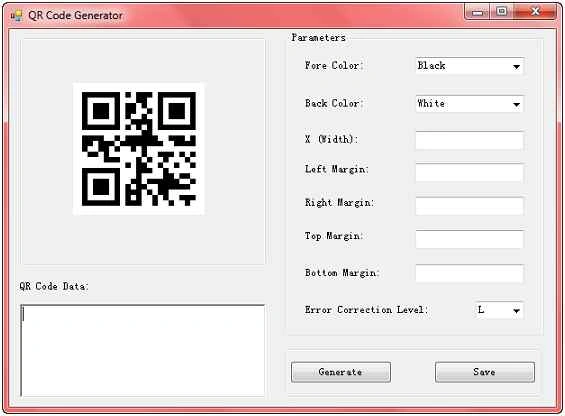
Design the form with some input fields for accepting parameters to customize your QR code, one Generate button to create QR code image and display it in a picture box, and one Save button to save the QR code image to local folder.
 Step 5
Using the code. In this case, I only focus on the code under btnGenerate click event. The entire code is available in the zip file attached.
Spire provides a class of
BarcodeSettings in which all properties of a barcode can be found and reset. Here are some basic settings of my QR code.
- BarcodeSettings.ApplyKey("your key");
- BarcodeSettings settings = new BarcodeSettings();
- settings.Type = BarCodeType.QRCode;
- settings.Unit = GraphicsUnit.Pixel;
- settings.ShowText = false;
- settings.ResolutionType = ResolutionType.UseDpi;
Collect data from the form and assign the data value to each parameter member of the
BarcodeSetting object.
-
- string data = "12345";
- settings.Data = data;
- if (this.richTextBox1.Text != null && this.richTextBox1.Text.Length > 0) {
- data = this.richTextBox1.Text;
- settings.Data = data;
- }
-
- if (this.comboBoxForeColor.SelectedItem != null) {
- string foreColor = this.comboBoxForeColor.SelectedItem.ToString();
- settings.ForeColor = Color.FromName(foreColor);
- }
-
- if (this.comboBoxBackColor.SelectedItem != null) {
- string backColor = this.comboBoxBackColor.SelectedItem.ToString();
- settings.BackColor = Color.FromName(backColor);
- }
-
- short barWidth;
- if (this.textBoxX.Text != null && this.textBoxX.Text.Length > 0 && Int16.TryParse(this.textBoxX.Text, out barWidth)) {
- settings.X = barWidth;
- }
-
- short leftMargin = 1;
- if (this.textBoxLeft.Text != null && this.textBoxLeft.Text.Length > 0 && Int16.TryParse(this.textBoxLeft.Text, out leftMargin)) {
- settings.LeftMargin = leftMargin;
-
- }
-
- short rightMargin = 1;
- if (this.textBoxRight.Text != null && this.textBoxRight.Text.Length > 0 && Int16.TryParse(this.textBoxRight.Text, out rightMargin)) {
- settings.RightMargin = rightMargin;
-
- }
-
- short topMargin = 1;
- if (this.textBoxTop.Text != null && this.textBoxTop.Text.Length > 0 && Int16.TryParse(this.textBoxTop.Text, out topMargin)) {
- settings.TopMargin = topMargin;
-
- }
-
- short bottomMargin = 1;
- if (this.textBoxBottom.Text != null && this.textBoxBottom.Text.Length > 0 && Int16.TryParse(this.textBoxBottom.Text, out bottomMargin)) {
- settings.BottomMargin = bottomMargin;
-
- }
-
- if (this.comboBoxCorrectionLevel.SelectedItem != null) {
- int correctionLevel = this.comboBoxCorrectionLevel.SelectedIndex;
- switch (correctionLevel) {
- case 0:
- settings.QRCodeECL = QRCodeECL.L;
- break;
- case 1:
- settings.QRCodeECL = QRCodeECL.M;
- break;
- case 2:
- settings.QRCodeECL = QRCodeECL.Q;
- break;
- case 3:
- settings.QRCodeECL = QRCodeECL.H;
- break;
- }
-
- }
Generate QR code image and display it in picture box.
-
- BarCodeGenerator generator = new BarCodeGenerator(settings);
- Image QRbarcode = generator.GenerateImage();
-
- pictureBox1.Image = QRbarcode;
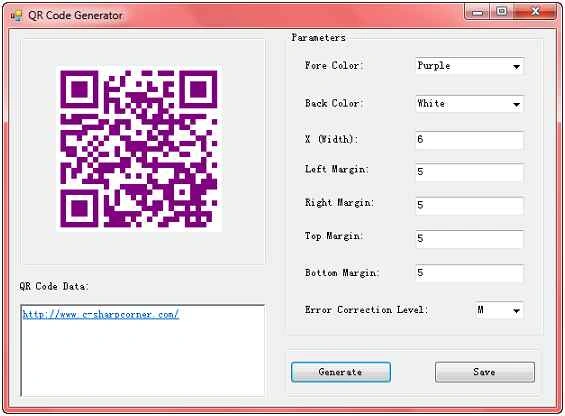
Run the program and input some data as follows, click
Generate and you’ll get the following output:
Click Save to extract QR code image to local folder:

Thanks for reading, and hope this article can be of help to someone who is searching an easy solution in this field.


thilinarPosted Apr 27, 2023, 11:34 AM
Great nice work
Dong Lam TrienPosted May 21, 2021, 9:08 AM
This link i came across, i downloaded their example works fine, i created a new one and followed the instructions on this page it doesn't work and i get the library error using Spire.Barcode; even though i added the library to winform but still getting error, how can i fix this ?
Naresh SainiPosted Mar 19, 2021, 8:32 AM
Good Effort.
Ganesh NaiduPosted Dec 24, 2020, 8:52 AM
Very useful article, thanks Susan
arunkumar selvarajPosted Jun 3, 2019, 5:05 AM
Hai.. i need QR code free font for crystal report. can i get it..?
Arjun DhilodPosted Mar 22, 2019, 1:31 AM
Great article
amit MishraPosted Apr 18, 2018, 12:00 AM
Hi Susan, Can you give me the key I want to use my logo.
Ayushi GuptaPosted Apr 8, 2018, 12:12 AM
How can i share this generated image via mail??
Ramandeep SinghPosted Feb 11, 2018, 12:15 AM
You can use this free open source QR Code generator
Ramandeep SinghPosted Feb 11, 2018, 12:14 AM
Https://github.com/codebude/QRCoder
shadab aliPosted Feb 1, 2018, 2:11 AM
I need a free key to remove the ‘E-iceblue’ logo in barcode image. please help anybody
Senthil KumarPosted Jan 22, 2018, 7:30 AM
Does anyone have the key. IF so please share the link
Abubacarr SillahPosted Jan 16, 2018, 9:52 AM
I am junior developer, looking for QR code and came across your site. Thank you for the good work. Can please get the key
Tainã LautenschlagerPosted Nov 6, 2017, 4:02 PM
Hey! Is it possible to use this library without Windows Forms?
Nap ChenPosted Oct 13, 2017, 3:42 AM
Thanks for share~Is it available to add my logo image to QR code image?
Aditya SharmaPosted Sep 12, 2017, 1:29 AM
Please give me the key
Aditya SharmaPosted Sep 12, 2017, 1:28 AM
Thank you Susan You Made my day..
Avaz BoltaevPosted Aug 9, 2017, 5:15 AM
Please give me key
md NurunnabiPosted Jul 24, 2017, 12:55 AM
Please give me key
Saineshwar BageriPosted Sep 20, 2015, 1:08 AM
nice one
Uehara AyakaPosted Sep 16, 2015, 4:52 AM
Thanks for the share.