

There are a lot of services out there. By using them, we can get the website visitor's geographical information such as country, region, city, latitude, longitude, ZIP code, time zone, and so on. It is possible just by using the IP address of the website visitor's machine.
In this article, I am using a service provided by http://iplocationtools.com/. This service is free and, based on the IP, returns geographical data in 3 formats.
- XML
- JSON
- CSV
This is the aspx code.
<%@ Page Language="C#" AutoEventWireup="true" CodeFile="Default.aspx.cs" Inherits="_Default" %>

<!DOCTYPE html PUBLIC "-//W3C//DTD XHTML 1.0 Transitional//EN" "http://www.w3.org/TR/xhtml1/DTD/xhtml1-transitional.dtd">
<html xmlns="http://www.w3.org/1999/xhtml">
<head runat="server">
    <title>Ip Address Location</title>
</head>
<body>
    <form id="form1" runat="server">
        <div>
            <asp:ScriptManager ID="ScriptManager1" runat="server"></asp:ScriptManager>
            <table cellpadding="0" cellspacing="0" width="50%" align="center" style="background-color: #f5f5f5; color: #4f6b72;">
                <tr>
                    <td align="center">
                        <asp:UpdatePanel ID="UpdatePanel1" runat="server">
                            <ContentTemplate>
                                <asp:Panel ID="panelLoc" runat="server">
                                    <asp:TextBox ID="txtIP" runat="server"></asp:TextBox>
                                    <asp:Button ID="btnGetLoc" runat="server" Text="Get IP Details" OnClick="btnGetLoc_Click" />
                                    <br />
                                    <asp:Xml ID="Xml1" runat="server"></asp:Xml>
                                </asp:Panel>
                            </ContentTemplate>
                        </asp:UpdatePanel>
                        <asp:UpdateProgress ID="updProgress" AssociatedUpdatePanelID="UpdatePanel1" runat="server">
                            <ProgressTemplate>
                                <img alt="progress" src="images/Img.gif" />
                            </ProgressTemplate>
                        </asp:UpdateProgress>
                    </td>
                </tr>
            </table>
        </div>
    </form>
</body>
</html>
Here is the code behind it.
using System;
using System.Xml.Linq;
public partial class _Default : System.Web.UI.Page
{
    protected void Page_Load(object sender, EventArgs e)
    {
    }
    protected void btnGetLoc_Click(object sender, EventArgs e)
    {
        string url = string.Empty;
        if (txtIP.Text.Trim() != string.Empty)
        {
            url = string.Format("http://iplocationtools.com/ip_query2.php?ip={0}", txtIP.Text.Trim());
            XDocument xDoc = XDocument.Load(url);

            if (xDoc == null || xDoc.Root == null)
            {
                throw new ApplicationException("Data is not Valid");
            }
            Xml1.TransformSource = "IP.xslt";
            Xml1.DocumentContent = xDoc.ToString();
        }
    }
}
Here, I also observe that an XML control (<asp: Xml ID="Xml1") has been added to the page.
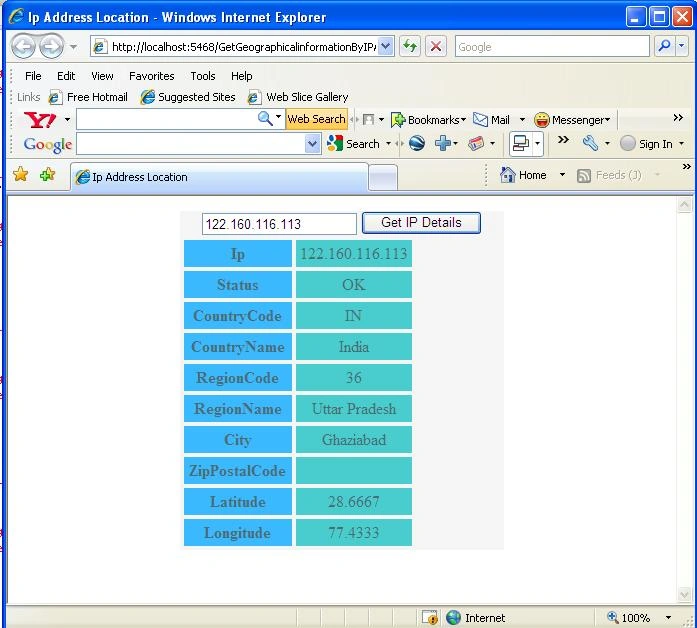
Our XSLT will look similar to the following.
Prashant SinghPosted Dec 14, 2016, 4:02 AM
It is not working ,,,,,,,it is waste of time
hemant emvPosted Jul 20, 2015, 4:53 AM
I am getting this error : '=' is an unexpected token. The expected token is ';'. Line 37, position 63.
Sujeet ShuklaPosted Jun 5, 2015, 1:28 AM
I am getting this error : '=' is an unexpected token. The expected token is ';'. Line 37, position 63.
Rahul Kumar SaxenaPosted Feb 27, 2015, 1:55 PM
thanks 2 all
meena routhuPosted Feb 20, 2015, 6:35 AM
when i am running this code i didn't get any result....
Vithal WadjePosted Dec 30, 2014, 9:53 PM
nice
jayesh baviskarPosted Dec 30, 2014, 9:21 PM
Not working... I found the error like ( '=' is an unexpected token. even i downloaded the source code but code didn't showing any results.
Puneet GuptaPosted Sep 28, 2013, 4:36 AM
I am getting this error : '=' is an unexpected token. The expected token is ';'. Line 37, position 63. and the api link you have used it does not give the correct location Please fix this.
Nikhil WaghmarePosted May 7, 2013, 3:22 AM
error : "'=' is an unexpected token. The expected token is ';'. Line 36, position 63."
Anand SainieditedPosted Feb 19, 2013, 2:57 AMEdited Feb 19, 2013, 2:58 AM
not working, waste of time
hiral kaharPosted Feb 4, 2013, 2:21 PM
error : "'=' is an unexpected token. The expected token is ';'. Line 36, position 63."
samirPosted Dec 5, 2012, 11:57 PM
I found the error like ( '=' is an unexpected token. The expected token is ';'. Line 36, position 63.this) , any one help me ..
mudasir bashaPosted Dec 1, 2012, 1:26 AM
no use
Ratish NairPosted Nov 23, 2012, 2:00 AM
Did any1 found the solution for '=' is an unexpected token. The expected token is ';'. Line 36, position 63.this error
riyaPosted Oct 1, 2012, 5:33 AM
,I'm getting this error - '=' is an unexpected token. The expected token is ';'. Line 36, position 63.plz help its urgent.
riyaPosted Oct 1, 2012, 5:33 AM
,I'm getting this error - '=' is an unexpected token. The expected token is ';'. Line 36, position 63.plz help Thanks
VirenPosted Sep 28, 2012, 8:10 AM
Hi, I'm getting this error - '=' is an unexpected token. The expected token is ';'. Line 36, position 63. plz help Thanks
Arun Kumar MadduPosted Jun 12, 2012, 8:16 AM
Hi I am getting the below error what can i do... please help me... '=' is an unexpected token. The expected token is ';'. Line 36, position 63.
ram atriPosted Sep 15, 2011, 6:06 AM
'=' is an unexpected token. The expected token is ';'. Line 36, position 63.
manisha chauhanPosted Aug 12, 2011, 3:06 AM
this code is very good and make me feel better thanks alot again
ajay sharmaPosted Jul 29, 2011, 7:07 AM
The 'meta' start tag on line 12 does not match the end tag of 'head'. Line 13, position 3.
surendraPosted Mar 15, 2011, 1:52 AM
i have download your code and run it. when pass the ip and click the button then create error Error is 'The 'meta' start tag on line 12 does not match the end tag of 'head'. Line 13, position 3.' My userid is:[email protected]
umer ziaPosted Jan 27, 2011, 6:44 AM
not working
Sudhir KumarPosted Dec 31, 2010, 8:07 AM
Plz help me i have download your code and run it. when pass the ip and click the button then create error Error is 'The 'meta' start tag on line 12 does not match the end tag of 'head'. Line 13, position 3.' My userid is:[email protected] Thanks.
adisaPosted Jul 24, 2010, 2:49 PM
I tried it and I'm getting an error 500 no response from the server. Is the service inactive now?
JayzonPosted Mar 1, 2010, 9:01 PM
Thank you!
Halil GULERPosted Jun 13, 2009, 4:10 AM
thanks