

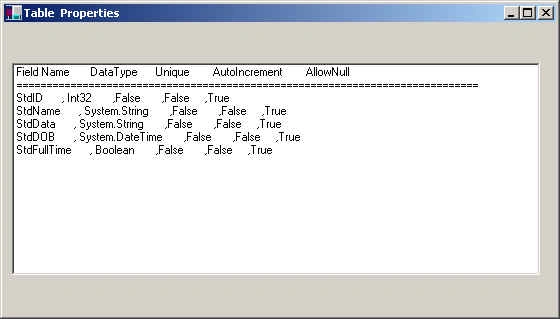
This program displays your table properties such as its column names, types, and column properties. I have used a database "mcTest.mdb" which has a table called 'Developer'. You can download this attached database and change the path of the database according to your location.
Explanation
I have used ADODataSetCommand, DataSet, DataTable, and DataColumn classes to do so. See my forthcoming tutorial on ADO.NET for more details of these classes.
- private void Form1_Load(object sender, System.EventArgs e) {
- string strDSN = "Provider=Microsoft.Jet.OLEDB.4.0;Data Source=c:\\mcTest.MDB";
- string strSQL = "SELECT * FROM Developer";
- // create Objects of ADOConnection and ADOCommand
- OleDbConnection myConn = new OleDbConnection(strDSN);
- OleDbDataAdapter myCmd = new OleDbDataAdapter(strSQL, myConn);
- myConn.Open();
- DataSet dtSet = new DataSet();
- myCmd.Fill(dtSet, "Developer");
- DataTable dt = dtSet.Tables[0];
- listBox1.Items.Add("Field Name DataType Unique AutoIncrement AllowNull");
- listBox1.Items.Add("=================================");
- foreach(DataColumn dc in dt.Columns) {
- listBox1.Items.Add(dc.ColumnName + " , " + dc.DataType + " ," + dc.Unique + " ," + dc.AutoIncrement + " ," + dc.AllowDBNull);
- }
- }
How to Run?
- Download source code and database zip files and unzip them.
- Change the database path in this string. "Provider=Microsoft.JET.OLEDB.4.0;data source=C:\\Mahesh\\mcb.mdb");
- Run the application
Join the conversation! Your thoughts help the community grow.