

In device information we can get the Latitude and Longitude of the current location which the user needs.
To access the location information in Windows 10 application we need to accessit using the GeoLocator class which has the property to get us the information of Latitude and Longitude of the specific location.
Let’s see the steps.
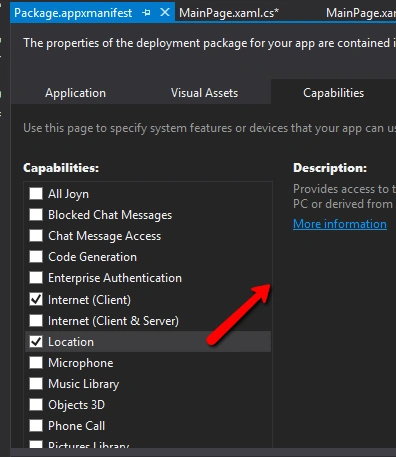
Create Windows 10 application and enable the “Location” capabilities for the application to access the location. For that open the Package.appxmanifest file and navigate to the Capabilities tab then enable Location capability as in the following screenshot,
Now go to the code behindthe page. Create an instance of Geolocator class; with the instance you can get the desired location by accessing the GetGeopositionAsync() method to get the device location information.
C# Code
- private async void getBtn_Click(object sender, RoutedEventArgs e)
- {
- var geoLocator = new Geolocator();
- geoLocator.DesiredAccuracy = PositionAccuracy.High;
- Geopositionpos = await geoLocator.GetGeopositionAsync();
- string latitude = "Latitude: " + pos.Coordinate.Point.Position.Latitude.ToString();
- string longitude = "Longitude: " + pos.Coordinate.Point.Position.Longitude.ToString();
- }
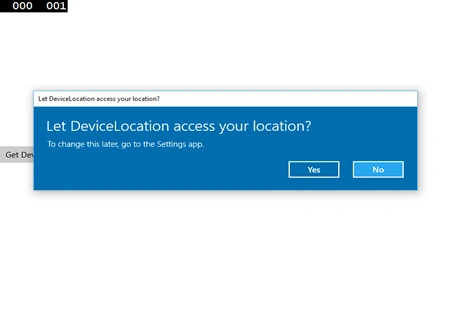
Firstly, it will ask user permission to access the device location.
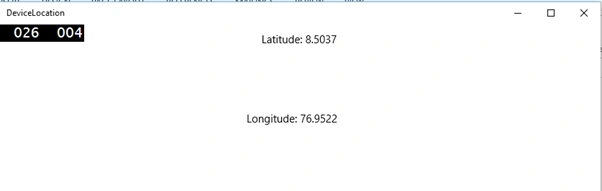
For more information on Windows 10 UWP, refer my e-book:
Ammar ShaukatPosted Jul 19, 2018, 7:27 AM
Source of this information is the internet connection. Is there a way to get the same info using device GPS?
Mohammed IbrahimPosted Apr 7, 2016, 12:47 PM
nice
Debasis SahaPosted Apr 7, 2016, 10:24 AM
Nice One..
Vignesh ManiPosted Apr 7, 2016, 6:13 AM
nice
Rahul Kumar SaxenaPosted Apr 7, 2016, 4:34 AM
Good Show