

Introduction
Windows 10 operating systems come with pre-loaded apps and many of these apps run in the background. This may also cause your machine to run slower.
To see what apps run on your machine, search "background apps" and select the first option you see.
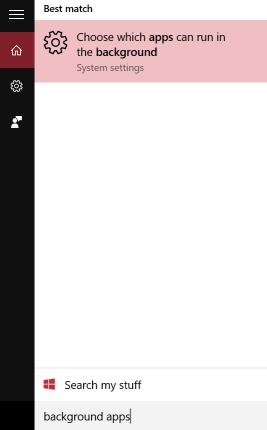
You will go to System Settings > Background Apps and can see what apps are running in the background on your machine. Here you may also turn off and on these apps.
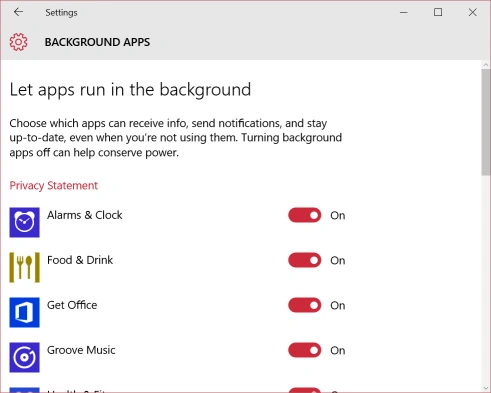
Personally, I have most of them turned off.
Summary
In this article, we learned about getting a List Of Background Apps Running In Windows 10.
gaolin huangPosted Mar 10, 2022, 8:36 AM
How to get list of background apps running in windows 10 by C#,thanks.
Asfend YarPosted Feb 20, 2016, 4:45 AM
what the??
Ammar ShaukatPosted Feb 11, 2016, 5:00 AM
that's very helping . thanks.
Joe WilsonPosted Feb 5, 2016, 12:33 AM
Thank you very much.
Shubham KumarPosted Feb 4, 2016, 1:24 AM
nice info
Sibeesh VenuPosted Feb 4, 2016, 12:45 AM
Nice Share
Humayun Kabir MamunPosted Feb 3, 2016, 10:56 PM
Nice...
Santhakumar MunuswamyPosted Feb 3, 2016, 2:52 PM
Thanks for your information sir
Ankit SaxenaPosted Feb 3, 2016, 11:28 AM
Thanks for sharing. Usefull info.