

A picture library is a type of a Document Library that is dedicated to store digital pictures or graphics. A SharePoint picture library is useful for sharing photos with other people. OOB the picture library provides many features. Whenever you upload an image to a SharePoint Picture Library, SharePoint automatically creates two additional images and stores them in different locations. A small thumbnail it used in views and a preview image it used when you're viewing the picture properties.
The URLs of pictures are as below:
http:/<servername>/<PictureLibraryName>/_w/imageFile
http:/servername/<PictureLibraryName>/ _t/ imageFile
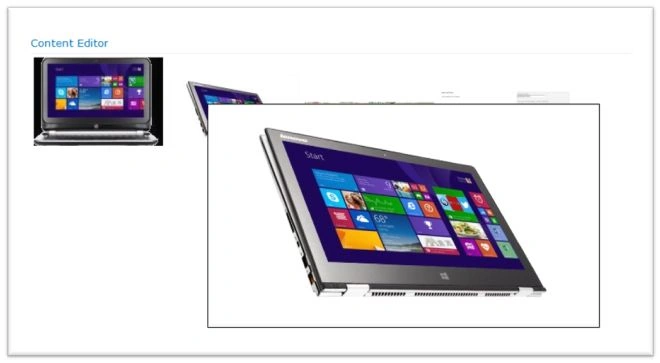
In this article I will explain how to enlarge a picture on a mouse hover.
Use the following procedure to do that:
Step 1: Create a picture library. In my case say MyPicture
Step 2: Upload a few images there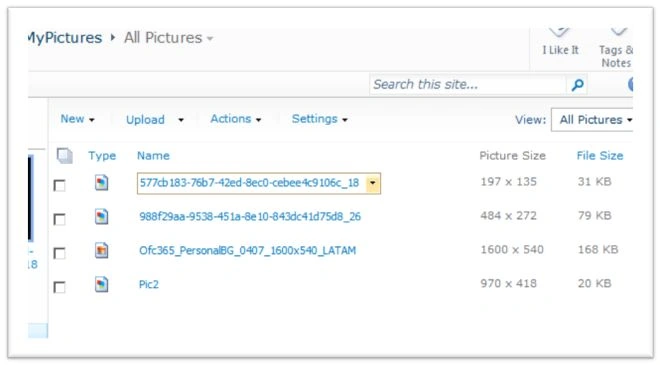
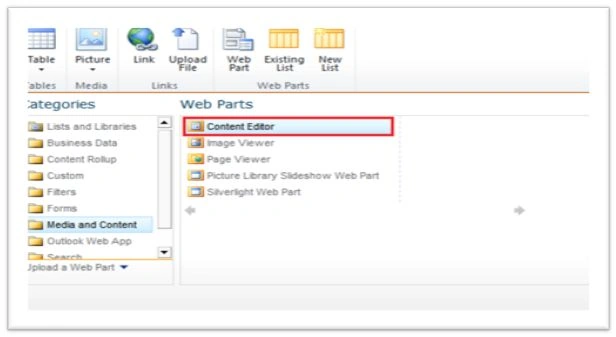
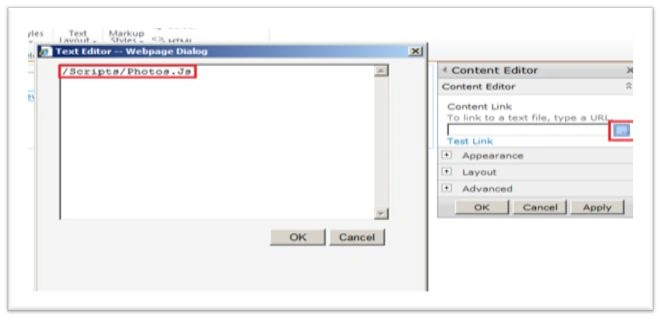
Step 3: Create a Photo.Js file and add the following scripts:
<script type="text/javascript" src="/Scripts/jquery-1.4.2.min.js"></script>
<script type="text/javascript" src="/Scripts/jquery.thumbhover.js"></script>
<div id="pictureMicroGallery">
Loading...
</div>
<script>
ExecuteOrDelayUntilScriptLoaded(loadSharePointPictures, 'sp.js');
function loadSharePointPictures() {
//fetch the list of items using the client object model
var context = new SP.ClientContext.get_current();
//get the current website
var web = context.get_web();
//get the pictures list
var list = web.get_lists().getByTitle('MyPictures');
//create the query to get all items
var query = SP.CamlQuery.createAllItemsQuery();
//get all items from the query
pictures = list.getItems(query);
//load the context
context.load(pictures, 'Include(FileLeafRef,FileDirRef)');
//execute the query in async mode
context.executeQueryAsync(
Function.createDelegate(this, this.success),


SURESHKUMAR VIJAYAKUMARPosted Apr 9, 2018, 2:45 AM
I am getting timed out error. pls help on this.
Mac MIllanPosted Aug 15, 2017, 6:59 AM
This was not working in SharePoint online.Please help...