

This article describes how to get the list of all files from a server folder or directory with a download link option in DataList control.
Suppose you have a folder or directory in your ASP.NET server application and you want to show all the files in that directory on the web page with a download link and allow the user to delete files from the server.
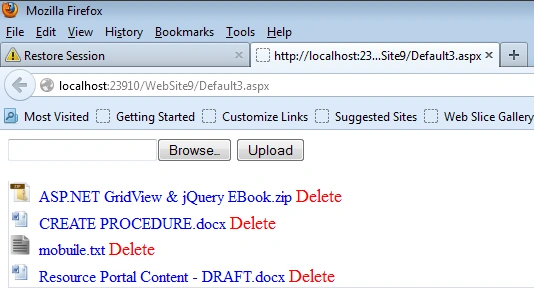
Here I will get all the fields from the server directory and display them in the DataList control with an image icon, download link and a delete option. This will work with any type of extension file.
HTML Markup for the UI
Here, I use an ASP.NET DataList control to display the files from the server directory.
- <body>
- <form id="form1" runat="server">
- <asp:FileUpload ID="FileUpload1" runat="server" />
- <asp:Button ID="btnUpload" runat="server" Text="Upload" OnClick="UploadFile" />
- <div style="border: solid 1px #D9DCEA; border-top: none; width: 40%; margin-top: -1px;
- float: right">
- <div style="border-top: none; width: 97%; padding: 5px;">
- <asp:DataList ID="DataListContent" runat="server" OnItemCommand="ButtonDownloadContent"
- RepeatDirection="Vertical" BorderStyle="None" Style="padding: 0px!important">
- <ItemTemplate>
- <div>
- <img src='<%# DataBinder.Eval(Container.DataItem,"Icon") %>' id="ImgIcon" />
- <asp:LinkButton ID="ButtonDownload" runat="server" Style="padding-left: 5px; text-decoration: none"
- ToolTip="Click here to download" CommandName="Download" CommandArgument='<%# DataBinder.Eval(Container.DataItem,"DownLoadLink") %>'
- Text=' <%# DataBinder.Eval(Container.DataItem,"FileName") %>'></asp:LinkButton>
- <asp:LinkButton ID="lnkDelete" Text="Delete" CommandArgument='<%# Eval("DownLoadLink") %>'
- Style="text-decoration: none; font-size: large; color: red;" runat="server" OnClick="DeleteFile" />
- </div>
- </ItemTemplate>
- </asp:DataList>
- </div>
- </div>
- </form>
- </body>
Getting files from directory.
Here I get all the files from the directory to show in the DataList control.
Thorwald OdinPosted Oct 6, 2015, 9:26 PM
You save the day! Thank you very much! :)
Baqir AliPosted Mar 1, 2015, 11:29 AM
Nice one..
heemanshu bhallaPosted Feb 13, 2015, 11:18 AM
good article . i was fumbled somehwhere is my project . it really solved that .............Thanks buddy
Siva PrasadPosted Jun 18, 2014, 3:13 AM
DataListContent.DataBind(); adding no rows...
Martin RuppPosted Apr 8, 2014, 5:44 PM
case "png": => case "pdf": and also need wither to remove the dot in ext or to add it in the swicth ( case(".doc") .. case(".xls") etc...
Martin RuppPosted Apr 8, 2014, 5:21 PM
you need to add the rows you create by using ShowContent.Rows.Add(dr);