

Microsoft Defender XDR
Microsoft 365 Defender is now Microsoft Defender XDR (Extended Detection and Response).
It mainly consists of 4 parts.
- Microsoft Defender for Office 365
- Microsoft Defender for Identity
- Microsoft Defender for Endpoint
- Microsoft Defender for Cloud Apps
In this article, I mainly focus on Microsoft Defender for Office 365.
Microsoft Defender for Office 365
Microsoft Defender for Office 365 is a cloud-based service integrated into Microsoft 365 subscriptions. It provides advanced protection against threats to email and collaboration tools.
Exchange Online Protection with Microsoft Defender for Office 365
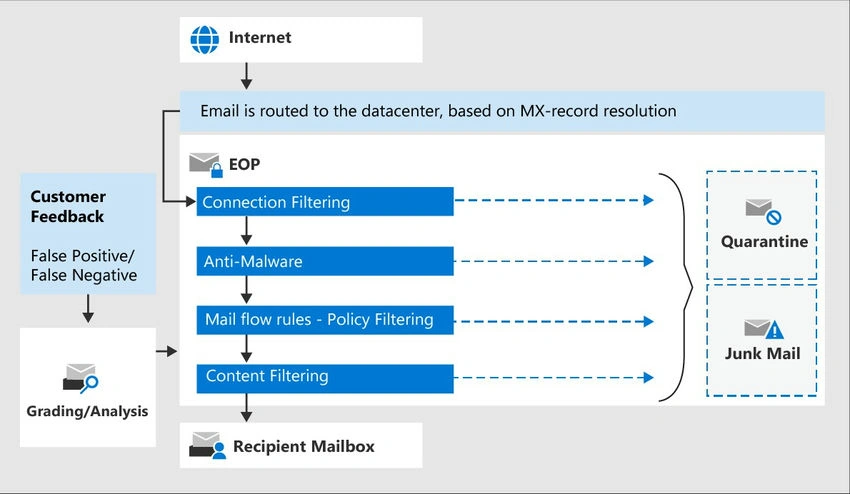
Microsoft 365 services ensure robust email security against threats such as spoofing, phishing, spam, and malware through Exchange Online Protection (EOP). EOP delivers comprehensive email protection by utilizing a variety of techniques, including.
- IP and URL reputation analysis
- Domain reputation evaluation
- Spam filtering mechanisms
- Malware detection and filtering
- Content-based filtering
- Connection filtering
- Spoof intelligence technology
All Microsoft 365 organizations benefit from EOP if they have Exchange Online mailboxes. Additionally, EOP can be purchased as a standalone solution to secure on-premises mailboxes and to protect hybrid environments that incorporate on-premises Exchange servers.
Below image explains how a Recipient mailbox receives an email from the internet when you have Exchange Online Protection.
Key Security Features of Microsoft Defender for Office 365
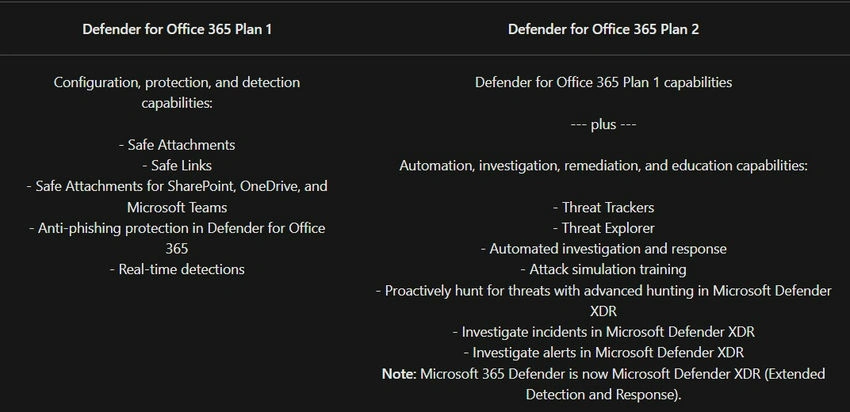
- Safe Attachments: Protects against zero-day threats by opening and testing unknown attachments in a secure environment, detecting malicious activity before antivirus signatures are available.
- Safe Links: Provides real-time protection by dynamically checking URLs when clicked in emails and documents, blocking access to malicious websites and phishing scams.
- Spoof Intelligence: Identifies and allows administrators to review and manage senders spoofing your domain, helping to prevent unauthorized use of your domain.
- Quarantine: Automatically isolates emails identified as spam, bulk mail, phishing attempts, or containing malware, allowing authorized users to review and manage quarantined messages.
- Anti-Phishing Policies: Uses machine learning and impersonation detection to protect against phishing attacks, with configurable policies set by Global or Security administrators to safeguard against both common and advanced threats.
Microsoft Defender for O365 comes with 2 plans.

Zero-Hour Auto Purge (ZAP)
Zero-Hour Auto Purge (ZAP) is a security feature in Microsoft Defender for Office 365 designed to enhance email protection by automatically detecting and removing malicious or unwanted emails from user inboxes after they have been delivered. ZAP provides email protection in Microsoft 365 organizations with mailboxes in Exchange Online. ZAP doesn't work in standalone EOP environments that protect on-premises Exchange mailboxes.
Here’s a brief overview of its key features and benefits
- Real-Time Protection: ZAP continuously scans delivered emails and uses advanced algorithms and threat intelligence to identify and remove phishing, malware, and spam emails that were initially missed.
- Ongoing Monitoring: Even after an email is delivered, ZAP monitors for new threat intelligence updates, ensuring that emerging threats are quickly addressed.
- Automatic Removal: When a potentially harmful email is identified, ZAP automatically moves it to the Junk Email folder or deletes it, reducing the risk of users interacting with malicious content.
- User Notification: Users may be notified about the removal of harmful emails, keeping them informed about potential threats and actions taken.
- Reduced Risk Exposure: By swiftly removing malicious emails, ZAP minimizes the window of exposure to threats, protecting users from phishing attacks, malware infections, and other email-based threats.
- Complementary Defense: ZAP works in conjunction with other Microsoft Defender for Office 365 security features, such as Safe Links and Safe Attachments, to provide comprehensive email protection.
- Integrated Solution: ZAP integrates seamlessly with Microsoft 365, providing a consistent and automated approach to email security without requiring additional configuration or management.
You can reach the Microsoft Defender portal by the below link.
Go to https://security.microsoft.com/
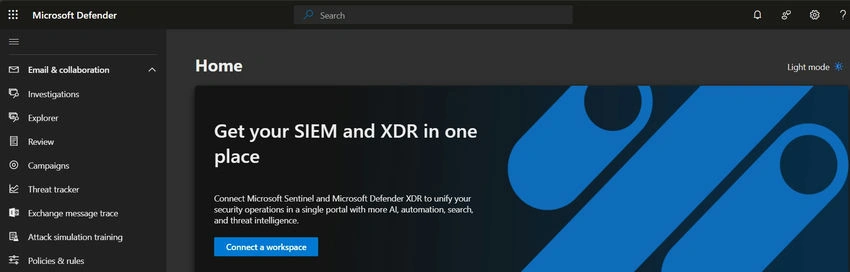
Microsoft Defender for Office 365 reports in the Microsoft Defender portal
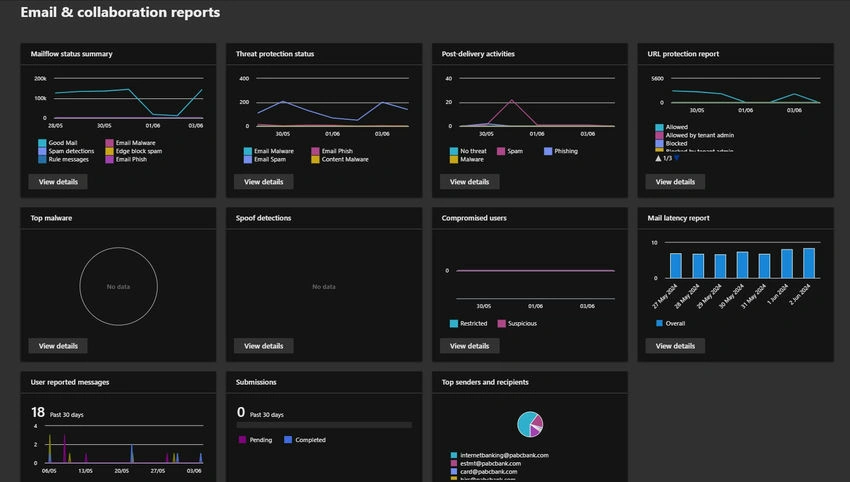
Various reports are available in the Microsoft Defender portal to help you see how email security features in Microsoft 365 are protecting your organization. The Email and collaboration reports include:
- Top malware
- Mail latency report
- Top senders and recipients
- Mail flow status summary
- Threat protection status
- URL protection report
- Spoof detections
- Compromised users
- Exchange transport rule
- User reported messages
- Submissions
Join the conversation! Your thoughts help the community grow.