

In this article I will discuss how to get information about your system hardware such as available CPU Id, Physical Memory, BIOS-Information, CPU-Speed, Motherboard Maker, CPU Maker.
The first way is by using Windows Management Instrumentation (WMI) provided by the System.Management namespace. You simply call the Class-Name.
For Example:
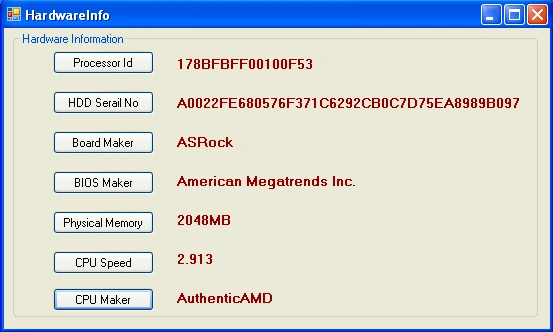
This code gives you information about the Processor Id.
lblPid.Text = HardwareInfo.GetProcessorId();
This code gives you the HDD Serial No.
lblHDD.Text = HardwareInfo.GetHDDSerialNo();
This code gives you the Board Maker.
lblBM.Text = HardwareInfo.GetBoardMaker();
This code gives you the Information about BIOS Maker.
lblBios.Text = HardwareInfo.GetBIOSmaker();
This code gives you the Information about RAM Memory.
lblPM.Text = HardwareInfo.GetPhysicalMemory();
This code gives you the Information about CPU Speed.
lblCS.Text = HardwareInfo.GetCpuSpeedInGHz().ToString();
This code gives you the Information about CPU Maker.
lblCM.Text = HardwareInfo.GetCPUManufacturer();
Ng JayPosted Jul 23, 2021, 7:10 AM
'System.Management' currently is only supported for Windows desktop applications.
nice guyPosted Jul 16, 2019, 3:15 AM
Does it work on lInux?
SubashPosted Nov 24, 2016, 12:12 PM
Very nice and useful code thanks for sharing
Vishnu SinghPosted May 27, 2015, 7:02 AM
Nice code.. it really helped me.... thanks
sanjeev guptaPosted Nov 19, 2014, 4:32 AM
thr exists some problem ,we can't fetch information from all windows machine ...as wmi is not working on some systems(i have checked this ) ....so does thr exists any solid way like the one in which Operating system fetch information about the hardware........ thanx in advance
sanjeev guptaPosted Nov 19, 2014, 4:05 AM
hi Ravindra,
Bahar JalaliPosted Mar 26, 2014, 10:43 AM
i need some hardware information from client computer, i use your class but it give me server hardware information, how can i get client hardware information? i need at least one unique info from client computer
Mohamed Amine ZghalPosted Mar 25, 2014, 1:28 PM
thaks you are a super man
lohith kumarPosted Oct 3, 2013, 10:10 PM
Thank u sir....
Volkan EFEPosted Apr 16, 2013, 5:32 PM
Thanks for your share! Best Regards
hamad asgharPosted Nov 24, 2012, 6:55 AM
Thanks Dear
Ravindra T CPosted Jun 11, 2012, 1:53 AM
Hi jay i think we are not able to change the processor Id we can only retrieve the Processor information. Thanks for viewing my article.
Jay JayPosted Jun 10, 2012, 7:47 AM
Hi Ravindra and all. I have doubt, can we change Processor ID in Windox XP and Window 7. Looking forward for reply. Regards, [email protected]
Rewan SoleimaniPosted Apr 5, 2012, 8:26 AM
Thank you for this post. Finally i found best code for ProcessorId, Thanks ...
K JabazPosted Apr 2, 2012, 5:36 AM
Thanks You ! It's very useful .
K JabazPosted Apr 2, 2012, 5:36 AM
Thanks You ! It's very useful .
sandeep raju dantuluriPosted Mar 26, 2012, 1:31 AM
thanks for sharing...
Arun ChoudharyPosted Mar 24, 2012, 7:46 AM
Thanks for sharing.
Nanda KishorPosted Nov 30, 2011, 7:49 AM
Thanks...For the code;
mohit bansalPosted Jul 23, 2011, 3:17 AM
thanks
Dinesh BeniwalPosted Jun 28, 2011, 7:27 AM
Very useful , thanks