

First we'll create a class to process WinApi calls.
This Class has been written by Michael Bright in 2003.Since then i've been using this code and extending it for network related needs.
- using System;
- using System.Runtime.InteropServices;
- namespace GettingAllUsers {
- public class NetworkAPI {
- // USER_INFO_1 - Strucutre to hold obtained user information
- [StructLayout(LayoutKind.Sequential, CharSet = CharSet.Unicode)]
- public struct USER_INFO_1 {
- public string usri1_name;
- public string usri1_password;
- public int usri1_password_age;
- public int usri1_priv;
- public string usri1_home_dir;
- public string comment;
- public int usri1_flags;
- public string usri1_script_path;
- }
- // USER_INFO_0 - Structure to hold Just Usernames
- [StructLayout(LayoutKind.Sequential, CharSet = CharSet.Unicode)]
- public struct USER_INFO_0 {
- public String Username;
- }
- // NetUserAdd - To Add Users to a local machine or Network
- [DllImport("Netapi32.dll")]
- public extern static int NetUserAdd([MarshalAs(UnmanagedType.LPWStr)] string servername, int level, ref USER_INFO_1 buf, int parm_err);
- // NetUserDel - To delete Users from a local machine or Network
- [DllImport("Netapi32.dll")]
- public extern static int NetUserDel([MarshalAs(UnmanagedType.LPWStr)] string servername, [MarshalAs(UnmanagedType.LPWStr)] string username);
- // NetUserGetInfo - Returns to a struct Information about the specified user
- [DllImport("Netapi32.dll")]
- public extern static int NetUserGetInfo([MarshalAs(UnmanagedType.LPWStr)] string servername, [MarshalAs(UnmanagedType.LPWStr)] string username, int level, out IntPtr bufptr);
- // NetUserSetInfo - Allows us to modify User information
- [DllImport("Netapi32.dll")]
- public extern static int NetUserSetInfo([MarshalAs(UnmanagedType.LPWStr)] string servername, [MarshalAs(UnmanagedType.LPWStr)] string username, int level, ref USER_INFO_1 buf, int error);
- // NetUserChangePassword - Allows us to change a users password providing we have it
- [DllImport("Netapi32.dll")]
- public extern static int NetUserChangePassword([MarshalAs(UnmanagedType.LPWStr)] string domainname, [MarshalAs(UnmanagedType.LPWStr)] string username, [MarshalAs(UnmanagedType.LPWStr)] string oldpassword, [MarshalAs(UnmanagedType.LPWStr)] string newpassword);
- // NetUserEnum - Obtains a list of all users on local machine or network
- [DllImport("Netapi32.dll")]
- public extern static int NetUserEnum(string servername, int level, int filter, out IntPtr bufptr, int prefmaxlen, out int entriesread, out int totalentries, out int resume_handle);
- // NetAPIBufferFree - Used to clear the Network buffer after NetUserEnum
- [DllImport("Netapi32.dll")]
- public extern static int NetApiBufferFree(IntPtr Buffer);
- public NetworkAPI() {
- //
- // TODO: Add constructor logic here
- //
- }
- }
- }
Add a ListBox in your form and then,Later inside your main application create a function:
- public void EnumerateUsers() {
- int EntriesRead;
- int TotalEntries;
- int Resume;
- listBox1.Items.Clear();
- IntPtr bufPtr;
- NetworkAPI.NetUserEnum(null, 0, 2, out bufPtr, -1, out EntriesRead, out TotalEntries, out Resume);
- if (EntriesRead > 0) {
- NetworkAPI.USER_INFO_0[] Users = new NetworkAPI.USER_INFO_0[EntriesRead];
- IntPtr iter = bufPtr;
- for (int i = 0; i < EntriesRead; i++) {
- Users[i] = (NetworkAPI.USER_INFO_0) Marshal.PtrToStructure(iter, typeof(NetworkAPI.USER_INFO_0));
- iter = (IntPtr)((int) iter + Marshal.SizeOf(typeof(NetworkAPI.USER_INFO_0)));
- listBox1.Items.Add(Users[i].Username);
- }
- NetworkAPI.NetApiBufferFree(bufPtr);
- }
- listBox1.SelectedIndex = 0;
- }
- Now just call EnumerateUsers inside Form_Load to populate them in your listbox at startup
- private void Form1_Load(object sender, EventArgs e) {
- EnumerateUsers();
- }
And run it!
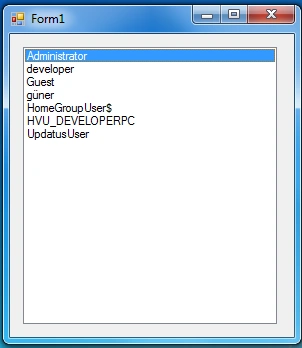
Hope that helps!
Riddhi ValechaPosted Jul 5, 2016, 2:28 PM
My post - www.c-sharpcorner.com/forums/resultpropertycollection-resultpropertyvaluecollection
Riddhi ValechaPosted Jul 5, 2016, 2:27 PM
Requirement is - I have to make an online application that shows the system status on continuous basis of all users, along with their details ...Just like in news channels, news keep flashing , I have to keep flashing the data on continuous basis of all users ... This will include everything - Last login date, manager name, email id, emp code, etc ... User/Domain Last Login Date Time Last Logout Date Time Manager Emp CodeAbc.xyz.com 1-jan-2016 1:1:1 2-jan-2016 3:3:3 Mahesh Bhatt 12345 User Properties - Emp Code, email, manager name, email , department, location, company joining date, company leaving date(if applicable), etc
Riddhi ValechaPosted Jul 5, 2016, 2:26 PM
I have one more requirement ...Can you please guide me...
Riddhi ValechaPosted Jul 5, 2016, 2:26 PM
Hi... Thanks a ton.. this code really helped...
Ibrahim ErsoyPosted Jul 10, 2012, 6:30 AM
Thank you! You can get only logged-in username with Environment,using Network APIs you can get all of them whether they logged in or not.
Mahesh ChandPosted Jul 9, 2012, 11:19 PM
How about Environment class? http://msdn.microsoft.com/en-us/library/system.environment.aspx I thought it had member for the same so we don't need to call WinAPI
Mahesh ChandPosted Jul 9, 2012, 11:17 PM
You're on a roll!