

In this article, we will learn how to get the data from Lotus Notes view and display the records, using ASP MVC list.
Introduction about Lotus Notes
Lotus Notes is a brand of Groupware, which is now owned by IBM. Lotus Notes is used with a variety of local and collaborative server applicatios, including email, calendars, Personal Information Managers (PIM) and the Web.
To know more about Lotus Notes, find the link.
Step 1
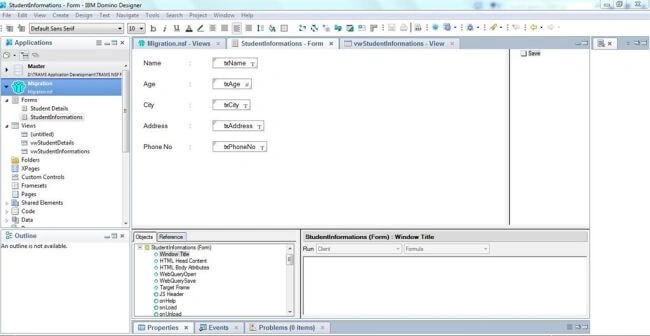
Create a simple form in Lotus Notes to save the records in Lotus notes database. Here, I have created the database "Migration.nsf" and created a form "StudentInformations" to save the student details in Lotus notes.
Steps 2
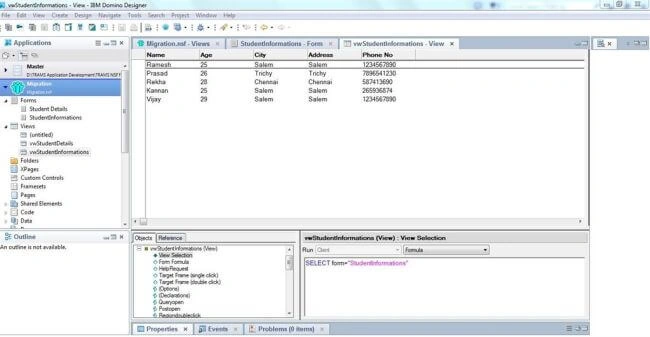
Insert the records once the form has been designed and create Lotus Notes view to display the saved records.
Step 3
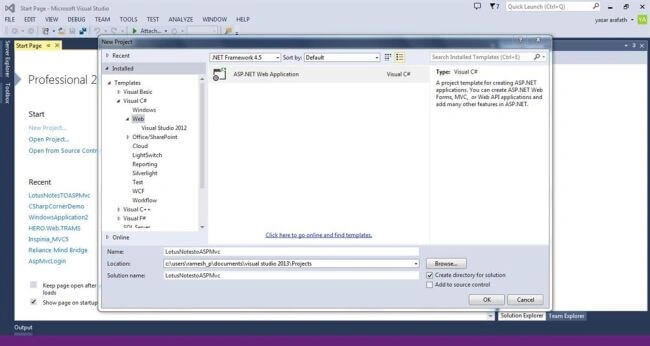
Create a ASP MVC project . Here, I have created a project named "LotusNotestoASPMvc", using Visual Studio 2013.
Step 4
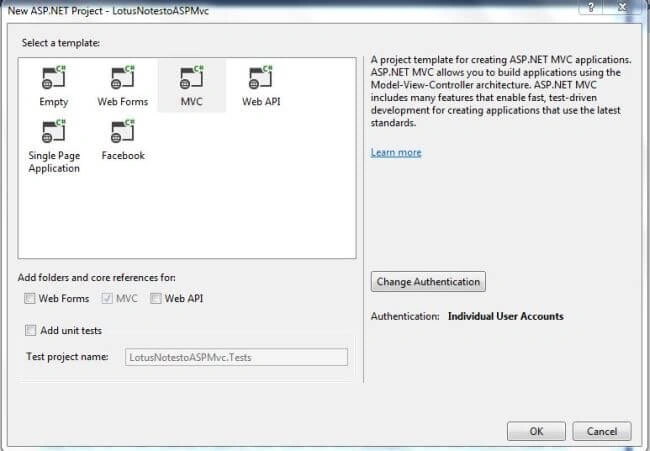
Click OK and dialog Window will appear to select the Application type. Select MVC and Click OK.
Step 4
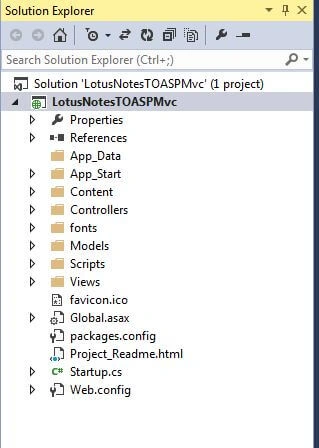
Once the project has been created, you can find the project solution files in the right corner of VS2013.
Step 5
To access Lotus Notes in Visual studio, we have to add "Interop.Domino" file in our reference folder. To get "Interop.Domino" library file, proceed, as shown below.
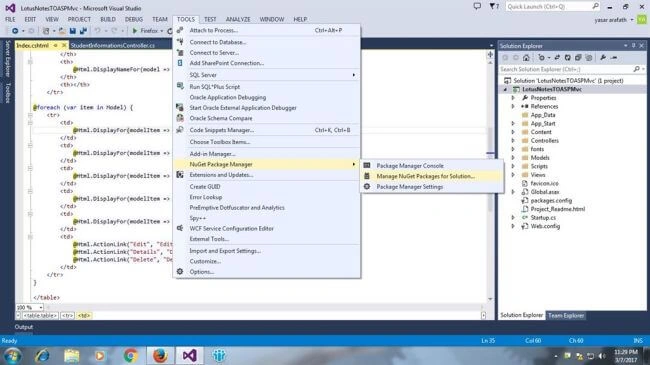
Go to Tools -> NuGet Package Manager -> Manage NuGet package for Solution.
Step 6
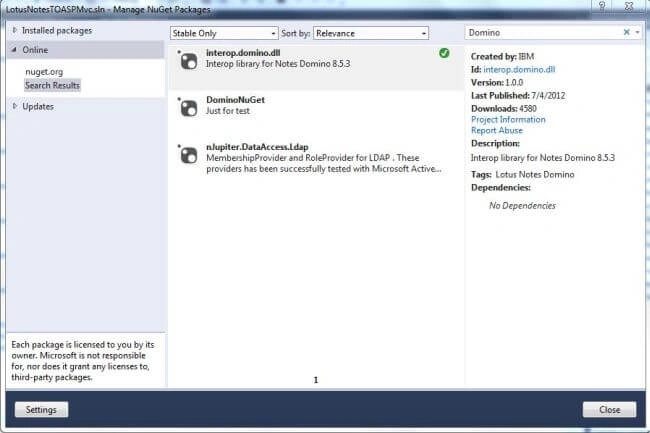
Now, you can see the dialog Window, which contains "Installed packages"(already installed components), Online (Get components from online). Click Online tab and search the text as "Domino" in search box. Select the "Interop.Domino.dll" and click install button to add the Domino component in our reference folder.
Step 7
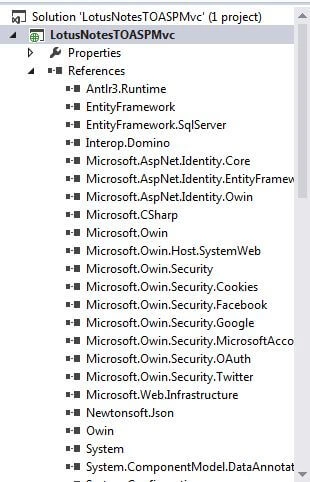
Now, you can see the installed "Interop.Domino.dll" in our reference folder.
Step 8
Create a model , select Model Folder > Right Click -> Add new class and name it as "StudentDetails" and click ok. Now, write the code given below in your model.
Introduction about Lotus Notes
Lotus Notes is a brand of Groupware, which is now owned by IBM. Lotus Notes is used with a variety of local and collaborative server applicatios, including email, calendars, Personal Information Managers (PIM) and the Web.
To know more about Lotus Notes, find the link.
Step 1
Create a simple form in Lotus Notes to save the records in Lotus notes database. Here, I have created the database "Migration.nsf" and created a form "StudentInformations" to save the student details in Lotus notes.
Steps 2
Insert the records once the form has been designed and create Lotus Notes view to display the saved records.
Step 3
Create a ASP MVC project . Here, I have created a project named "LotusNotestoASPMvc", using Visual Studio 2013.
Step 4
Click OK and dialog Window will appear to select the Application type. Select MVC and Click OK.
Step 4
Once the project has been created, you can find the project solution files in the right corner of VS2013.
Step 5
To access Lotus Notes in Visual studio, we have to add "Interop.Domino" file in our reference folder. To get "Interop.Domino" library file, proceed, as shown below.
Go to Tools -> NuGet Package Manager -> Manage NuGet package for Solution.
Step 6
Now, you can see the dialog Window, which contains "Installed packages"(already installed components), Online (Get components from online). Click Online tab and search the text as "Domino" in search box. Select the "Interop.Domino.dll" and click install button to add the Domino component in our reference folder.
Step 7
Now, you can see the installed "Interop.Domino.dll" in our reference folder.
Step 8
Create a model , select Model Folder > Right Click -> Add new class and name it as "StudentDetails" and click ok. Now, write the code given below in your model.
- using System;
- using System.Collections.Generic;
- using System.Linq;
- using System.Web;
- namespace LotusNotesTOASPMvc.Models {
- public class StudentDetails {
- public string StudentName {
- get;
- set;
- }
- public double Age {
- get;
- set;
- }
- public string City {
- get;
- set;
- }
- public string Address {
- get;
- set;
- }
- public string PhoneNo {
- get;
- set;
- }
- }
- }
Step 9
Create a controller to get Lotus Notes data and bind them to our model. To create a controller, select Controller Folder -> Right click -> select controller -> Select MVC Empty controller -> Click OK.
Now, add the code given below in your controller.
Create a controller to get Lotus Notes data and bind them to our model. To create a controller, select Controller Folder -> Right click -> select controller -> Select MVC Empty controller -> Click OK.
Now, add the code given below in your controller.
- using System;
- using System.Collections.Generic;
- using System.Linq;
- using System.Web;
- using System.Web.Mvc;
- using Domino; // To access the Domino classes
- using LotusNotesTOASPMvc.Models; // to access the models
- namespace LotusNotesTOASPMvc.Controllers {
- public class StudentInformationsController: Controller {
- NotesSession session = new NotesSession(); // Notes Session Object
- NotesDatabase db;
- NotesView view;
- NotesDocument doc;
- public ActionResult Index() {
- session.Initialize("password@#123"); // Notes Password for your Notes Id
- db = session.GetDatabase("", "Migration.nsf", false);
- view = db.GetView("vwStudentInformations"); // View name
- doc = view.GetFirstDocument(); // get the first document
- List < StudentDetails > student = new List < StudentDetails > ();
- while (doc != null) {
- string Name = doc.GetItemValue("txName")[0];
- double Age = doc.GetItemValue("txAge")[0];
- string City = doc.GetItemValue("txCity")[0];
- string Address = doc.GetItemValue("txAddress")[0];
- string PhoneNo = doc.GetItemValue("txPhoneNo")[0];
- student.Add(new StudentDetails // Bind the data to model
- {
- StudentName = Name,
- Age = Age,
- City = City,
- Address = Address,
- PhoneNo = PhoneNo
- });
- doc = view.GetNextDocument(doc); // Looping the next document
- }
- return View(student);
- }
- }
- }
Step 10
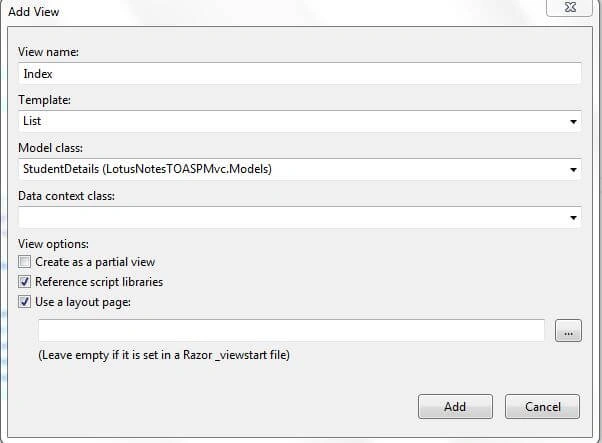
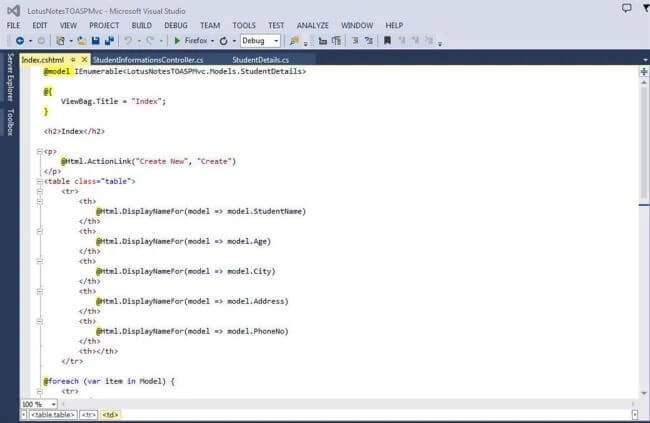
Create a MVC view to show the records. To create a view, right click the controller action name "Index" -> Add View -> Select List in Scafolding template -> Select your Model and click OK. Your view will be created.
Step 11
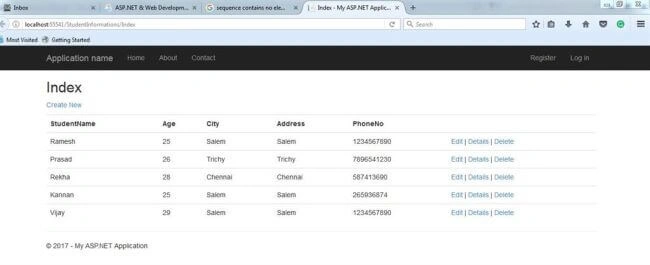
Build your Application and click CTRL+ F5 to run the Application.
Result
Create a MVC view to show the records. To create a view, right click the controller action name "Index" -> Add View -> Select List in Scafolding template -> Select your Model and click OK. Your view will be created.
Step 11
Build your Application and click CTRL+ F5 to run the Application.
Result
Mahesh RautPosted May 14, 2021, 8:34 AM
Returns null : db = session.GetDatabase("", "Migration.nsf", false);
Mahesh RautPosted May 14, 2021, 8:34 AM
Db = session.GetDatabase("", "Migration.nsf", false);
Mahesh RautPosted May 14, 2021, 8:34 AM
In my case this line returns null
Mahesh RautPosted May 14, 2021, 8:34 AM
In my case returns null :
Óscar Ancajima RodriguezPosted Jul 25, 2019, 3:39 PM
Hi, is it my first time using lotus notes how can I know what the password is or how to create it?
Manish SoniPosted May 31, 2018, 5:34 AM
I am getting an error while creating an object of NotesSession Class, "Retrieving the COM class factory for component with CLSID {29131539-2EED-1069-BF5D-00DD011186B7} failed due to the following error: 80040154 Class not registered (Exception from HRESULT: 0x80040154 (REGDB_E_CLASSNOTREG))", Can you help on this?
Amirul AshrafPosted Apr 17, 2018, 4:27 AM
Ramesh. Do u have email?
khouloud yaakoubiPosted Feb 21, 2018, 10:09 AM
Hi ,any one have an idea how can I get data from ibm lotus notes through android studio apps? thnx
Satyaprakash SamantarayPosted Mar 9, 2017, 6:18 AM
Nice stuff thank for this
Ramesh PalanivelPosted Mar 8, 2017, 10:10 PM
can you share the screen shot of your code, then easily find out the issue
Ramesh PalanivelPosted Mar 8, 2017, 10:09 PM
Hi Aravind, have you entered your notes id password in session initialize section?
Arvind KumarPosted Mar 8, 2017, 7:31 PM
Hi Ramesh, I am getting an error while creating an object of NotesSession Class, "Retrieving the COM class factory for component with CLSID {29131539-2EED-1069-BF5D-00DD011186B7} failed due to the following error: 80040154 Class not registered (Exception from HRESULT: 0x80040154 (REGDB_E_CLASSNOTREG))", I even changed the platform target to x86 but still getting the same error. Could you please help me on this.