

Introduction
This article explains how to access data from a view of the controller's action method. The action method is a simple C# method that can be parameterized or without a parameter in the controller.
We use two types of methods to handle our browser request; one is HTTP GET, and another is HTTP POST. When we call an action method by a request's URL by the browser, then the HTTP GET method will be called, but when a request is from a button click event, then the HTTP POST method will be called. So in this article, I am going to explain how to access view input field data in the controller's action method when an HTTP POST request is called.
To understand how to access view input field data in the controller's action method (POST), we create a "Calculate Simple Interest" application. This application gets Principle, Rate, and Time as user input and generates simple interest. So let's proceed with the application.
Create an action method in the CalculateSimpleInterest controller (CalculateSimpleInterestController.cs) that renders the view on the UI.
public ActionResult SimpleInterest()
{
    return View();
}
Create a view to get user input from the UI so the code is.
<h2>Calculate Simple Interest</h2>
<fieldset>
    <legend>Calculate Simple Interest</legend>
    @using (Ajax.BeginForm("CalculateSimpleInterestResult", "CalculateSimpleInterest", new AjaxOptions { UpdateTargetId = "pInterestDeatils" }))
    {
        <p id="pInterestDeatils"></p>
        <ol>
            <li>
                @Html.Label("Amount")
                @Html.TextBox("txtAmount")
            </li>
            <li>
                @Html.Label("Rate")
                @Html.TextBox("txtRate")
            </li>
            <li>
                @Html.Label("Year")
                @Html.TextBox("txtYear")
            </li>
        </ol>
        <button>Calculate</button>
    }
</fieldset>
So now the screen is ready to get input, and it shows it as
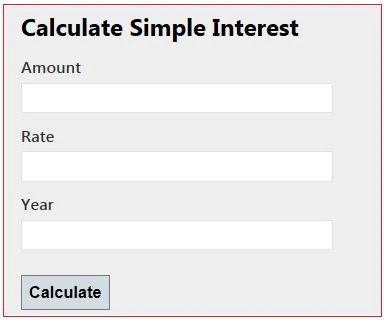
Figure 1.1 Input screens to calculate simple interest
I will now explain the four ways to get the view's data in the controller action. These are.
- Using Traditional approach
- Using the FormCollection Object
- Using the Parameters
- Strongly type model binding to view
Using Traditional Approach
In the traditional approach, we use the request object of the HttpRequestBase class. The request object has view input field values in name/value pairs. When we create a submit button, the request type POST is created and calls the POST method.

Figure 1.2 Requested Data
We have four data. Those are in Name-Value pairs. So we can access these data in a POST method by passing the Name as an indexer in the Request and get values. Our POST method means the controller action that handles the POST request type is [HttpPost].
[HttpPost]
public ActionResult CalculateSimpleInterestResult()
{
    decimal principle = Convert.ToDecimal(Request["txtAmount"]);
    decimal rate = Convert.ToDecimal(Request["txtRate"]);
    int time = Convert.ToInt32(Request["txtYear"]);

    decimal simpleInterest = (principle * time * rate) / 100;

    StringBuilder sbInterest = new StringBuilder();
    sbInterest.Append("<b>Amount :</b> " + principle + "<br/>");
    sbInterest.Append("<b>Rate :</b> " + rate + "<br/>");
    sbInterest.Append("<b>Time(year) :</b> " + time + "<br/>");
    sbInterest.Append("<b>Interest :</b> " + simpleInterest);

    return Content(sbInterest.ToString());
}
When it executes, we get simple interest as the result in the following.
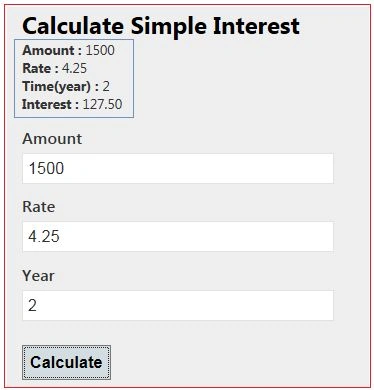
Figure 1.3 Output screen after getting a response
Using the FormCollection Object
We can also get post-requested data by the FormCollection object. The FormCollection object also has requested data in the name/value collection as the Request object. To get data from the FormCollection object, we need to pass it is as a parameter, and it has all the input field data submitted on the form.
[HttpPost]
public ActionResult CalculateSimpleInterestResult(FormCollection form)
{
    decimal principle = Convert.ToDecimal(form["txtAmount"]);
    decimal rate = Convert.ToDecimal(form["txtRate"]);
    int time = Convert.ToInt32(form["txtYear"]);

    decimal simpleInterest = (principle * time * rate) / 100;

    StringBuilder sbInterest = new StringBuilder();
    sbInterest.Append("<b>Amount :</b> " + principle + "<br/>");
    sbInterest.Append("<b>Rate :</b> " + rate + "<br/>");
    sbInterest.Append("<b>Time(year) :</b> " + time + "<br/>");
    sbInterest.Append("<b>Interest :</b> " + simpleInterest);

    return Content(sbInterest.ToString());
}
It also gives the same output as Figure 1.3 shows.
Using the Parameters
We can pass all input field names as a parameter to the post-action method. The input field name and parameter name should be the same. These parameters have input field values that were entered by the user. So we can access view input field values from these parameters. The input field takes a string value from the user, so the parameter should be a string type. There is no need to define a parameter in any specific sequence.
[HttpPost]
public ActionResult CalculateSimpleInterestResult(string txtAmount, string txtRate, string txtYear)
{
    decimal principle = Convert.ToDecimal(txtAmount);
    decimal rate = Convert.ToDecimal(txtRate);
    int time = Convert.ToInt32(txtYear);

    decimal simpleInterest = (principle * time * rate) / 100;

    StringBuilder sbInterest = new StringBuilder();
    sbInterest.Append("<b>Amount :</b> " + principle + "<br/>");
    sbInterest.Append("<b>Rate :</b> " + rate + "<br/>");
    sbInterest.Append("<b>Time(year) :</b> " + time + "<br/>");
    sbInterest.Append("<b>Interest :</b> " + simpleInterest);

    return Content(sbInterest.ToString());
}
It also gives the same output as Figure 1.3 shows.
In all three approaches above, we are parsing the string to a non-string type. If any of the parsing attempts fail, then the entire action will fail. We are converting each value to avoid an exception but it also increases the amount of code. So we look at the fourth approach that would reduce the amount of code.
Strongly type model binding to view
We bind a model to the view; that is called strongly type model binding.
Step 1. Create a Model for Simple Interest
namespace CalculateSimpleInterest.Models
{
    public class SimpleInterestModel
    {
        public decimal Amount { get; set; }
        public decimal Rate { get; set; }
        public int Year { get; set; }
    }
}
Step 2. Create an action method that renders a view of the UI
We are passing an empty model to be bound to the view.
public ActionResult SimpleInterest()
{
    SimpleInterestModel model = new SimpleInterestModel();
    return View(model);
}
Step 3.
Create a strongly typed view that has the same screen as in Figure 1.1
@model CalculateSimpleInterest.Models.SimpleInterestModel

@{
    ViewBag.Title = "SimpleInterest";
}

<h2>Calculate Simple Interest</h2>

@using (Ajax.BeginForm("CalculateSimpleInterestResult", "CalculateSimpleInterest", new AjaxOptions { UpdateTargetId = "pInterestDeatils" }))
{
    <fieldset>
        <legend>Calculate Simple Interest</legend>
        <p id="pInterestDeatils"></p>

        <div class="editor-label">
            @Html.LabelFor(model => model.Amount)
        </div>
        <div class="editor-field">
            @Html.EditorFor(model => model.Amount)
        </div>

        <div class="editor-label">
            @Html.LabelFor(model => model.Rate)
        </div>
        <div class="editor-field">
            @Html.EditorFor(model => model.Rate)
        </div>

        <div class="editor-label">
            @Html.LabelFor(model => model.Year)
        </div>
        <div class="editor-field">
            @Html.EditorFor(model => model.Year)
        </div>

        <p>
            <input type="submit" value="Calculate" />
        </p>
    </fieldset>
}

@section Scripts {
    @Scripts.Render("~/bundles/jqueryval")
}
Step 4. Create an action method that handles the POST request and processes the data
In the action method, we pass a model as the parameter. That model has UI input field data. Here we do not need to parse and do not need to write extra code.
[HttpPost]
public ActionResult CalculateSimpleInterestResult(SimpleInterestModel model)
{
    decimal simpleInterest = (model.Amount * model.Year * model.Rate) / 100;

    StringBuilder sbInterest = new StringBuilder();
    sbInterest.Append("<b>Amount :</b> " + model.Amount + "<br/>");
    sbInterest.Append("<b>Rate :</b> " + model.Rate + "<br/>");
    sbInterest.Append("<b>Time(year) :</b> " + model.Year + "<br/>");
    sbInterest.Append("<b>Interest :</b> " + simpleInterest);

    return Content(sbInterest.ToString());
}
It also gives the same output as Figure 1.3 shows.
Mohammed AljadaanPosted Jul 21, 2022, 11:36 AM
Valuable comment .......
Abdelrahman AhmedPosted Apr 5, 2021, 7:00 PM
Very helpful
Dharmendra Kumar PanditPosted Jun 18, 2020, 12:55 PM
Nice article.........
Aruni samPosted Dec 10, 2019, 11:29 AM
Nice, Thanks a lot
Anton PolchenkoPosted Jul 16, 2019, 1:23 PM
Found a way but I suppose this is not the safest way to store data to resend it to HttpPost action. Here it is: <input asp-for="UserName" type="hidden" value="@Model.UserName"/> But if user look the code of the page user can see this data.
Anton PolchenkoPosted Jul 16, 2019, 1:17 PM
Thank you for the info. Is in actually possible to post the data back without input?
Pravin LalgePosted Nov 28, 2018, 3:16 AM
Very good explanation till date on model binding
Morris ChikwerePosted Aug 27, 2018, 7:34 AM
Thank you so much. This is helpful
Muhammad FaheemPosted Jun 12, 2018, 7:56 PM
You have done a great article sir. Thanks a-lot
Manav PandyaPosted Jan 8, 2017, 1:57 AM
What do you think about best approach , i like 4th one
Manav PandyaPosted Jan 8, 2017, 1:57 AM
Thanks for sharing this article sir
Yaduveer SainiPosted Oct 22, 2016, 1:51 PM
Nice Article...
Ganesh MohitePosted Oct 5, 2016, 4:12 AM
Very Useful Article..ty sandeep
asif iqbalPosted Sep 28, 2016, 8:36 AM
"Figure 1.3 Output screen after getting response"This code will not display re result as in 1.3 Fig. as this code is not written asynchronously.
Upendra Pratap ShahiPosted Mar 21, 2016, 11:24 AM
nice share..
Kselva KumarPosted Nov 19, 2015, 10:46 PM
Good One Sandeep
Luis OliveiraPosted Oct 15, 2015, 8:02 AM
what I really want is the jquery code (no validation rules required)
Rishi KasniaPosted Aug 20, 2015, 8:09 AM
below is my Action method [HttpPost] public ActionResult Create(GuestbookEntry entry) { ... } here GuestbookEntry is my model and on my view i have just used the name of controls same as of the Properties Name in model and when i simply click on button to POST to this action i get my model object initialized with view values. so can you plz explain how in my action method i am getting the view values. as i have not created any strongly typed view.
hema guntaPosted May 8, 2015, 8:06 AM
useful
Hussain AfridiPosted Nov 10, 2014, 12:55 AM
how to download this sorce code