

Hi guys, Its remarkable achievement in the technology that today we can complete most of our work through phone. It serves to be a best companion in daily life for example, if you consider yourself in a strange place and dont know where to go then your phone can sometime come for the rescue by showing you the right directions to the destined place. In this article you will learn how to implement this feature in your Windows Phone application. For incorporating this follow the steps below.
Step 1 : First of all you need to have Windows Phone 7.1 SDK installed in your system.
Step 2 : Then open Visual Studio
- Select new project
- Select your preferred language
- Select the silverlight for Windows Phone application on the left pane and Windows Phone application in right pane.
- Name the project
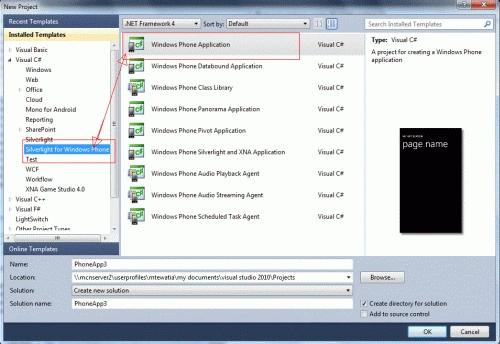
Step 3 : Now you land up in a screen showing the Windows Phone application and XAML coding into different partition. Now you may change the look of your application as you wish.

Step 4 : Now drag and drop the map control from the toolbox into the phone application.
- Add a textbox and in the properties change the name of this textbox as "fromtxtbox". This text box holds the value of the start place.
- Add another textbox and in the properties change the name of this textbox as "totxtbox" . This text box holds the value of the end place to find the direction between these two.
- Add a button name it as "Change view". This is to change the mode of view of the map.
- Add another button and name it as "Get direction" to start the event of searching direction between two places.
Step 5 : Now before we start the coding ahead you need to get the credentials for using the Bing map in Windows Phone application. To know how to get the credentials see this article . If you don't get the credentials then an irritating white strip keeps appearing over the map urging to get the credential for using the map control.
Step 6 : When you have the Bing map key, move to the XAML part and find the following:
<my:Map Grid.Row="1" Height="448" HorizontalAlignment="Left" Margin="12,0,0,0" Name="map1" VerticalAlignment="Top" Width="456"/>
In this line add the following parameters to make the map work better.
CredentialsProvider="type the bing map key you got here" LogoVisibility="Collapsed"
Then the complete code becomes.
<my:Map Grid.Row="1" Height="448" HorizontalAlignment="Left" Margin="12,0,0,0" Name="map1" VerticalAlignment="Top" Width="456" CredentialsProvider="type the bing map key you got here" LogoVisibility="Collapsed"/>
Step 7 : Now add the following references:
-
Go to Solution Explorer
-
Right click on references--> add reference
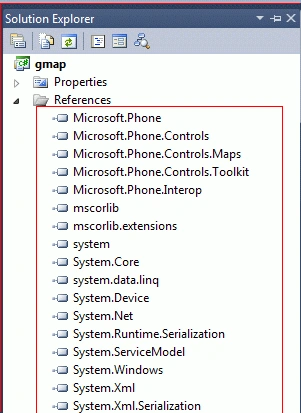
-
Also add a service reference--> Right click on reference
-
Add service reference
-
In the address bar type- http://dev.virtualearth.net/webservices/v1/geocodeservice/geocodeservice.svc?wsdl. This is to use the geocode related clases in the application
Step 8 : Now if you want your phone to show your location then write the following line of code in the constructor.
public partial class MainPage : PhoneApplicationPage
{
// Constructor
GeoCoordinateWatcher
watcher; // This is declared global
public MainPage()
{
InitializeComponent();
map1.ZoomBarVisibility = System.Windows.Visibility.Visible;
// This sets the Zoom bar in the map
visible
map1.LogoVisibility =
Visibility.Collapsed;
// The Bing map logo is set not to appear in the
map
map1.CopyrightVisibility =
Visibility.Collapsed;
// The bing map copyright text is hidden
map1.Mode = new
AerialMode();
// The map is set to load with default view mode
as aerial.
if (watcher ==
null)
{
//---To get the
highest accuracy--
watcher =
new GeoCoordinateWatcher(GeoPositionAccuracy.High)
{
//---the minimum
distance (in meters) to travel before the next location updates---
MovementThreshold = 10
};
//when a new
position is obtained---
watcher.PositionChanged +=
new EventHandler<GeoPositionChangedEventArgs<GeoCoordinate>>(watcher_PositionChanged);
//---event to
fire when there is a status change in the location
// service API---
watcher.StatusChanged +=
new EventHandler<GeoPositionStatusChangedEventArgs>(watcher_StatusChanged);
watcher.Start();
}
}
Now if the status is changed then this method covers the status change event.
void
watcher_StatusChanged(object sender,
GeoPositionStatusChangedEventArgs e)
{
switch (e.Status)
{
case
GeoPositionStatus.Disabled:
if (watcher.Permission ==
GeoPositionPermission.Denied)
{
// the user has changed the settings in phone.
Debug.WriteLine("Location is
disabled.Change Settings");
}
else
{
Debug.WriteLine("Location is not
functioning on this phone");
}
break;
case
GeoPositionStatus.Initializing:
Debug.WriteLine("initializing");
Debug.WriteLine("finding
location");
break;
case
GeoPositionStatus.NoData: Debug.WriteLine("nodata");
break;
case
GeoPositionStatus.Ready: Debug.WriteLine("ready");
break;
}
}
Now if the position of the
user changes then this method comes to the rescue to keep updated with changes
in positions.
void watcher_PositionChanged(object
sender, GeoPositionChangedEventArgs<GeoCoordinate>
e)
{
Debug.WriteLine("({0},{1})",
e.Position.Location.Latitude, e.Position.Location.Longitude);
map1.Center = new
GeoCoordinate(e.Position.Location.Latitude,
e.Position.Location.Longitude);
}
Step 9 : Now in the design view double click on the "change view button" and in the code write the code:
private
void chngview(object
sender, RoutedEventArgs e)
{
if (map1.Mode
is RoadMode)
{
map1.Mode = new
AerialMode(true);
}
else
{
map1.Mode = new
RoadMode();
}
}
Step 10 : Now double click on the "get dir" button; write the following code:
private
void getdir(object
sender, RoutedEventArgs e)
{
var task =
new Microsoft.Phone.Tasks.BingMapsDirectionsTask();
task.Start = new
Microsoft.Phone.Tasks.LabeledMapLocation(fromtxtbx.Text,
new System.Device.Location.GeoCoordinate());
task.End = new
Microsoft.Phone.Tasks.LabeledMapLocation(totxtbx.Text,
new System.Device.Location.GeoCoordinate())
task.Show();
}
Step 11 : Now press F5 and see the preview in the Windows Phone emulator. Output.

Changing the mode of the map to Roadmode.

Entering the places:

Time, Distance and directions are displayed in the application.

M.Yaseen FerozPosted Apr 7, 2016, 6:16 AM
can any one please tell me that how can i get directions from my current location to the location where i want i have a latitude,longitude of that position using wp8.1
mohammed badwanPosted Apr 23, 2012, 2:22 PM
great job ,i would like to ask you a question can i have a distance calculator code which returns distance in meters,also if i can change the distance returned from the direction service from miles to meters and i will be so thankful???
asim abbasPosted Jan 18, 2012, 10:37 AM
it works on emulator or not
Rajesh KumarPosted Jan 5, 2012, 4:25 AM
Good Work.........Manoj
melinda xiePosted Jan 5, 2012, 12:58 AM
<a href="http://www.cheapbootaustralia.com" title="Cheap UGGs for Sale">Cheap UGGs for Sale</a> <a href="http://www.buyuggsbootscheap.com" title="UGG Boots Cheap">UGG Boots Cheap</a> <a href="http://www.aucheapuggboot.com" title="UGG Boots for Cheap">UGG Boots for Cheap</a> <a href="http://www.newuggsbootscheap.com" title="UGG Boots Cheap">UGG Boots Cheap</a> <a href="http://www.onsaleuggbootscheap.com" title="UGGs for Cheap">UGGs for Cheap</a> <a href="http://www.uggbootscheapsite.us" title="UGG Boots Cheap">UGG Boots Cheap</a>