

Introduction
Atom makes it easy to receive regular
updates from news websites, blogs, and/or Gmail. This feed is only
available for Gmail accounts on Google Apps domains.
To get a Gmail Feed, you can access the Atom Feed for your Gmail account on the following URL:
https://mail.google.com/mail/feed/atom
Enter your Gmail account credentials and access the Atom Feed for all unread Email.
Note: Gmail messages will appear in your aggregator only if there are unread messages in your account inbox.
The following C# code shows how to read/save the atom feed of that account after a valid authentication process:
- using System;
- using System.Collections.Generic;
- using System.Linq;
- using System.Web;
- using System.Web.UI;
- using System.Web.UI.WebControls;
- using System.Security.Principal;
- using System.Net;
- using System.Collections;
- using System.IO;
- using System.Xml;
- using System.Data;
- public partial class _Default : System.Web.UI.Page
- {
- protected void Page_Load(object sender, EventArgs e)
- {
- }
- protected void showdet(object sender, EventArgs e)
- {
- NewMethod();
- login.Visible = false;
- }
- private void NewMethod()
- {
- var Url = @"https://mail.google.com/mail/feed/atom";
- var username = TextBox1.Text.Trim();
- var password = TextBox2.Text.Trim();
- var encoded = TextToBase64(username + ":" + password);
- var request = HttpWebRequest.Create(Url);
- request.Method = "POST";
- request.ContentLength = 0;
- request.Headers.Add("Authorization", "Basic" + encoded);
- var respone = request.GetResponse();
- var stream = respone.GetResponseStream();
- XmlReader reader = XmlReader.Create(stream);
- XmlDocument doc = new XmlDocument();
- doc.Load(reader);
- doc.Save(Server.MapPath("GmailFeed.xml"));
- DataSet dt = new DataSet();
- // dt.ReadXmlSchema(Server.MapPath("GmailFeed.xml"));
- dt.ReadXml(Server.MapPath("GmailFeed.xml"));
- DataTable DT = dt.Tables[3];
- // DT.Merge(dt.Tables[1]);
- DT.Merge(dt.Tables[2]);
- grid.DataSource = DT;
- DataBind();
- Session["Table"] = DT;
- }
- public static string TextToBase64(string S)
- {
- System.Text.ASCIIEncoding encode = new System.Text.ASCIIEncoding();
- byte[] bytes = encode.GetBytes(S);
- return System.Convert.ToBase64String(bytes, 0, bytes.Length);
- }
- protected void IndexChagning(object sender, GridViewPageEventArgs e)
- {
- grid.PageIndex = e.NewPageIndex;
- if (!object.Equals(Session["Table"], null))
- {
- grid.DataSource = Session["Table"] as DataTable;
- DataBind();
- }
- }
- }
Output
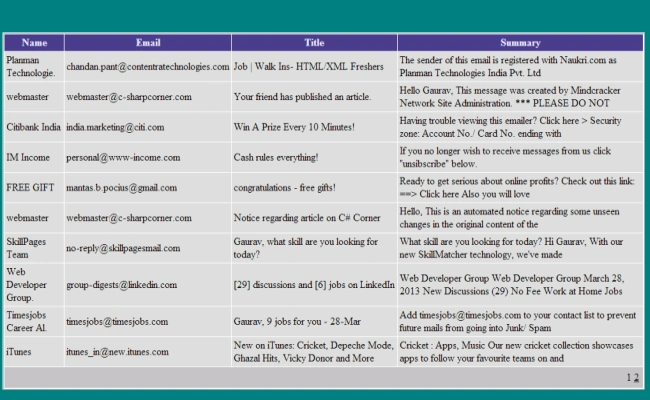
Enter Email and Password for your account and click on the button.
You will see that all the new or unread message from your account inbox will appear.
naresh kumarPosted Jun 12, 2015, 8:48 AM
when i try to logged then it shows "The remote server returned an error: (401) Unauthorized." plz help me how to fix this issue
maharshi upadhyayPosted Aug 7, 2013, 3:00 AM
i am not getting unread emails, and full description of email. please help
Former memberPosted Apr 17, 2013, 10:23 PM
Nice one Gaurav
Ravi ShekharPosted Apr 17, 2013, 3:23 AM
realy Nice Blog...
Anubhav ChaudharyPosted Apr 16, 2013, 10:45 PM
Nice Article Gaurav